Table 6: SRX550 High Memory Services Gateway Front Panel Components (continued)
DescriptionLocationComponentNumber
While working on the services gateway, use the ESD outlet to
plug in an ESD grounding strap to prevent your body from
sending static charges to the services gateway, which will
damage the device.
Left side of the
front chassis panel
Electrostatic discharge
(ESD) outlet
13
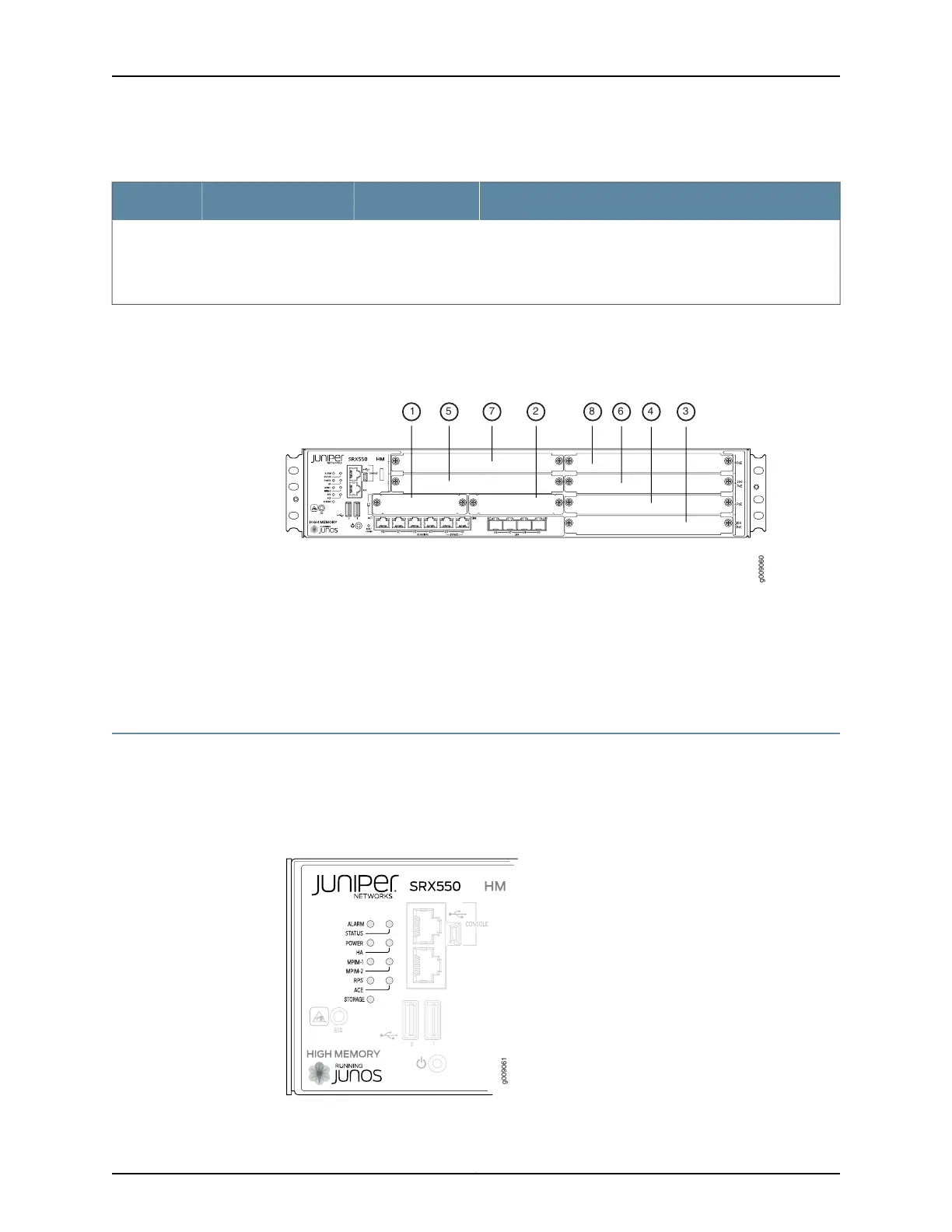
Figure 3 on page 17 shows how the slots on the front panel of the SRX550 High Memory
Services Gateway are numbered.
Figure 3: SRX550 High Memory Services Gateway Slot Numbers
Related
Documentation
SRX550 High Memory Services Gateway Front Panel LEDs on page 17•
• SRX550 High Memory Services Gateway Chassis on page 13
• SRX550 High Memory Services Gateway Back Panel on page 19
SRX550 High Memory Services Gateway Front Panel LEDs
Figure 4 on page 17 shows the locations of the SRX550 High Memory Services Gateway
front panel LEDs. Table 7 on page 18 describes the LEDs.
Figure 4: SRX550 High Memory Services Gateway Front Panel LED
Locations
17Copyright © 2016, Juniper Networks, Inc.
Chapter 2: Chassis Description



 To Next Page