Chapter 2. Installing and Using RF ValProbe Software
RF ValProbe® User’s Manual 37
2.5 Selecting a Communications Option and Establishing
Preferences (cont.)
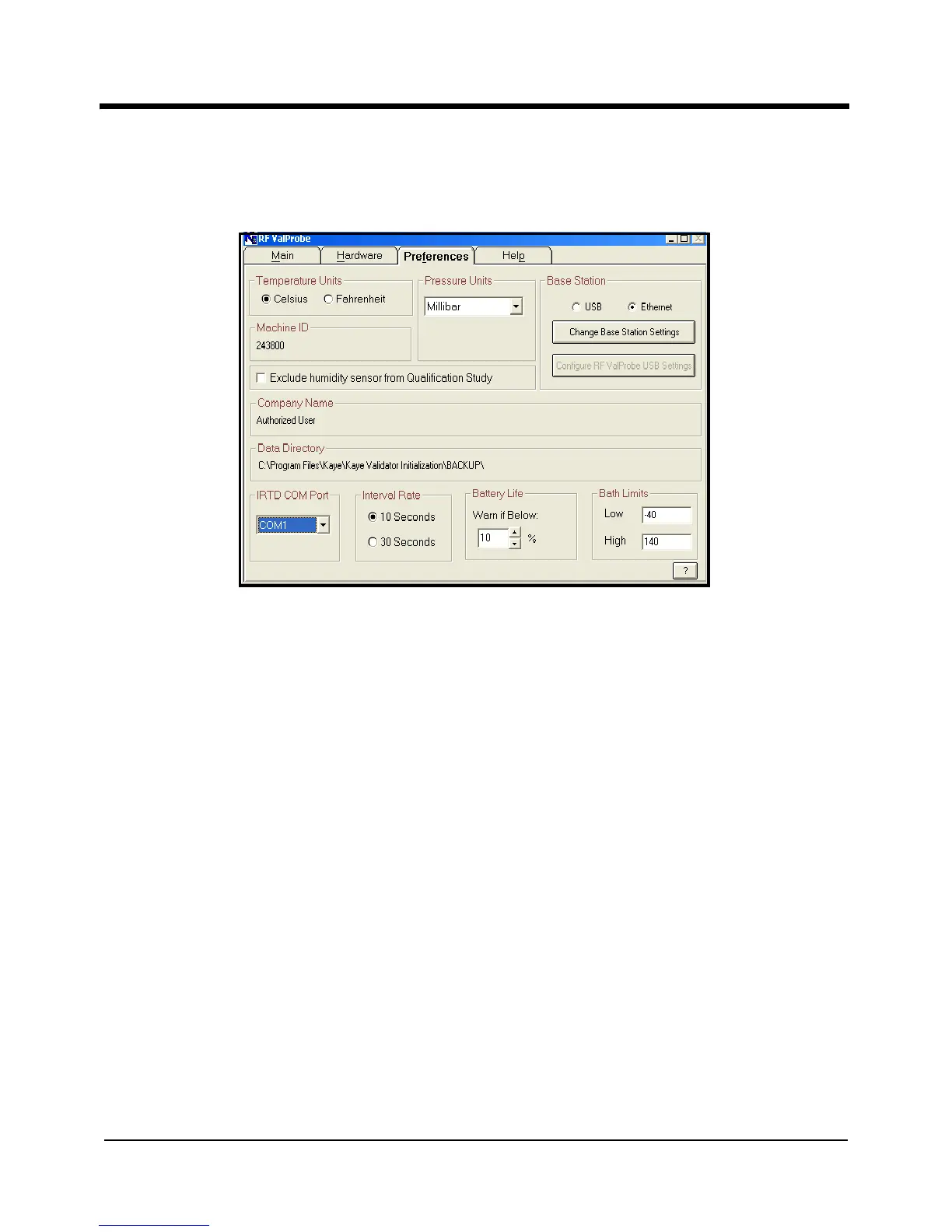
Figure 16: Preferences Screen
3. To select the units in which you wish to display temperature (Celsius or Fahrenheit),
click on the appropriate radio button.
Note: This selection applies to the entire RF ValProbe --both the Base Station and
Loggers.
4. If you are connecting an IRTD to the PC, click on the COM port to which you will
connect the IRTD from the pull-down list.
5. The Battery Life warning signals the user to change the battery if its life drops below a
certain percentage (from 0 to 90%). The default setting is 10%. If you want a different
percentage, use the arrow keys to scroll to the desired percentage.
6. Click on the desired communications option (USB or Ethernet) from the Base Station
radio buttons. USB is the default selection. You can use USB or Ethernet, but not both
simultaneously.



 To Next Page