Chapter 2. Installing and Using RF ValProbe Software
40 RF ValProbe® User’s Manual
2.5.2 Setting Up the Ethernet Connection
Note: If you plan to use an Ethernet connection, please be sure the Ethernet cable is no
longer than 30 m to the nearest hub/switch. If you switch the Base Station to
Ethernet mode, the Base Station acquires the IP address by DHCP from your
network during startup. Please make sure that there is a DHCP Server available
before switching to Ethernet mode. After switching to Ethernet mode, the Base
Station will no longer communicate over USB. To restore USB communication,
you must establish an Ethernet connection.
If you want to switch to Ethernet operation, you must click on the
Switch to Ethernet
button, and follow the on-screen instructions. Be sure the Base Station remains connected
to the USB port until you receive specific instructions to change the connection.
The
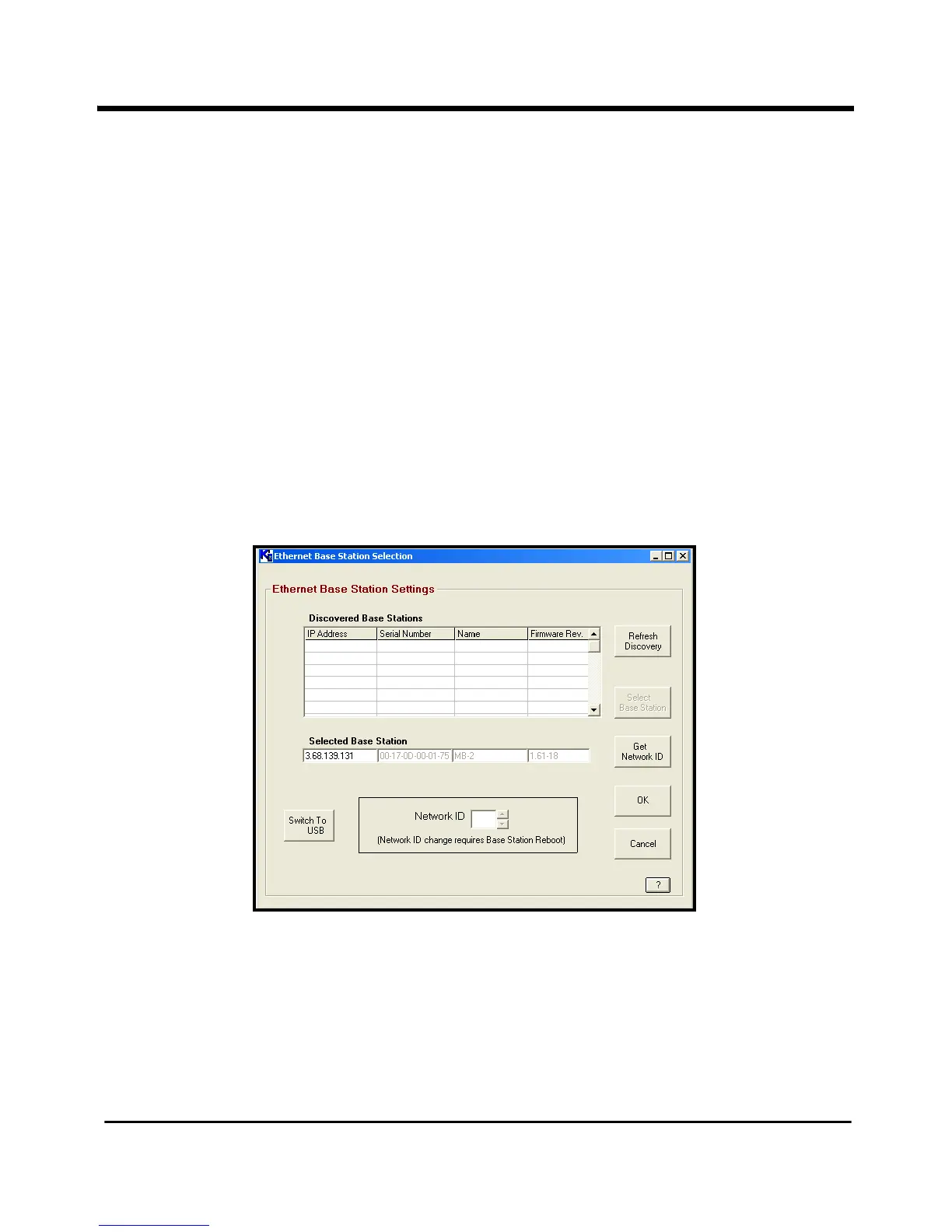
Ethernet Base Station Settings window opens, similar to Figure 18 below.
Figure 18: Ethernet Base Stations Settings
a. To locate the Base Stations on the network, click on the
Refresh Discovery button.
The software scans the network and locates the Base Stations on the network.
b. To select and program a specific Base Station, highlight the desired Base Station in
the
Discovered Base Stations window and click on the Select Base Station button.



 To Next Page