Getting Started 1
Keysight 2050/60 X-Series User’s Guide 17
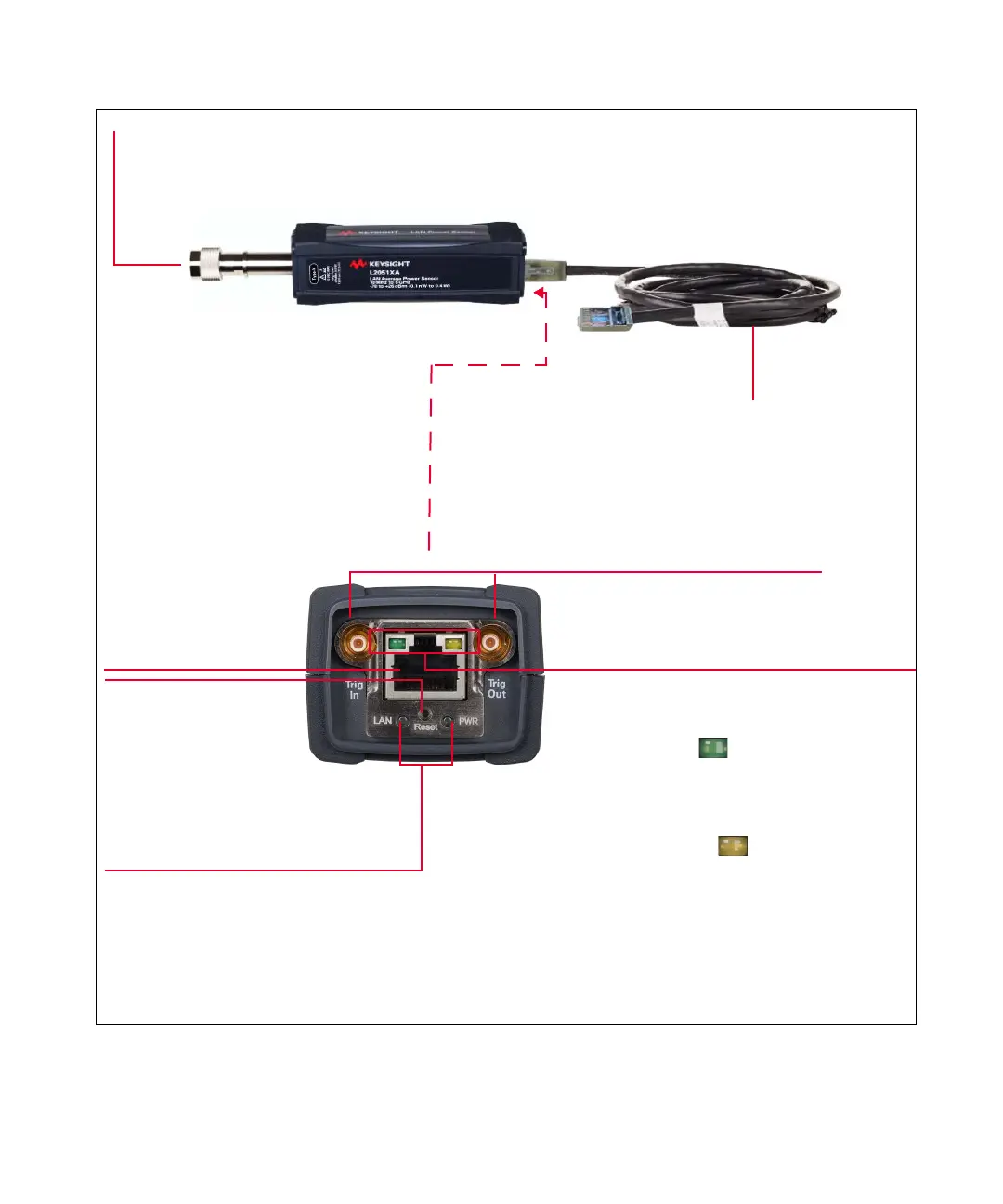
Figure 1-2 LAN sensor
RF input port for
RF/microwave signals
LAN cable
LAN port
External trigger ports
Link state LED indicators
Indicate the LAN sensor link states:
– Green solid ( ): Link speed indicator.
Lights up when the operating speed is 100 Mbps.
No indication when the operating speed is 10 Mbps
or during line isolation.
– Amber blinking ( ): Link activity indicator.
Blinks when a valid link activity is detected.
LED indicators
Indicate the LAN sensor state.
Refer to “LED Indicator Sequences for
the LAN Sensor” on page 43 for more
information.
LAN reset
switch
Push the switch button
(a straightened paper clip will
do the job) to perform a LAN Configuration
Initialize (LCI) reset of the instrument which
enables DHCP, DNS and resets the web site
password to the factory default password.



 To Next Page