1 Getting Started
32 Keysight 2050/60 X-Series User’s Guide
4 To enable static IP, click Interactive IO and send the following SCPI commands:
– SYSTem:COMMunicate:LAN:DHCP[:STATe] 0 //Turns off Dynamic IP
– SYSTem:COMMunicate:LAN:AIP[:STATe] 0 //Turns off Auto IP
– SYSTem:COMMunicate:LAN:RESTart //Restarts the LAN network for the above
setup to take effect
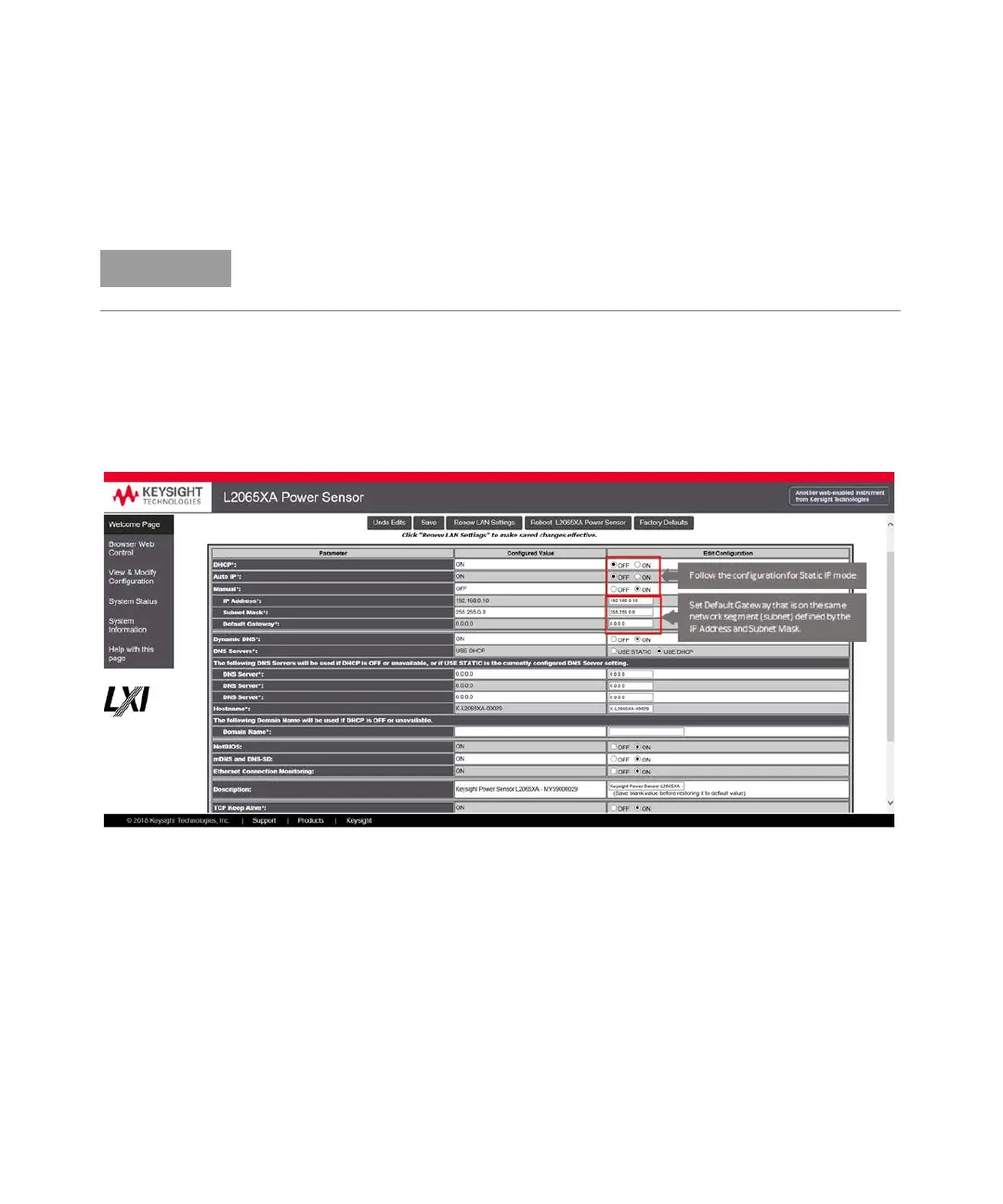
Alternatively, you can set these configurations using the LAN sensor web-based
interface (see “Using the Instrument Web Browser” on page 35).
On the Configuring your L20xxXA Power Sensor page, set the DHCP and Auto IP buttons to
OFF. Click Save to save the new settings. Then click Renew LAN Settings for the changes
to take effect.
Figure 1-16 Modify and renew LAN configuration settings
5 Set the PC IP address and subnet mask. Go to Start > Control Panel > Network and Internet
> Network and Sharing Center > Local Area Connection > Properties and set the following
properties.
For more information on remote SCPI programming, refer to the 2050/60 X-Series
Programming Guide.



 To Next Page