90 °C
60 °C
40 °C
Page 14 / 96
7.3. Touchscreen - Basic operation and display symbols
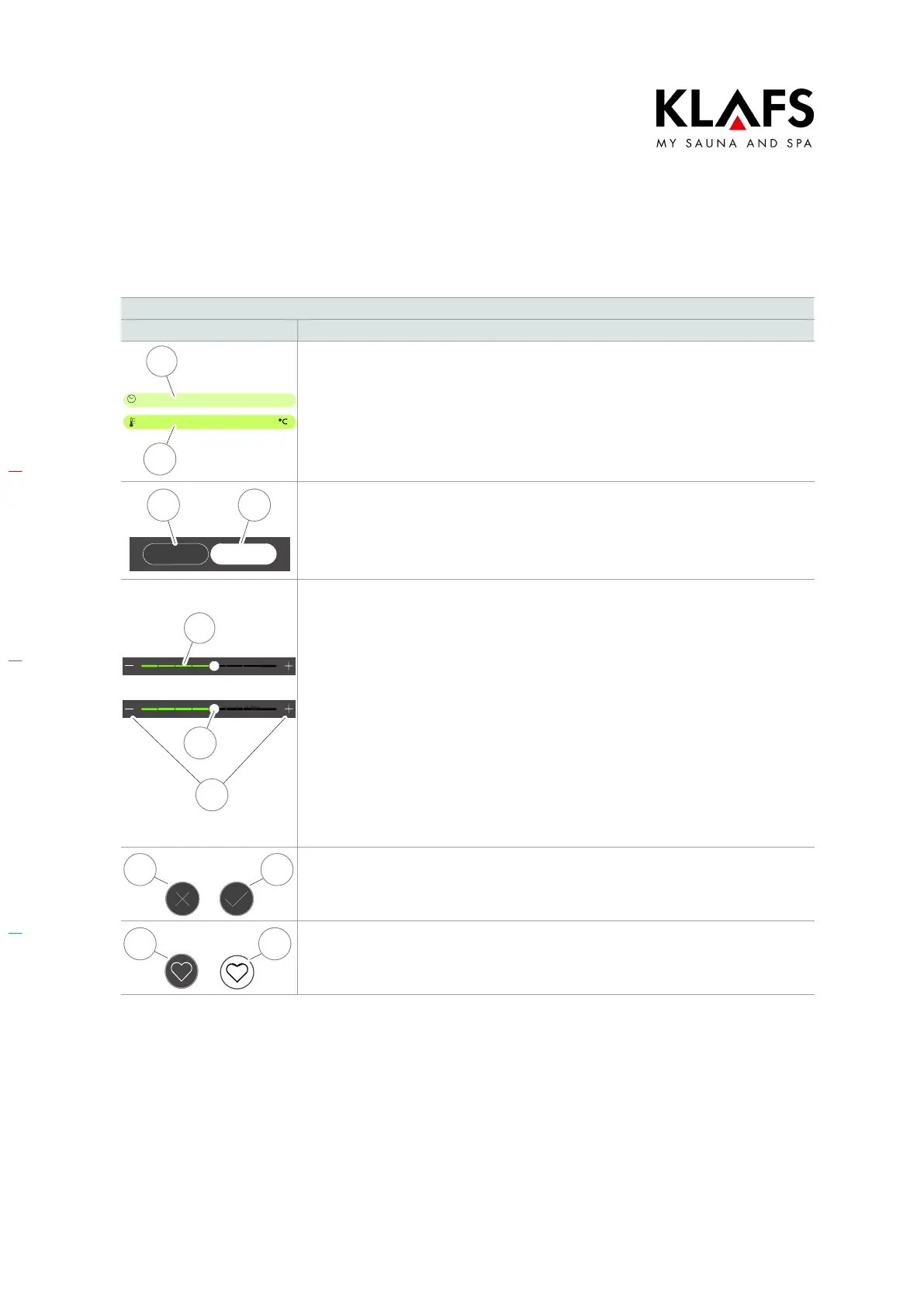
Example
Symbol: Display/function:
1
2
Symbols highlighted in colour.
E.g. duration, temperature or numerical value.
Pressing the field selects or activates the function.
Active/selected (1).
Not active (2).
Off On
43
Switches a function on/off.
D Pressing the function selects it and highlights it in colour.
Not active (3).
Active (4).
5
6
7
Indicators.
E.g. bar scale (5).
The bar scale displays the settings in ten bars.
The bar scale is used to set parameters such as humidity, volume, fan speed and
screen brightness.
D Press and hold the slider (6) to move the bar scale to the left or right.
or
D Increase or decrease the value by pressing the "+" (7) or "-" (7)
symbol respectively.
D If you do not confirm the new value by touching an area outside the
setting within three seconds, the controller will automatically exit
input mode and apply the new setting.
98
Cancel, confirm.
Press the cross button (8) to cancel changing a setting and discard the input value.
Press the tick button (9) to confirm the new setting or input value and apply it.
1110
Favourite.
Available (10).
Active (11).



 To Next Page