90 °C
60 °C
40 °C
Page 76 / 96
10.11. Extras: Coloured light
Sanarium
Bathing time
Temperature
Humidity
Back
Off
Manual Scene
Colour Brightness
1
2 5 3 6 4
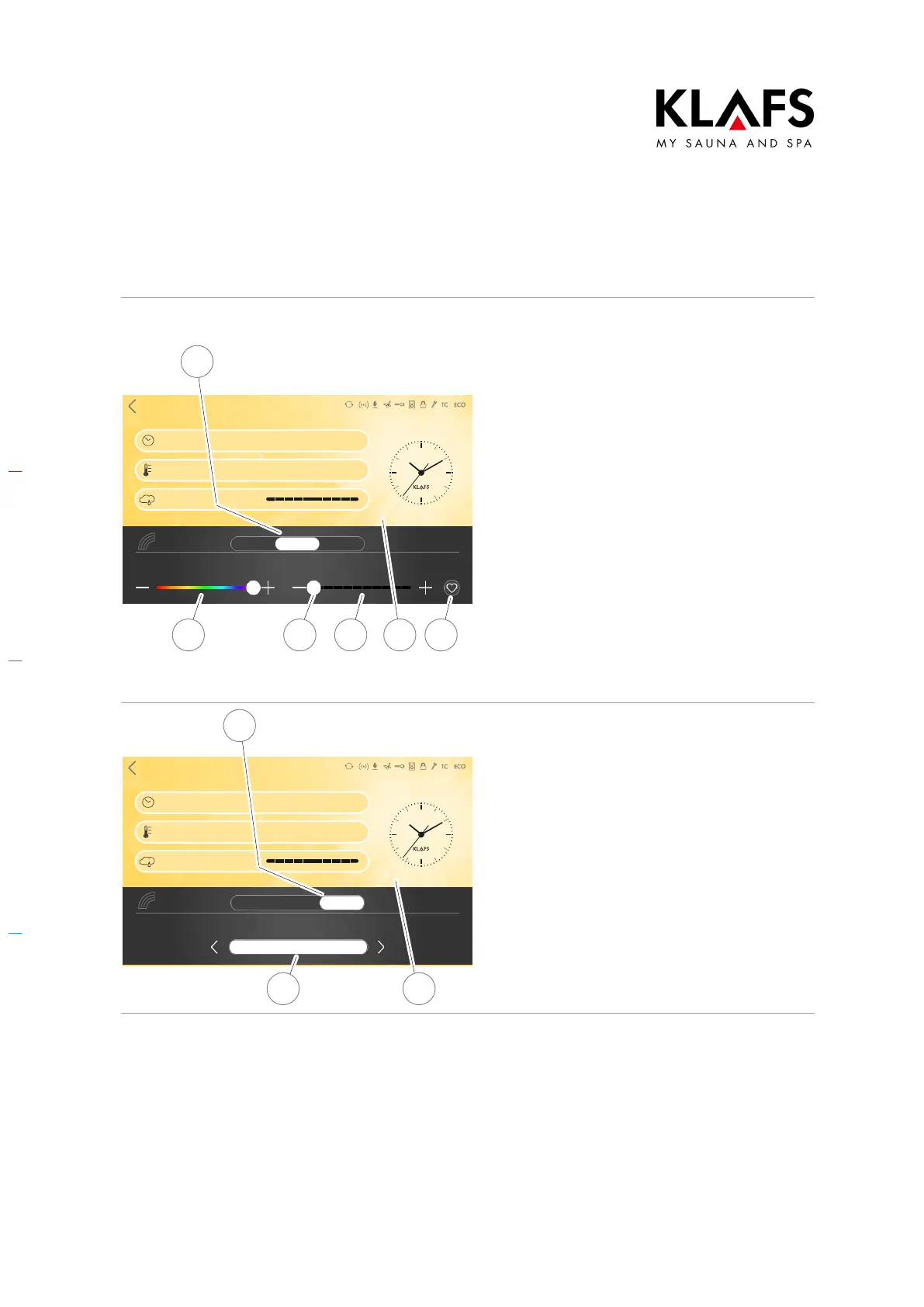
Setting the coloured light
1. Press the Colour light symbol.
The display for setting the coloured light appears.
2. Press the switch (1) to change the
coloured light settings manually.
3. The menu below allows you to
adjust the following settings:
D Colour spectrum (2)
D Brightness (3)
D Favourite settings (4).
4. Use the +/- buttons or the
slider (5) to configure the settings
you want.
5. Then apply the setting by touching
the screen (6).
Sanarium
Bathing time
Temperature
Humidity
Off
Back
Scenario selection
Manual Scene
7
8 9
Set a theme
1. Touch the switch (7) to select a
theme for the coloured light.
2. The menu below shows a list of
available options.
3. Select the theme you want (8) by
pressing the </> buttons.
4. Apply the change by touching the
screen (9).



 To Next Page