90 °C
60 °C
40 °C
Page 70 / 96
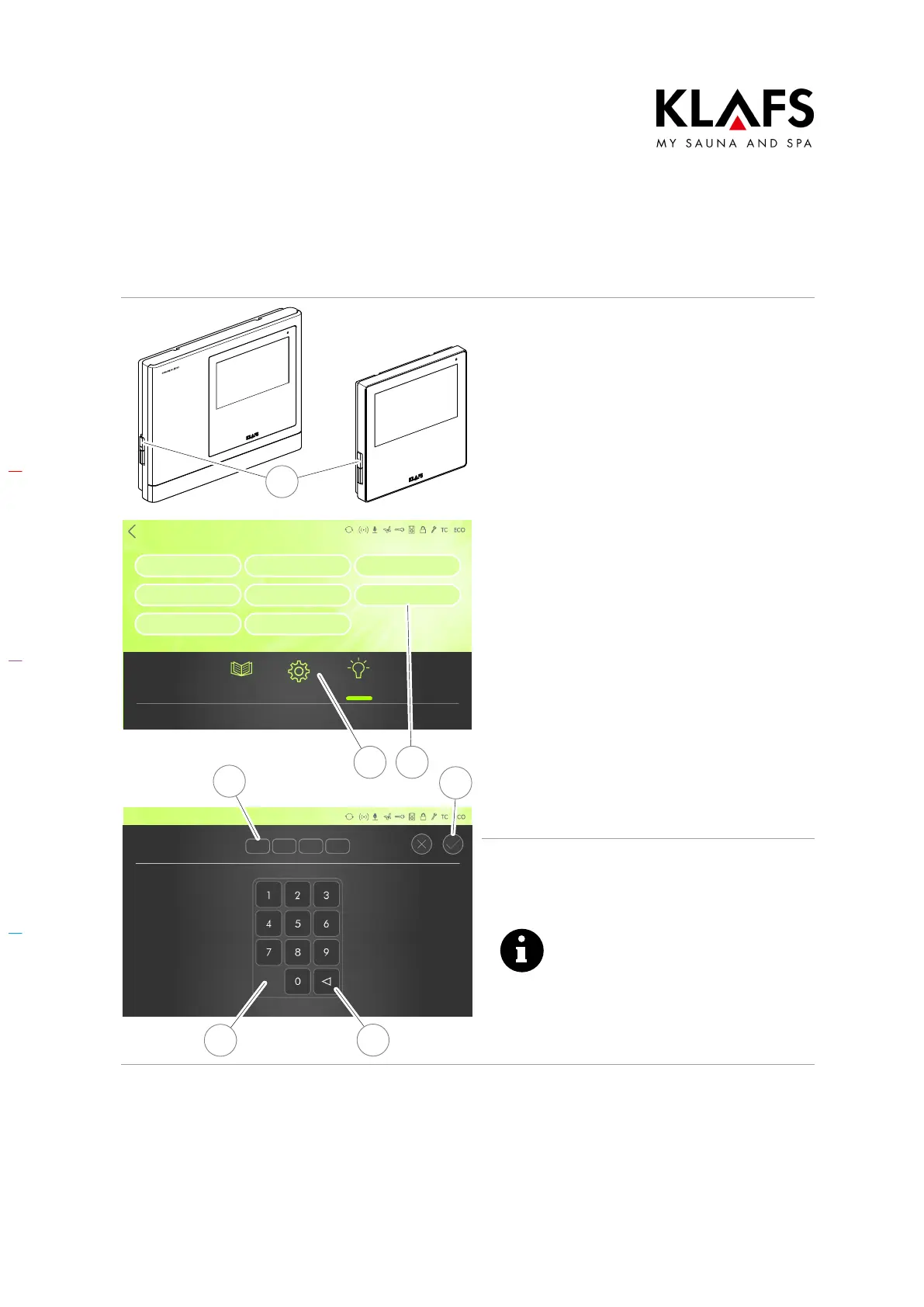
10.8. Assigning a PIN to the controller (optional)
SONSTIGES
Settings
Lock control
Activation ALEXA
Language
Water hardness
Servicemenu
Time
ASC PIN
Pairing Bluetooth
Clues Settings Light
Temperature
Humidity
Back
ASC PIN
4
6
7
5
1
2 3
Entering a PIN for remote control of the
controller
A PIN is required to switch on the controller
via the KLAFS app.
1. Switch the controller on at the main
switch (1).
2. Press the "Settings" symbol (2).
3. Press the ASC PIN (3) line.
The screen for entering the ASC PIN will
appear.
Create and note down your PIN (four-digit
number).
4. Enter the four digits using the
keypad (4). The digits will appear
in the line above (5). Press
button (6) to delete a number if
you enter the wrong one.
5. Confirm the four digits you have
entered by pressing the tick
symbol (7).
Any four-digit number can be
used as your PIN except for
"1111" and "2222", which have
already been allocated to KLAFS.
The lock will be activated when
you switch on the controller and
once the bathing session has
ended.



 To Next Page