• Klereo Therm: to select when using a Klereo heating pump that can then be controlled
from both the Kompact control box and the Klereo Therm display (refer to the Klereo
Therm heating pump manual).
• Other heating: to select when using any other heating equipment except Klereo
Therm. The P-Q heating output will be closed or open depending on whether the
heating target value is reached or not. This is default selected when delivered.
• None: mark this option when there is no heating equipment.
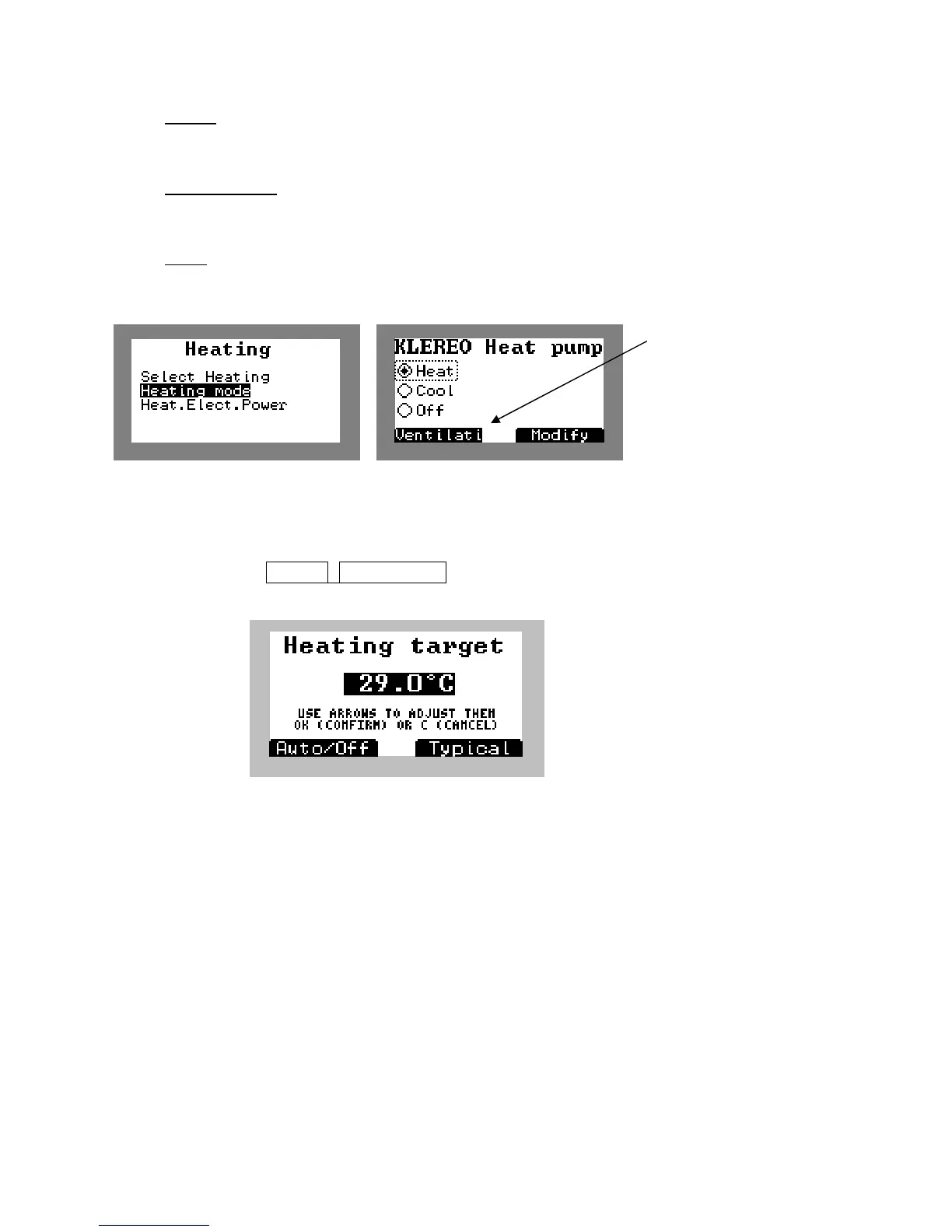
The « heating mode » menu will only appear when Klereo Therm has been selected. With
this menu, there are extra possibilities to parameter the heating pump.
Figure 49. Klereo Therm settings
5.13.2 Adjusting target value for heating
Go to menu:
to enter the heating temperature target value.
Figure 50. Heating temperature target value setting screen
In the case of « other heating », set the heating equipment target value to the maximum so
that it will always be above Klereo target value.
5.13.3 Matching a Klereo Therm heating pump
Connecting the communication bus line and matching the Klereo Therm heating
pump.
The communication bus line will be connected to the « lin » terminal boards of both printed
circuit boards (Klereo Kompact and Klereo Therm)
Wiring N°1: Klereo Kompact and a Klereo Therm
In case of liquid Chlorine, active Oxygen, bromine or Chlorine tablets disinfectant treatment,
connect the heating pump to the Kompact control box unit as follows:
Klereo


 To Next Page