21
3. Description
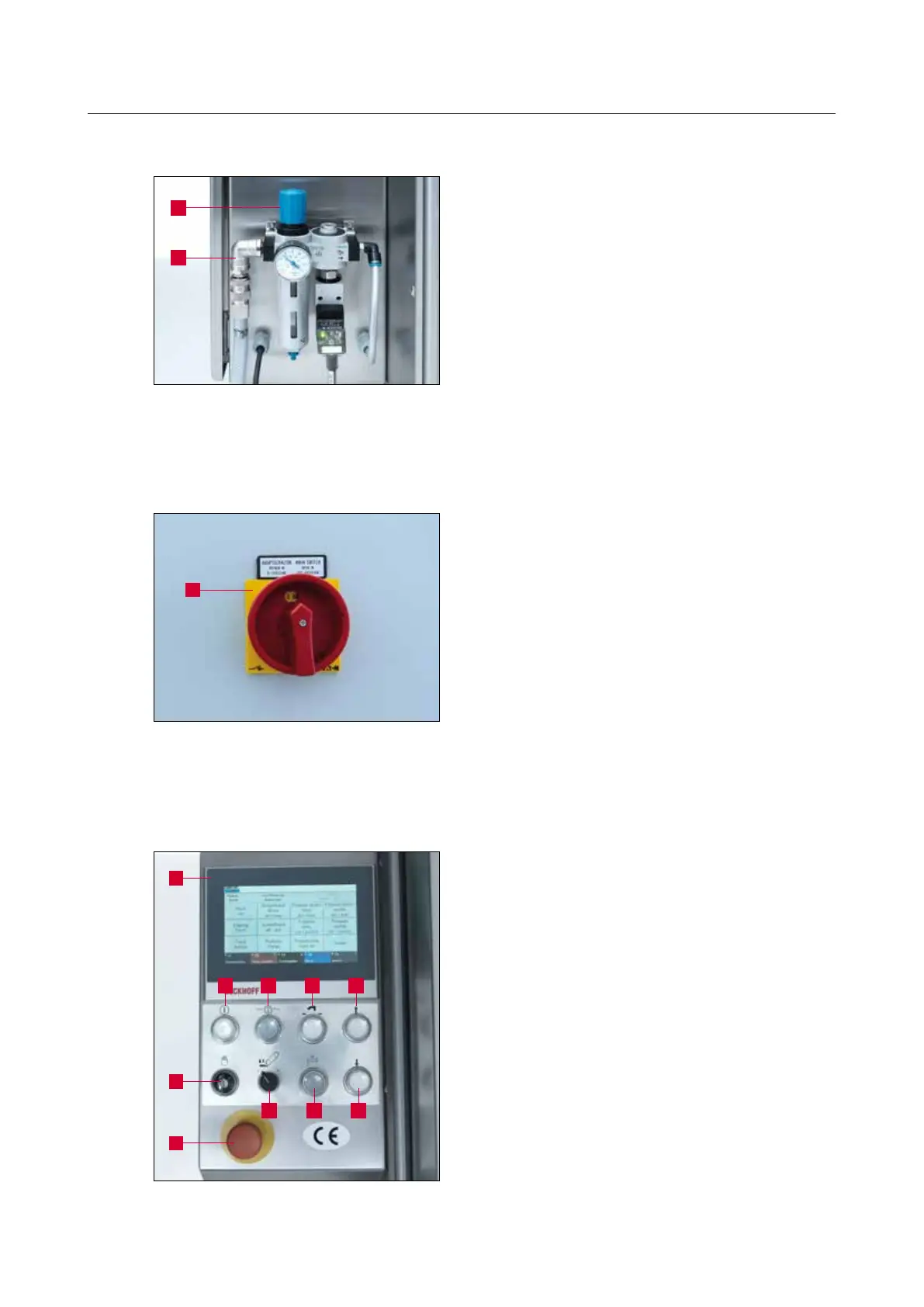
1 Control knob for pressure regulation
2 Compressed air connection (6.5 bar)
3.4.1 Switching the grinding machine on / off
The main switch (3-5/1) is disposed on the rear of
the switch cabinet.
Turning the main switch from “0” to “I” switches
on the grinding machine.
Turning the main switch from “I” to “0” switches
off the grinding machine.
3.4.2 Control panel
1 Display screen
2 “Control On” button: Activates the con-
trols (button starts flashing)
3 “Start / Stop” button: Starts / stops the
grinding program
4 “Change copy clamping plate” button
5 “Table forward” button: For moving the
table forward
6 “Setting Mode” key switch: Position “1”
for setting mode
7 “Wet grinding belt grinding pressure”
selector switch
8 “Coolant On / Off” button: Switches the
coolant pump on / off
9 “Table back” button: For moving the table
backward
10 “Emergency Stop” button
Figure 3-4 Pneumatic system
Figure 3-5 Main switch
Figure 3-6 Control panel
1
2
1
1
6
10
7
32 4 5
8 9



 To Next Page