49
8. Control system
8.3 Renaming, creating and deleting the product file
Product files can be renamed, deleted and new
ones created by copying.
The procedure is as follows:
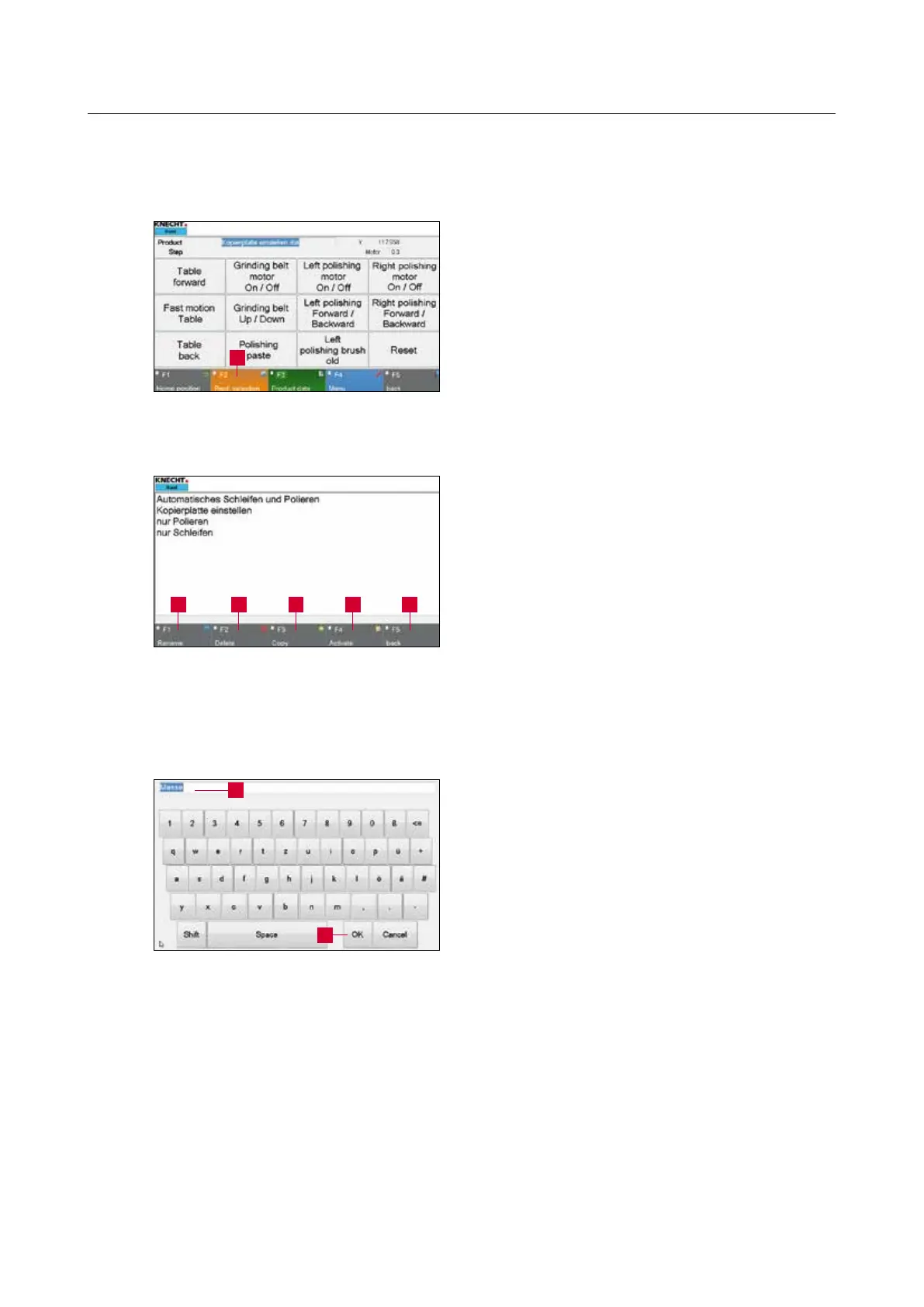
Activate the “F2 Prod. Selection” (8-5/1) touch
panel button.
A new window (8-6) opens.
Select the desired file so that it is highlighted in
blue.
Select the relevant touch panel button: “F1 Re-
name” (8-6/1), “F2 Delete” (8-6/2) or “F3 Copy”
(8-6/3).
8.3.1 Renaming product file
On pressing “F1 Rename” (8-6/1), a window as
displayed in the figure on the left (8-7) opens.
Edit the file name (8-7/1) using the keyboard and
confirm with “OK” (8-7/2).
The window closes. The renamed file appears in
the product file directory.
Then activate a product file with “F4 Activate”
(8-6/4) or return to the main screen with “F5
Back” (8-6/5).
Figure 8-6 Editing the product file
4 51 2 3
Figure 8-5 Main screen
1
Figure 8-7 Renaming the product file
2
1



 To Next Page