User manual - DATA RECORDER and cooperating software
•
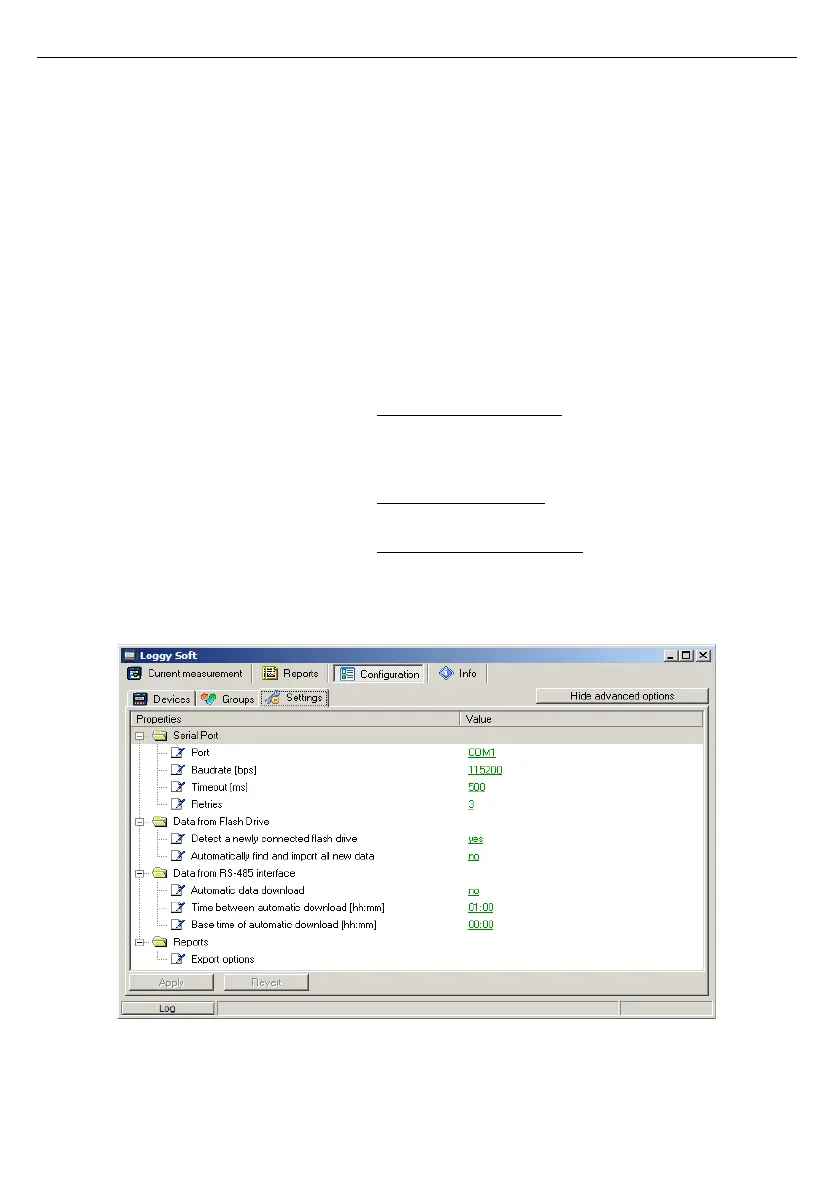
Time between automatic download
field
- this field specifies the time interval between automatic download
new data from data loggers. This time can be set with precision to
one minute, but can't be longer than 23 hours and 59 minutes. The
starting point of counting intervals is specified by
Base time of
automatic downloa
d field,
•
Base time of automatic download
field
- this field specifies start time from which begins counting the first
and following automatic data download processes,
•
Export options
field
- settings that are here, affect the way of creation a file from
generated data using the
[Export...]
button accessible from
Reports
menu. These settings include:
• Exclude Min/Max info – if this option is active,
instead of information about exceeds minimum and
maximum values of measurements, numeric values
will be created, which may be incorrect,
• Exclude error name – instead of an error in the
measurement, the default numerical value appears,
• Separate date and time – it creates a separate
column for date and time.
In order to change these settings, make sure the advanced options mode is active. If
necessary, activate it by clicking on the button
[Show advanced options]
(
Fig.
3.20
).
Fig. 3.20. Configuration - Settings tab (advanced options active)



 To Next Page