8 Parameter detail setup
74 © Copyright Reserved KONICS Co., Ltd.
8.2 ALARM SETUP (Alarm setting)
You can set alarm output specification such as alarm operation mode and alarm option by input
channel, alarm ON/OFF delay, alarm output relay, relay contact, etc.
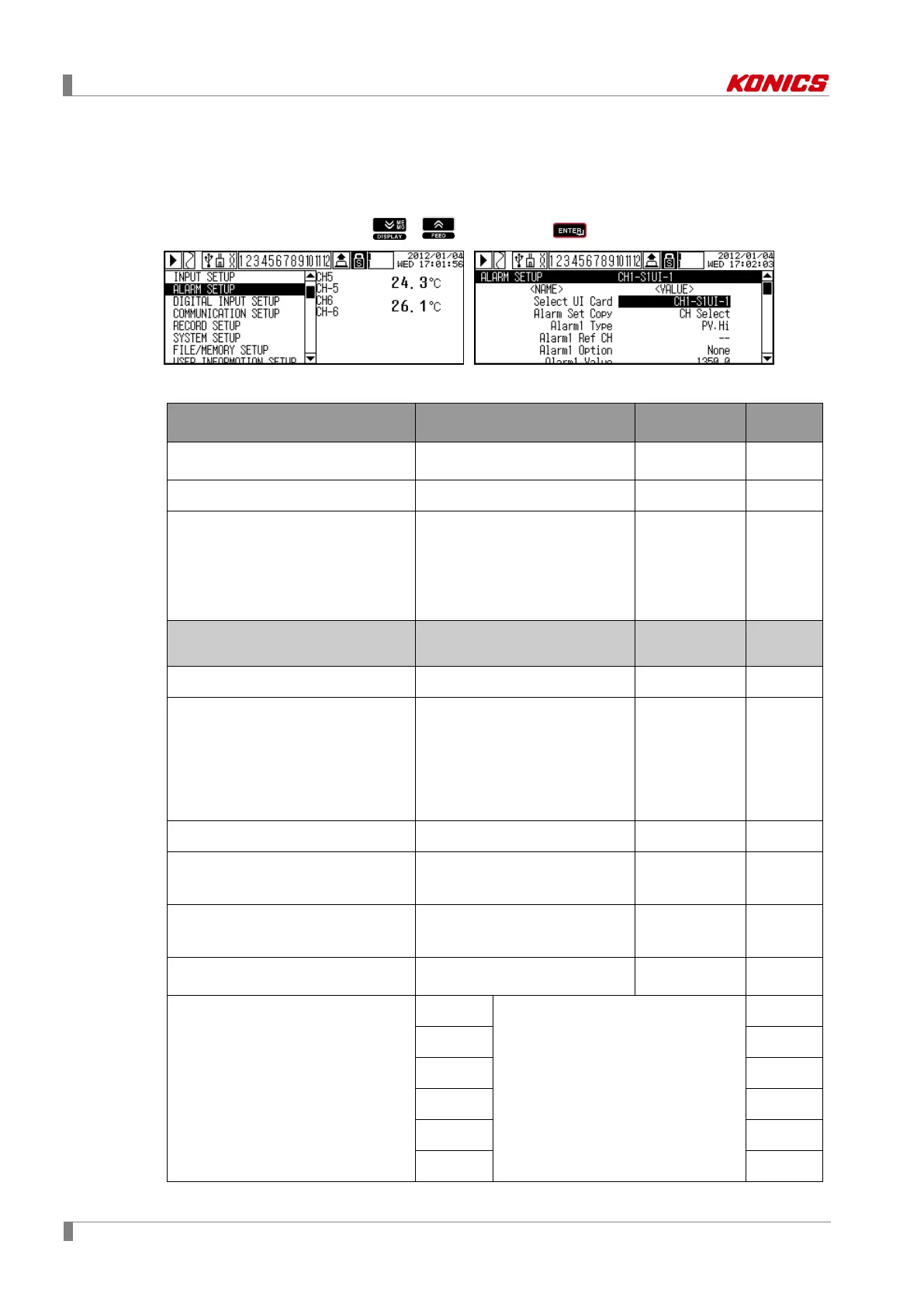
Move to ALARM SETUP with , keys, press key to enter ALARM SETUP.
Parameter list
Parameter Set range Unit
default
Select UI Card (Select universal card input)
CH□-S□UI-□
-
Automaticall
y set
Alarm Set Copy (Copy alarm parameter)
No Select/ CH□-S□UI-□
- CH Select
Alarm□ Type(Alarm□ operation mode)
※1
OFF ↔ PV.Hi ↔ PV.Lo ↔ DV. Hi
↔ DV.Lo ↔ SBA ↔ P. E N D
-
Alarm1
Type: PV.Hi
Alarm2
Type to
Alarm4
Type: None
Alarm□ Ref Channel(Alarm□ reference
None / CH□-S□UI-□
- -
Alarm□ Option(Alarm□ option)
※1
None ↔ Latch ↔ StBy ↔ La+St
- None
Alarm□ Value(Alarm□ set value)
※1
F.S. of INPUT TYPE by channel Digit
Alarm1
Value:
1350.0
Alarm2
Value to
Alarm4
Value: -
Alarm□ Hysteresis(Alarm□ hysteresis)
※1
F.S. of INPUT TYPE by channel Digit 0.0
Alarm□ ON/OFF Delay(Alarm□ ON/OFF
output delay time)
※1
0 to 3600 sec 0s
Alarm□ Alarm No(Alarm□ output alarm
number)
※1
None / S□AO-□
- None
Select Alarm Card(Select alarm output
card)
- -
Automaticall
y set
Alarm-□ Status(Relay and TR output
method)
※1
N.O.↔N.C.
When connecting Relay type KRN-AR4
(alarm output card), AL1 to AL4 are
activated.
When connecting TR type KRN-AT6
(alarm output card), AL1 to AL6 are
activated.
N.O.
N.O.↔N.C.
N.O.
N.O.↔N.C.
N.O.
N.O.↔N.C.
N.O.
N.O.↔N.C.
N.O.
N.O.↔N.C.
N.O.



 To Next Page