8 Parameter detail setup
© Copyright Reserved KONICS Co., Ltd. 63
8.1.11 Low Scale/High Scale (Lower limit/Upper limit scale value)
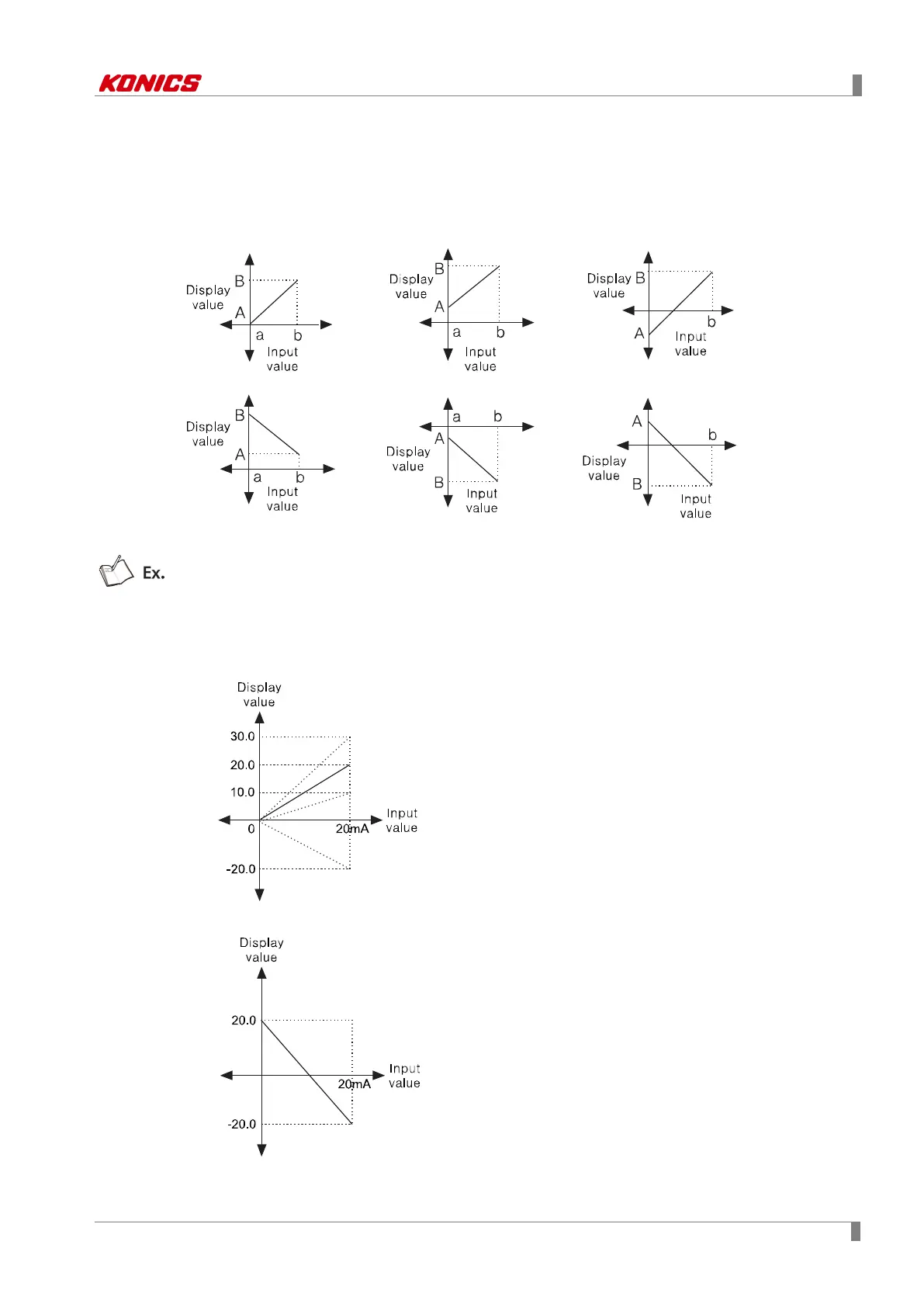
This function is for set the desired display value based on measuring value. It is applied to
analog (voltage, current) input type only.
As below figure, for example, measuring input value are ‘a’ and ‘b’ and the desired display value
are ‘A’ and ‘B’ . In this case, about the input ‘a’ and ‘b’, it displays a=A, b=B as linearly.
You can change display value about min./max. input value of measuring value.
In case input specification is 0 to 20 ㎃
Set Low Scale (Lower limit scale value) = 0.0, High Scale (Upper limit scale value) = 10.0,
20.0, 30.0, -20.0.
Set Low Scale (Lower limit scale value) = 20.0, High Scale (Upper limit scale value) = -20.0.



 To Next Page