SUPERSTRUCTURE OPERATION
98
Operating instructions • Semitrailer • 505369471-04 • 02/2019
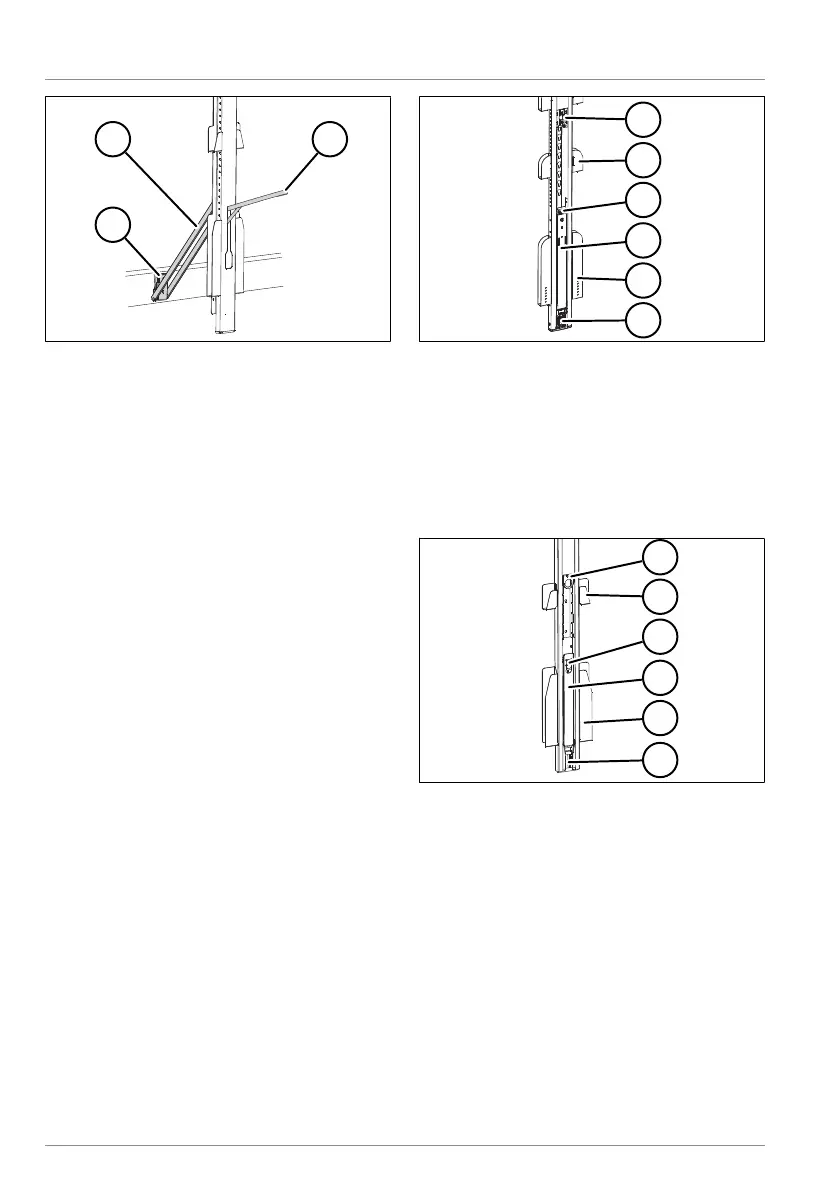
Fig.6-63: Releasing the one-part fold-out
post
1 Fastening bow
2 Locking lever completely folded up
3 Post retainer
► Pull the posts away from the vehicle
without pulling the fastening bow out of
the post retainer on the chassis.
► Lift the fastening bow out of the post
retainers.
► Slide the posts in the desired direction.
► Insert the fastening bow into the post
retainers.
► Push back the locking lever to the
stop.
ü The posts have been moved and are
locked.
6.2.10.2 Telescopic fold-out posts
KRONE trailers with a lifting roof are
equipped with telescopic fold-out posts that
can be lifted for loading/unloading. A tele-
scopic piece inside the posts adjusts to
match the height difference. Depending on
their design, telescopic fold-out posts have
○ several sets of lath sockets for plug-in
laths, and
○ one set of lath sockets above the floor,
each for four plug-in laths.
Posts without lath sockets are also pos-
sible.
Fig.6-64: Telescopic fold-out post
1 Plugging unit
2 Flat lath sockets
3 Lock
4 Locking lever
5 Lath depot
6 Post pockets
Fig.6-65: Optional design of the centre post
1 Plugging unit
2 Flat lath sockets
3 Lock
4 Locking lever
5 Lath depot
6 Post pockets
Opening the telescopic fold-out posts
þ The posts are ready to be moved (see
"6.2.10 Centre posts", pg.96).
► Press in the locks on the locking lever.
► Pull out the locking lever from the post
profile.



 To Next Page