2KA
1-5-19
(2) Manual color registration adjustment
Follow the procedure below to replace the laser scanner unit.
Procedure
1. Press the Menu key.
2. Select [Adjust/Maint.], [ColorCalibration] and then Press [Yes]. Color calibration begins.
3. Press [Color Regist.], [Detail], [Print Chart] and then Press [Yes]. A chart is printed.
4. Press [Adjust Magenta].
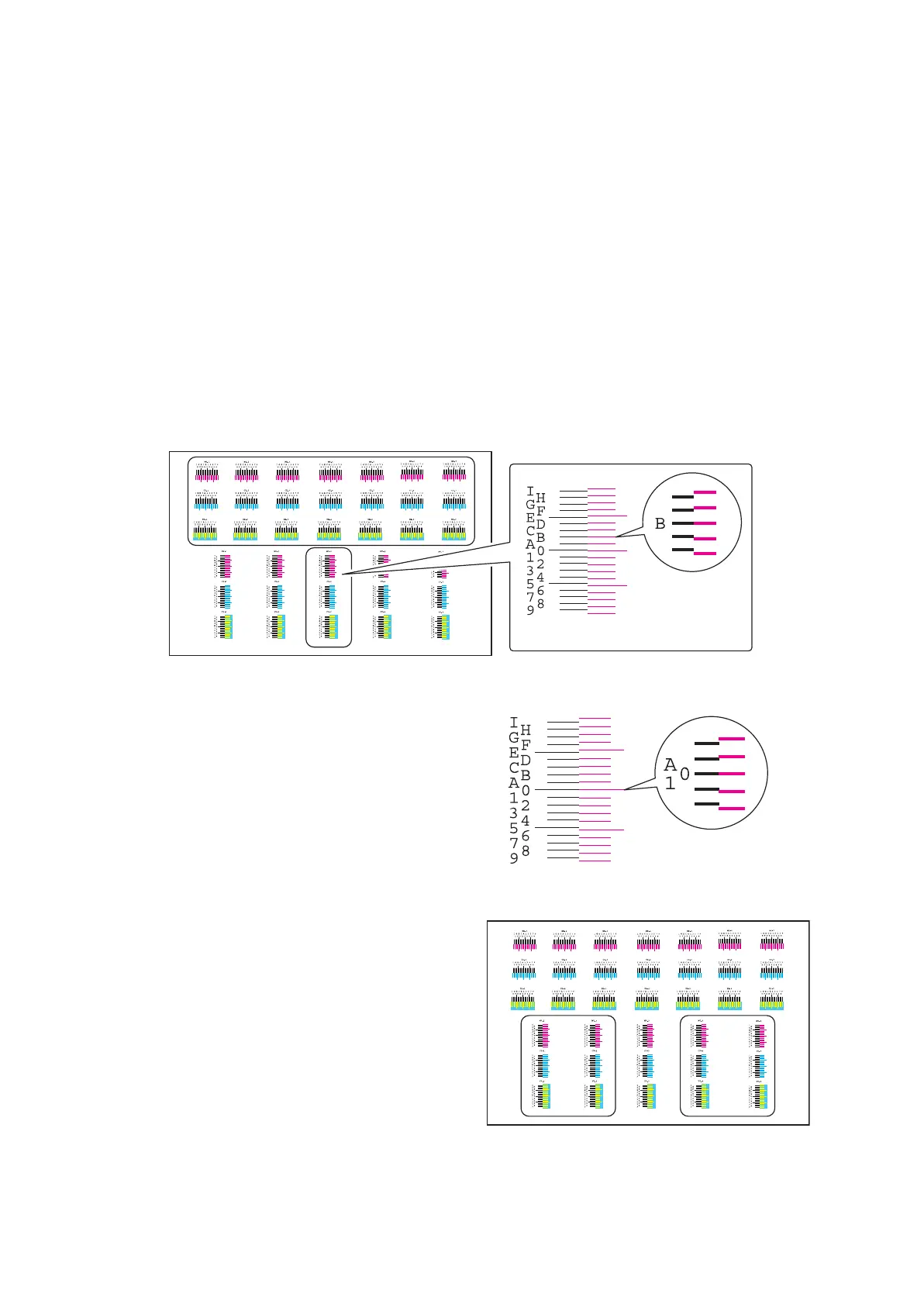
5. Read figures at MH-1 to 7 and MV-3 of the reference chart and enter the figure marked at the scale which the
BK fine line is in line with the magenta fine lines, using the cursor up/down keys.
6. Press Ok key after all values have been entered.
7. Press [Adjust Cyan].
8. Read figures at CH-1 to 7 and CV-3 of the reference chart and enter the figure marked at the scale which the
BK fine line is in line with the cyan fine lines, using the cursor up/down keys.
9. Press Ok key after all values have been entered.
10. Press [Adjust Yellow].
11. Read figures at YH-1 to 7 and YV-3 of the reference chart and enter the figure marked at the scale which the
BK fine line is in line with the yellow fine lines, using the cursor up/down keys.
12. Press Ok key after all values have been entered.
Figure 1-5-31
13. Select [Print Chart] to print a reference
chart.
14. Verify that each scale is within the range of 1
to A. If they are within the range, proceed to
step 15.
If scales are out of range, repeat steps 4
through 14.
Figure 1-5-32
15. Verify that scales of MV-1,2,4,5/CV-1,2,4,5/
YV-1,2,4,5 coincide within the range of 1 to
A.
If they are within the range, adjustment is
complete.
If they are out of range, proceed to step 16.
Figure 1-5-33
Reference chart
Example:
Enter B as scales
are coincided at B.
The scales must coincide
within 1 to A.
Reference chart



 To Next Page
 Loading...










