2KA
1-5-32
1-5-7 Other
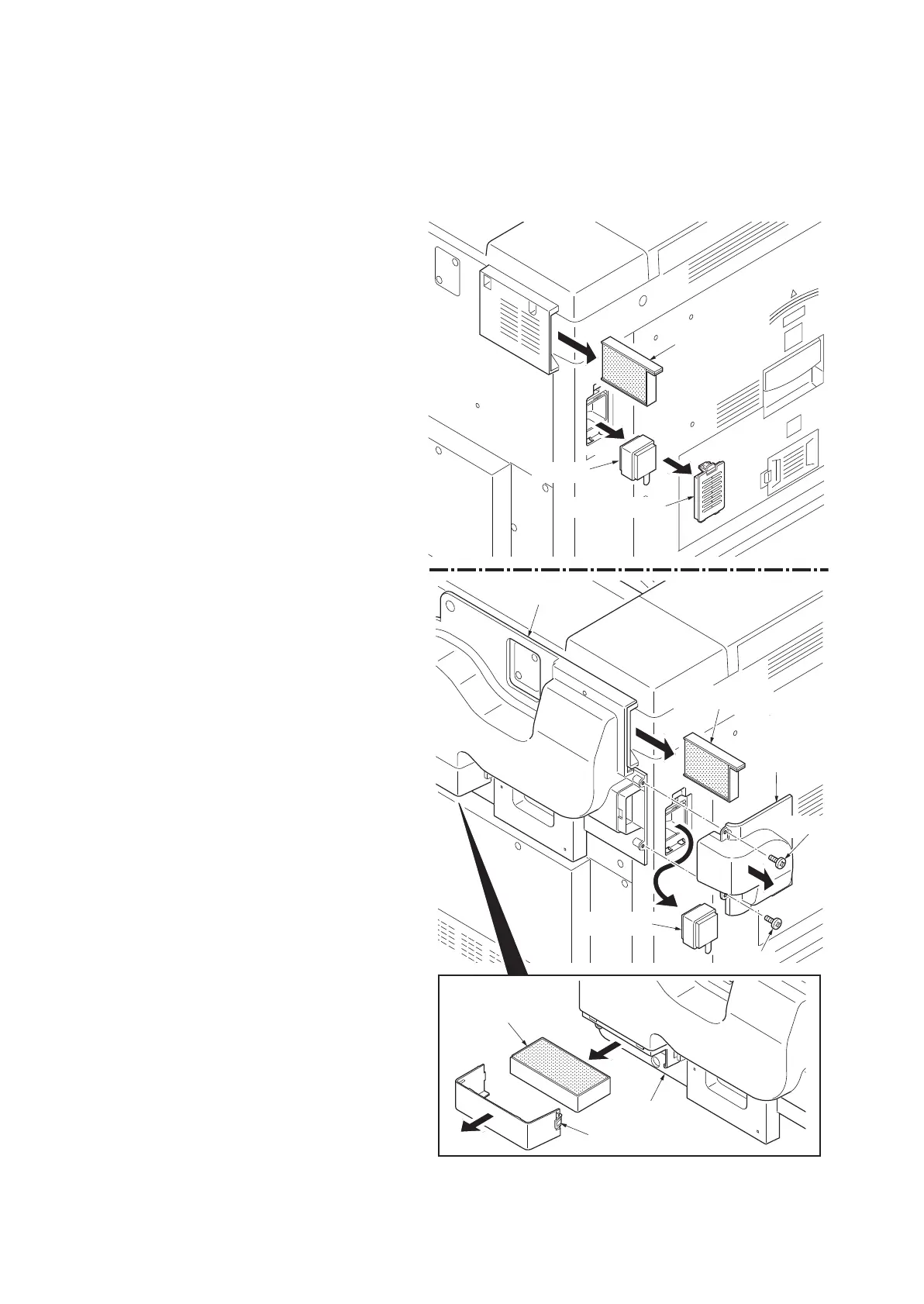
(1) Detaching and refitting the left filter, rear upper filter, right filter 1/2, rear lower filter, front filter and duct filter
Follow the procedure below to replace the left filter, rear upper filter, right filter 1/2, rear lower filter, front filter and duct fil-
ter.
Procedure
1. Remove the rear upper filter.
2. Clean or replace the rear upper filter and
refit the filter.
3. Remove the left filter cover from machine
left side.
For a machine with an optional duct unit
installed, remove the two screws and
remove duct unit B.
4. Remove the left filter.
5. Clean or replace the left filter and refit the fil-
ter.
Only machine with an optional duct unit
6. Remove the duct filter cover.
7. Remove the duct filter.
8. Clean or replace the duct filter and refit the
filter.
Figure 1-5-55
Left filter cover
Left filter
Rear upper filter
Rear upper filter
Left filter
Duct
unit B
Screw
Screw
Duct filter
Duct unit
Duct unit
Duct filter cover



 To Next Page
 Loading...










