2KA
1-5-31
1-5-6 Fuser section
(1) Detaching and refitting the fuser unit
Follow the procedure below to replace the fuser unit.
Procedure
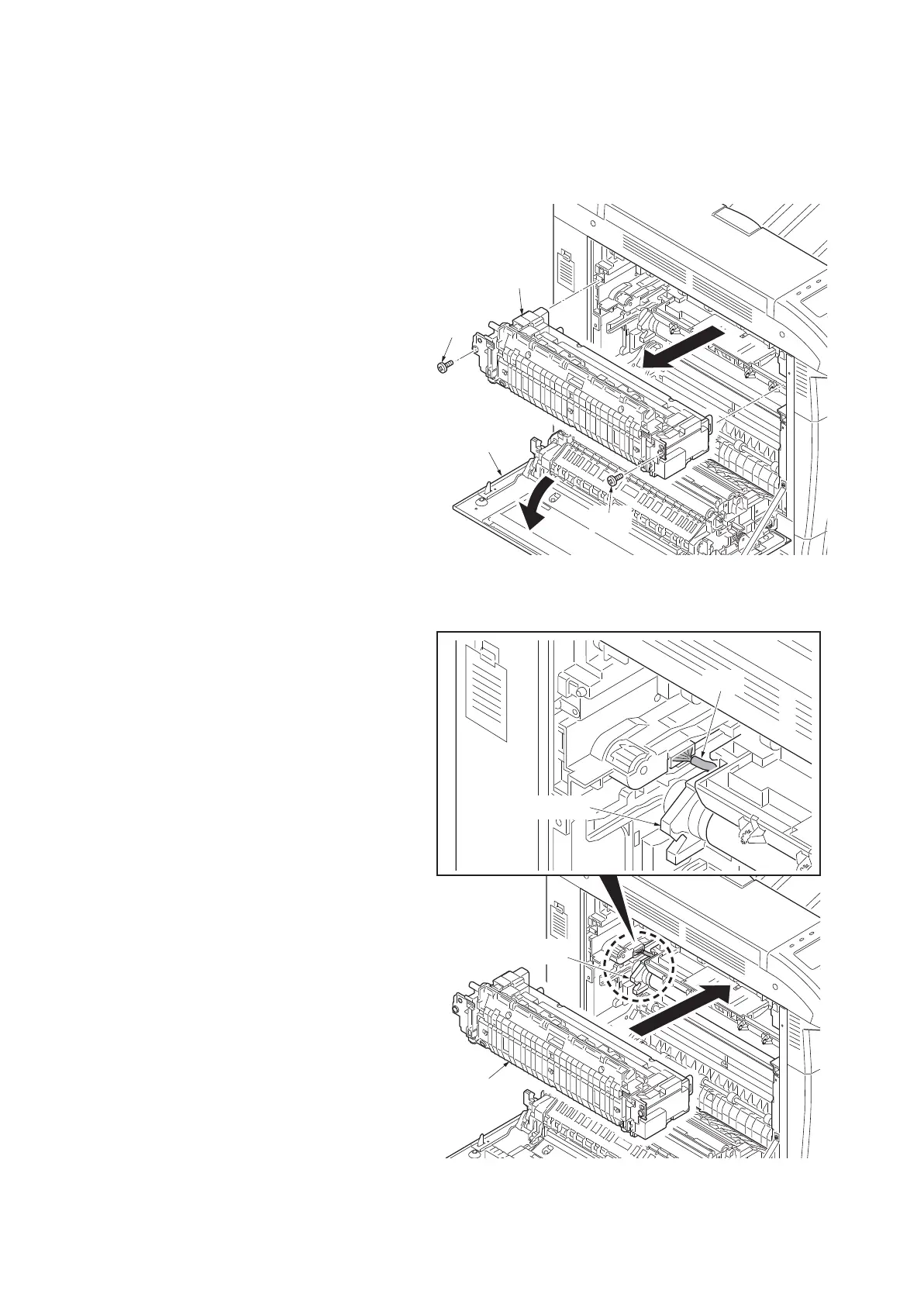
1. Open left cover 1.
2. Remove two screws and then remove the
fuser unit.
Figure 1-5-53
3. Replace the fuser unit and install the unit.
Caution
When refitting the fuser unit, take care not to
get the wire of transfer belt unit caught.
4. When the fuser unit is replaced with a new
one, carry out the following procedure.
5. Perform maintenance mode U167 (clearing
the fuser counter) (see page 1-3-63).
6. Perform the following image adjustment.
1)Color Calibration
2)Color Registration
Figure 1-5-54
Screw
Screw
Fuser unit
Left cover 1
Fuser unit
Wire
Transfer belt unit
Transfer belt unit



 To Next Page
 Loading...










