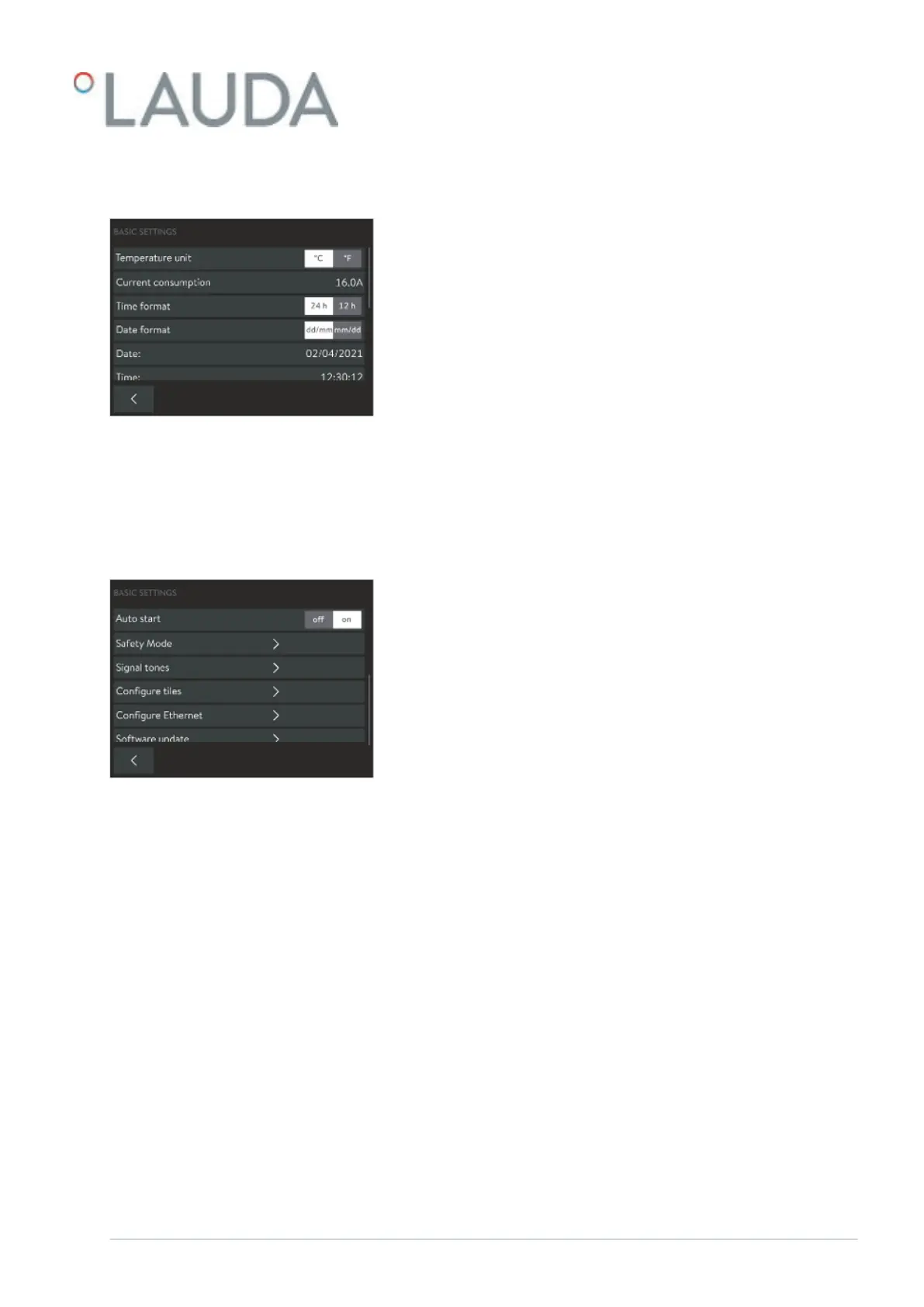
5.11 Basic settings
This chapter describes the basic settings of the Command Touch remote
control unit.
Temperature unit: Degrees Celsius or degrees Fahrenheit
Reducing the maximum current consumption of the device
Time format: [24 hours] or [12 hours]
Date format: [dd:mm] or [mm:dd]
Changing the current date
Changing the current time
Autostart: Setting [on] or [o]
Safety Mode Ä Chapter 5.11.1 “Safety Mode” on page 76
Setting signal tones for errors, alarms and warnings: o, low, medium
and loud Ä Chapter 5.11.2 “Adjusting the volume of signal tones”
on page 80
Configuring tiles Ä Chapter 5.11.3 “Positioning tiles” on page 80
Configuring Ethernet
Software update for Command Touch, for all modules or selected mod-
ules
1. Open the Home window.
2.
Touch the Settings Basic settings tile.
The Basic settings submenu opens.
Fig. 40: Basic settings part 1
Fig. 41: Basic settings part 2
V6 PRO bath thermostats and circulation thermostats 75 / 156



 To Next Page