Setting Description
Out 1, Out 2, Out 3 Switching contacts on the contact module (if avail-
able) can be programmed here (open, closed and
----). The entry ----- for contact modules indi-
cates that the previous segment was not modified.
If ----- appears in all the fields, this means that
the contact position of the initial setting or the set-
ting prior to program start is retained. The contact
modules are available as an accessory.
Delete A segment (a program line) is deleted
Undo delete A delete operation can be reversed
Copy A segment is copied and inserted under the copied
segment
Graph The program currently open is displayed as a tem-
perature-time diagram in the Cartesian coordinate
system
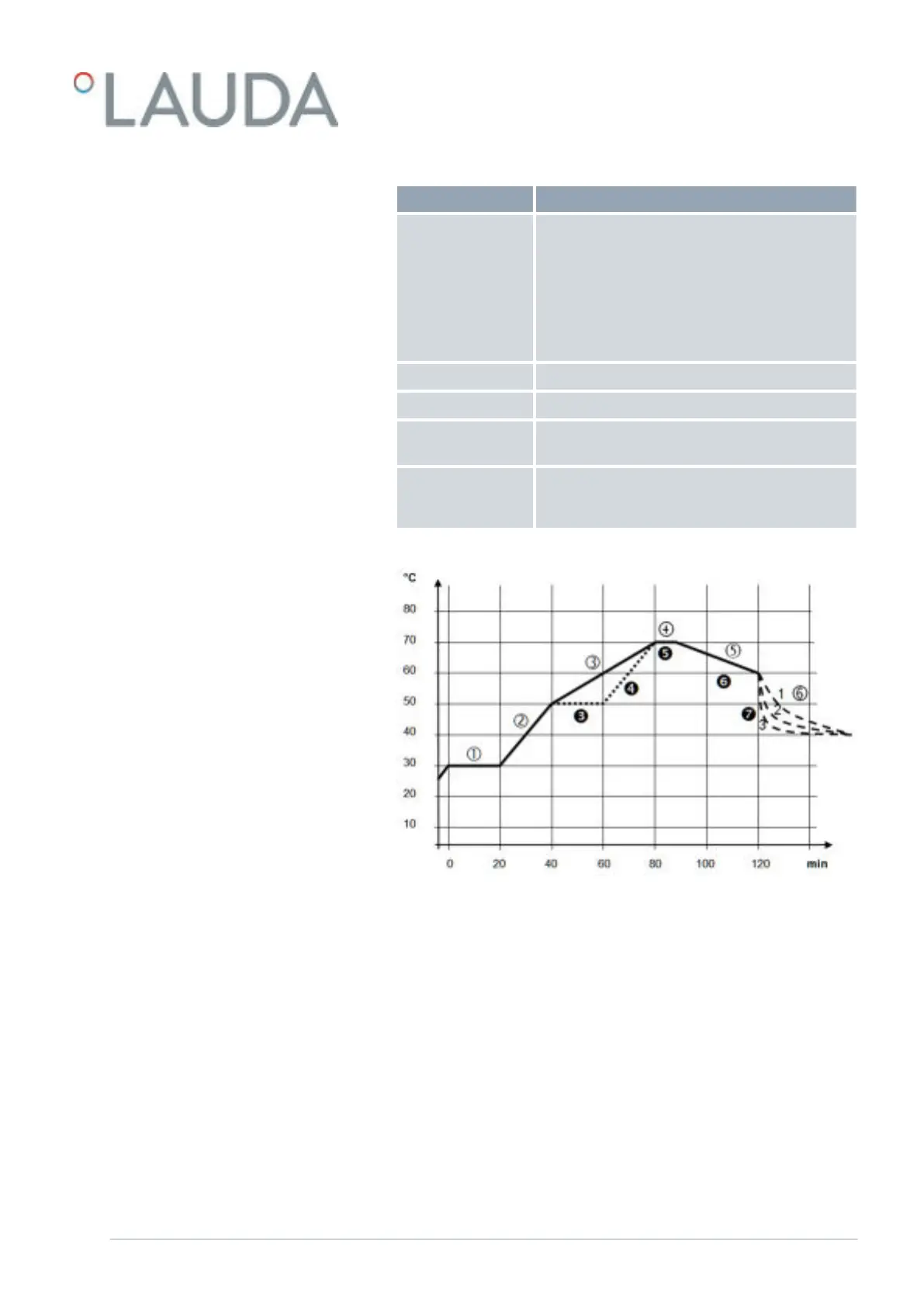
Fig. 55: Program example
The graph shows an example of a reprogrammed set temperature profile.
The cooling time in the graph varies depending on the device type, consumer
and so on. In example segment number 2, 50 °C should be reached within
20 minutes.
The original values in the first table below (before) are represented by a solid
line, while the values in the edited profile in the second table (after) are
represented by a dashed line.
Editing program examples
V6 PRO bath thermostats and circulation thermostats 93 / 156



 To Next Page