34 User Manual - LCR Pro1/Pro1 Plus - ver 1.06
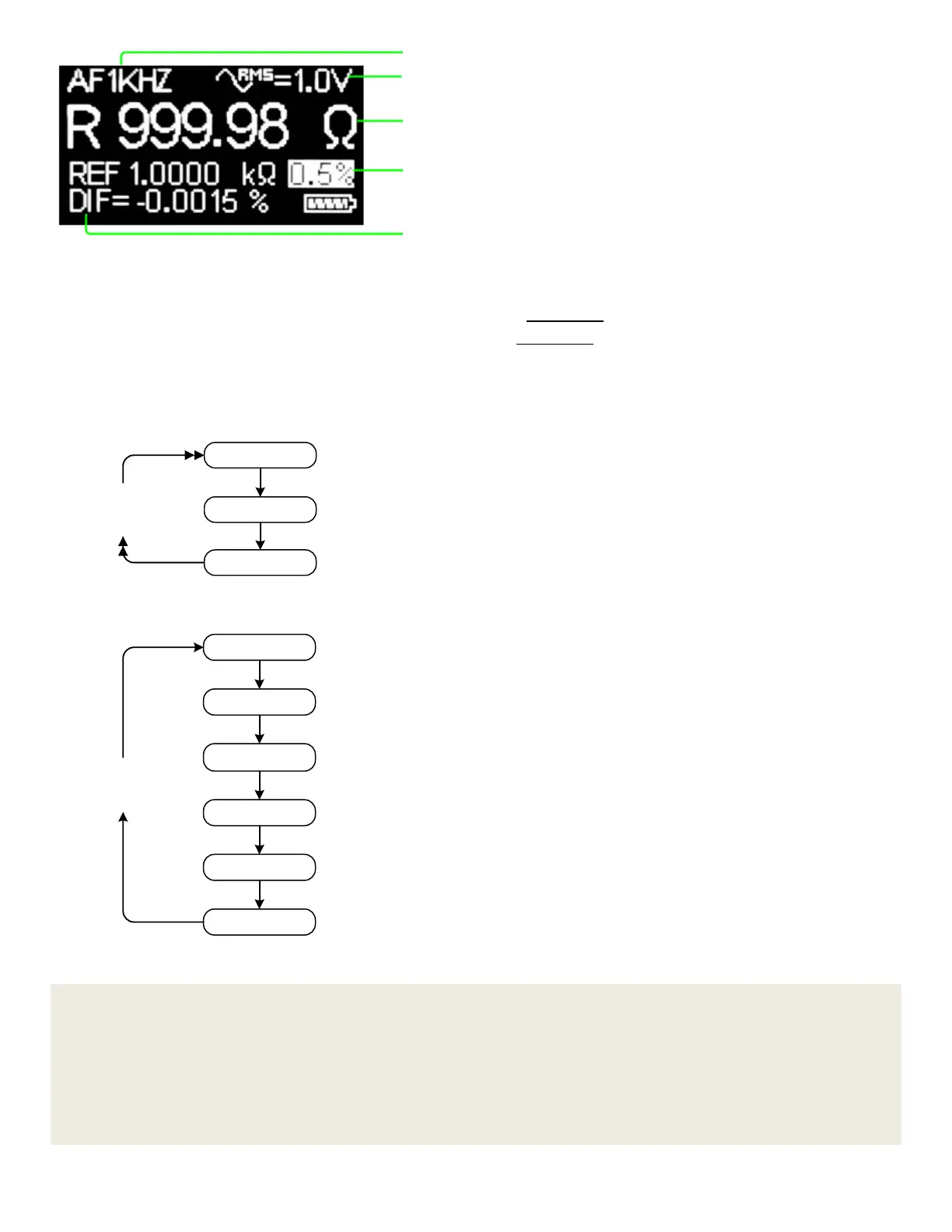
Figure 3-18: Display of Sorting Mode
Shortcuts are provided to quickly select the settings. Below are the available shortcuts in sorting mode.
• Single click the “Up” button to switch test frequency as Figure 3-2 shows.
• Double click the “Up” button to switch test voltage as Figure 3-3 shows.
• Double click the “Select” button to switch sorting type as Figure 3-19 shows.
• Single click the “Down” button to switch sorting tolerance range as Figure 3-20 shows.
• Press down the "Select" button for half second or so to go to the main menu screen.
Ref R
Ref L
Ref C
Double Click
SelectButton
Figure 3-19: Switch Sorting Type by Double Clicking the "Select" Button
0.5%
1%
5%
10%
20%
30%
Single Click
DownButton
Figure 3-20: Switch Sorting Tolerance Range by Single Clicking the "Down" Button
NOTE
(1) Some components under test may be sensitive to certain test parameters, such as test frequency, test
voltage, etc. In order to get the desired measurement result, please set the proper test parameters before
measuring such components.
(2) After the battery is completely dead or hardware reset is performed, all the sorting reference values will be
removed. Please set these values again if necessary.
Sorting type (R, L or C) and measurement result
(double click the "Select" button to switch sorting
type)
Sorting reference value and tolerance range
(single click the "Down" button to switch sorting
tolerance range)
Test voltage (double click the "Up" button to
switch)
Test frequency (single click the "Up" button to
switch)


 To Next Page