32
UserManualforELD2Servo
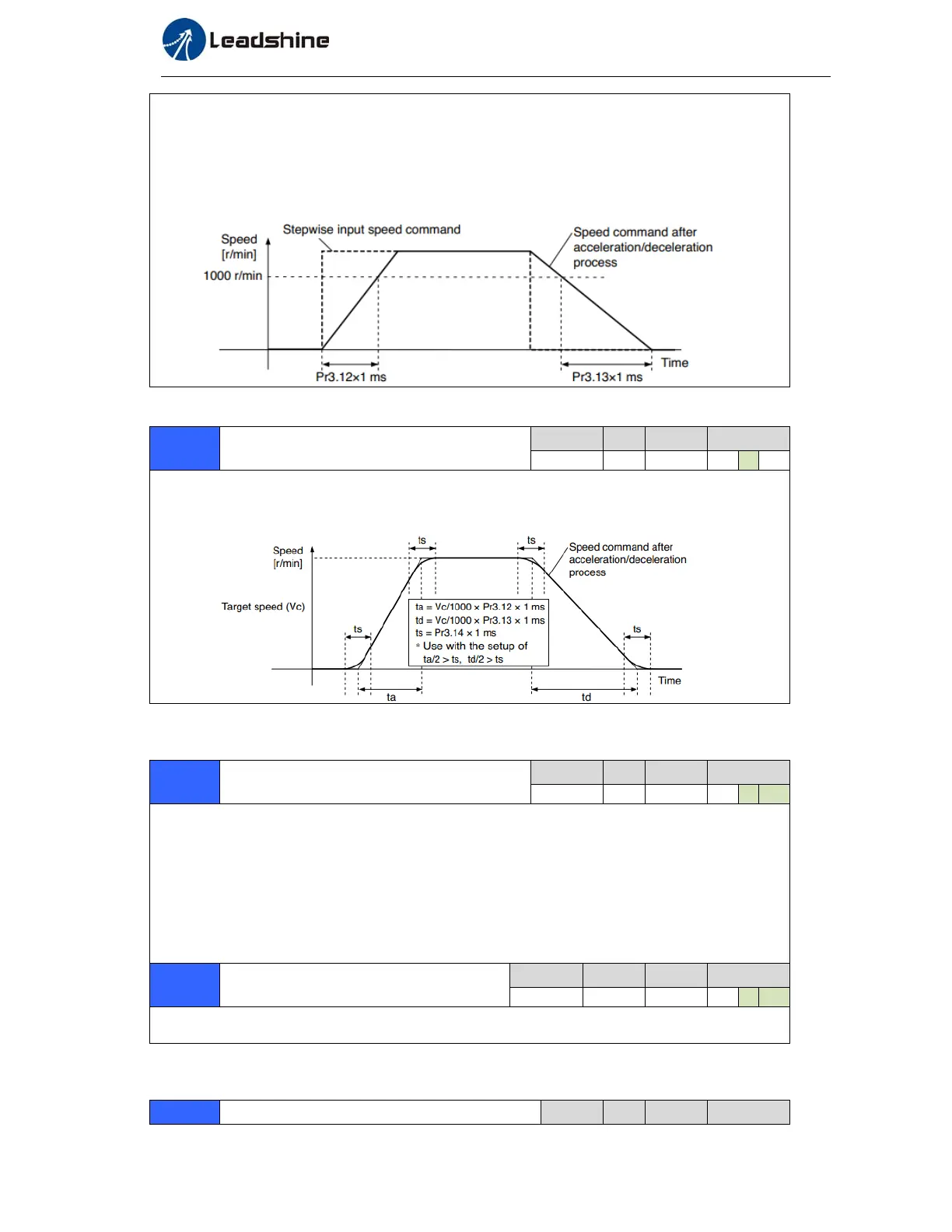
Set the time required for the speed command(stepwise input)to reach 1000r/min to Pr3.12
Acceleration time setup. Also set the time required for the speed command to reach from 1000r/min
to 0 r/min, to Pr3.13 Deceleration time setup.
Assuming that the target value of the speed command is Vc(r/min), the time required for
acceleration/deceleration can be computed from the formula shown below.
Acceleration time (ms)=Vc/1000 *Pr3.12 *1ms
Deceleration time (ms)=Vc/1000 *Pr3.13 *1ms
Pr3.14
Sigmoidacceleration/decelerationtime
setup
Range unit default
Related
control mode
0‐1000
ms
0 S
Set S-curve time for acceleration/deceleration process when the speed command is applied.
According to Pr3.12 Acceleration time setup and Pr3.13 Deceleration time setup, set up sigmoid time
with time width centering the inflection point of acceleration/deceleration.
Pr3.15
Speedzero-clampfunctionselection
Range unit default
Related
control mode
0‐3
‐
0 S T
1. If Pr3.15=0, the function of zero clamp is forbidden. It means the motor rotates with actual
velocity which is controlled by the analog voltage input 1 even if the velocity is less than 10
rpm. The motor runs no matter what the value of Pr3.16 is. The actual velocity is controlled by
external the analog voltage input .
2. If Pr3.15=1 and the input signal of Zero Speed is available in the same time, the function of zero
clamp works. It means motor will stop rotating in servo-on condition no matter what the
velocity of motor is, and motor stop rotating no matter what the value of Pr3.16 is.
3. If Pr3.15=2 , the function of zero clamp belongs to the value of Pr3.16. If the actual velocity is
less than the value of Pr3.16, the motor will stop rotating in servo-on condition.
Pr3.16
Speedzero-clamplevel
Range unit default
Related
control mode
0‐20000
r/min
30 S T
When analog speed given value under speed control mode less than zero speed clamp level setup,
speed command will set to 0 strongly.
Pr3.18
Torquecommanddirectionselection
Range unit default
Related
control mode


 To Next Page