33
UserManualforELD2Servo
Note:
For parameters which No. have a suffix of “*”,changed contents will be validated when you turn on
the control power.
4.2.5
【
Class 4
】
I/F Monitor Setting
0‐1
‐
0 T
Select the direction positive/negative direction of torque command
Setup value designation
0
Specify the direction with the sign of torque command
Torque command input[+] positive direction, [-] negative direction
1
Specify the direction with torque command sign(TC-SIGN).
OFF: positive direction ON: negative direction
Pr3.19
Torquecommandinputgain
Range unit default
Related
control mode
0‐1
‐
500 T
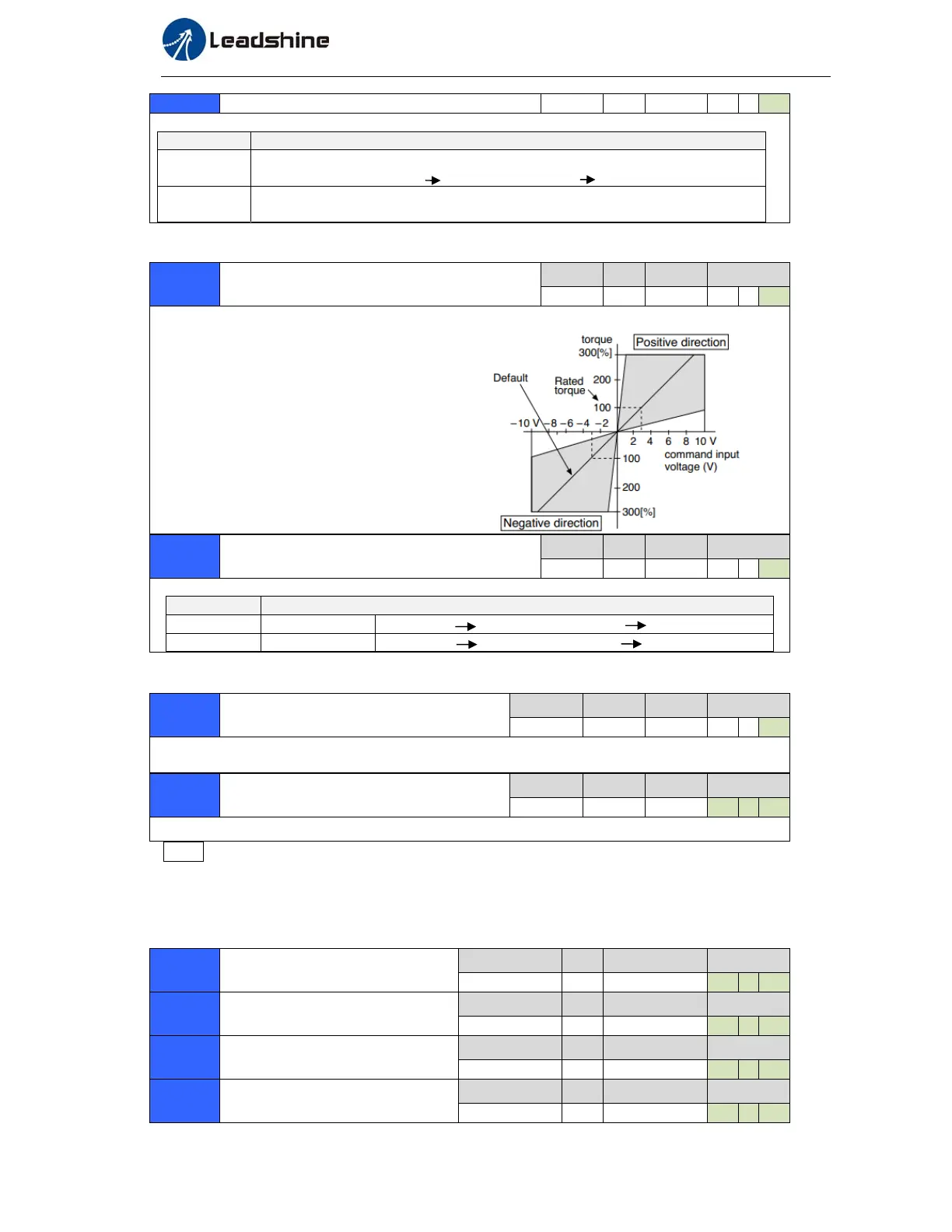
Based on the voltage (V) applied to the analog torque command (TRQR),set up the conversion gain
to torque command(%) .
Unit of the setup value is [0.1V/100%] and
set up input voltage necessary to produce
the rated torque.
Default setup of 30 represents 3V/100%
Pr3.20
Torquecommandinputreversal
Range unit default
Related
control mode
0‐1
‐
0 T
Set up the polarity of the voltage applied to the analog torque command(TRQR).
Setup value Direction of motor output torque
0 Non-reversal [+ voltage] [+ direction] [- voltage] [-direction]
1 reversal [+ voltage] [- direction] [- voltage] [+direction]
Pr3.21
Speedlimitvalue1
Range unit default
Related
control mode
0‐20000
r/min
0 T
Set up the speed limit used for torque controlling.
During the torque controlling, the speed set by the speed limit value cannot be exceeded.
Pr3.24*
Motorrotatemaximumspeedlimit
Range unit default
Related
control mode
0‐6000
r/min
3000 P S T
Set up motor running max rotate speed, but can’t be exceeded motor allowed max rotate speed.
Pr4.00*
InputselectionDI1
Range unit default
Related
control mode
0‐00FFFFFFh
‐
00030303h P S T
Pr4.01*
InputselectionDI2
Range unit default
Related
control mode
0‐00FFFFFFh
‐
00828282h P S T
Pr4.02*
InputselectionDI3
Range unit default
Related
control mode
0‐00FFFFFFh
‐
00818181h P S T
Pr4.03*
InputselectionDI4
Range unit default
Related
control mode
0‐00FFFFFFh
‐
00919191h P S T


 To Next Page