14 X75HD Installation and Operation Manual
Preliminary—Contents are proprietary and confidential. Do not photocopy or distribute.
Chapter 1: Introduction
Simulcast Operation
General Description
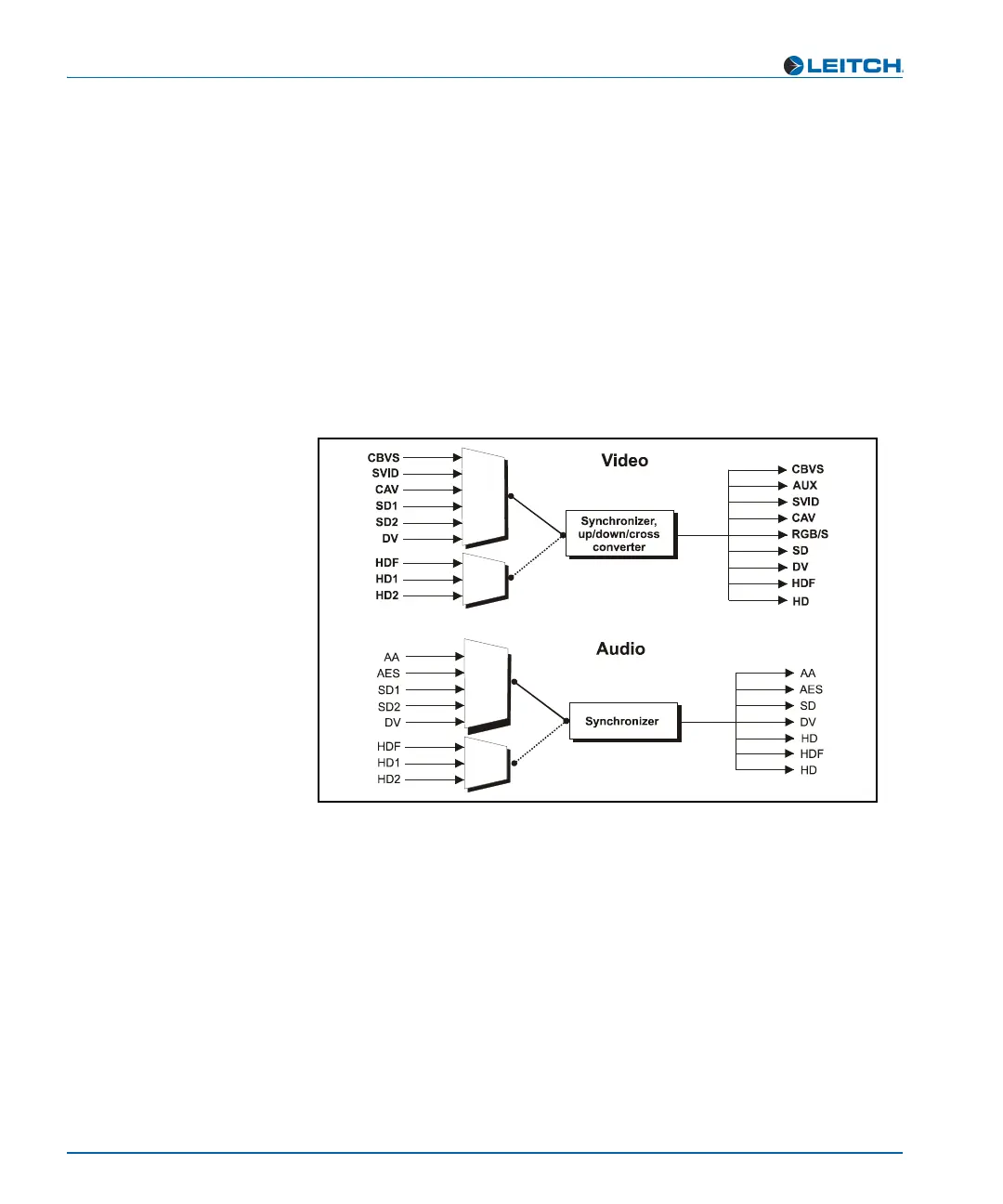
Simulcast operation allows you to identify two inputs and outputs (out
of many possible inputs) that you intend to cleanly switch between
frequently. As an example, when you enable this mode, the X75HD can
cleanly switch SDTV and HDTV inputs to simultaneous, deterministic
SDTV and HDTV outputs. This mode is useful for when you need to
alternate between both HDTV and SDTV signals and broadcast them
together (for example, if you have an HDTV satellite feed carrying the
programming and an SDTV local feed carrying the advertisements). A
simplified illustration is provided below.
Figure 1-8. Simulcast Processing
Enabling Simulcast Mode
To enable Simulcast as the operating mode for the X75HD, navigate to
the Routing Setup menu, and select Simulcast Mode Select. Set the
Simulcast Enable parameter to Enable.
For more information on selecting inputs for Simulcast processing, see
“Understanding X75HD Processing Modes” on page 77.



 To Next Page