X75HD Installation and Operation Manual 205
Appendix C: Servicing Instructions
Preliminary—Contents are proprietary and confidential. Do not photocopy or distribute.
Installing a New Power Supply
Follow this procedure to install a new, redundant power supply or to
replace an existing, failed power supply.
1. Remove all power from the frame, and then remove the chassis
cover. See “Preparing the X75HD for Servicing” on page 185 for
more information.
2. If you are replacing an existing power supply, identify and remove
it from the frame. See “Removing an Existing Power Supply” on
page 201.
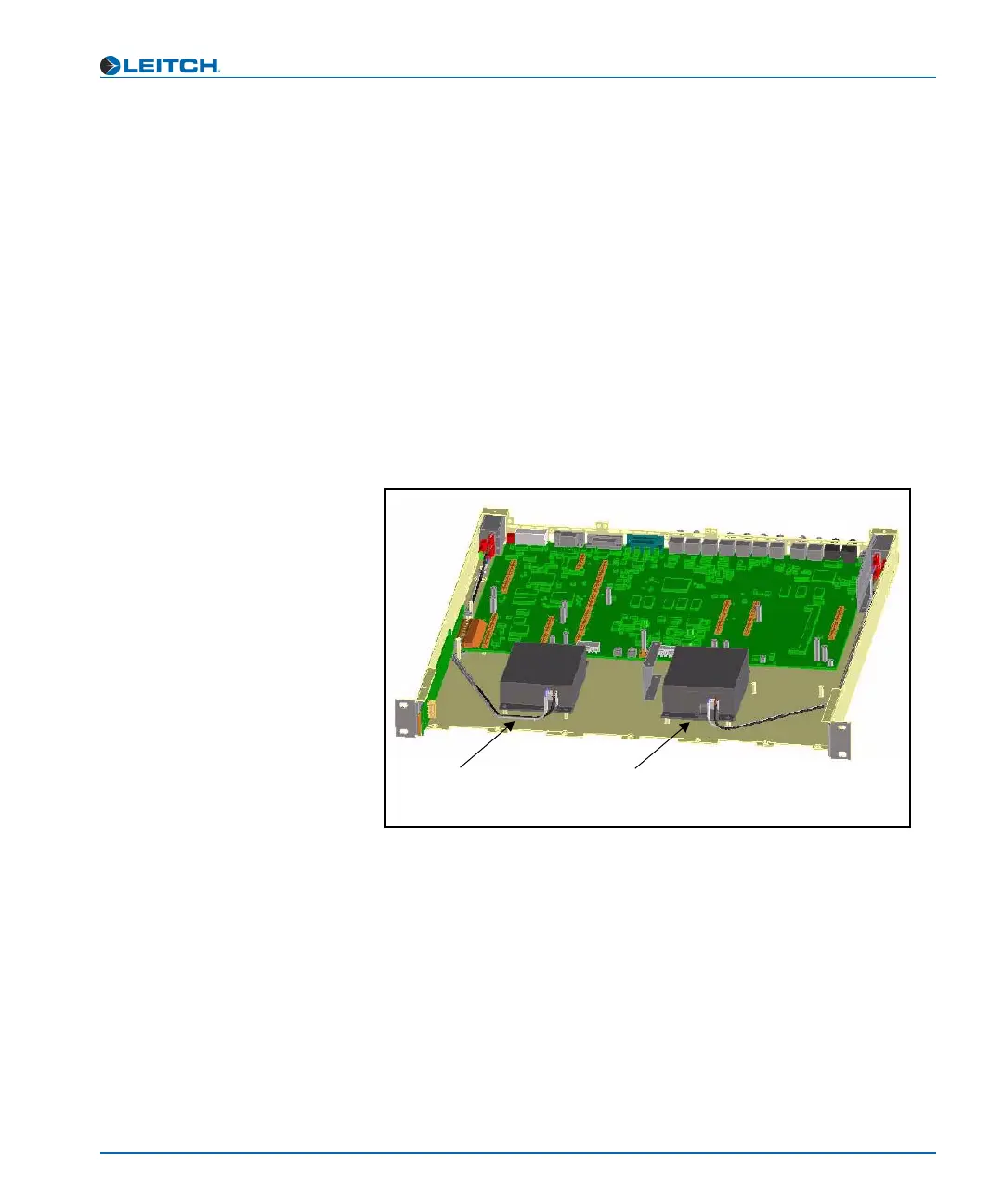
If you are installing a new, redundant power supply, locate the
position where it will be installed. A redundant power supply is
installed on the right side of the frame (labelled 2, below), as seen
from the front. (See Figure C-26.)
Figure C-26. Where to Install a Redundant Power Supply
3. Install the power supply onto the four standoffs on the chassis floor,
and then screw into place. (See Figure 16-28.)
The two-pin AC cable connector faces the front of the chassis,
while the six-pin DC cable connectors face the rear.
Primary
power supply
Secondary (redundant)
power supply
Rear of frame
Front of frame
1
2



 To Next Page