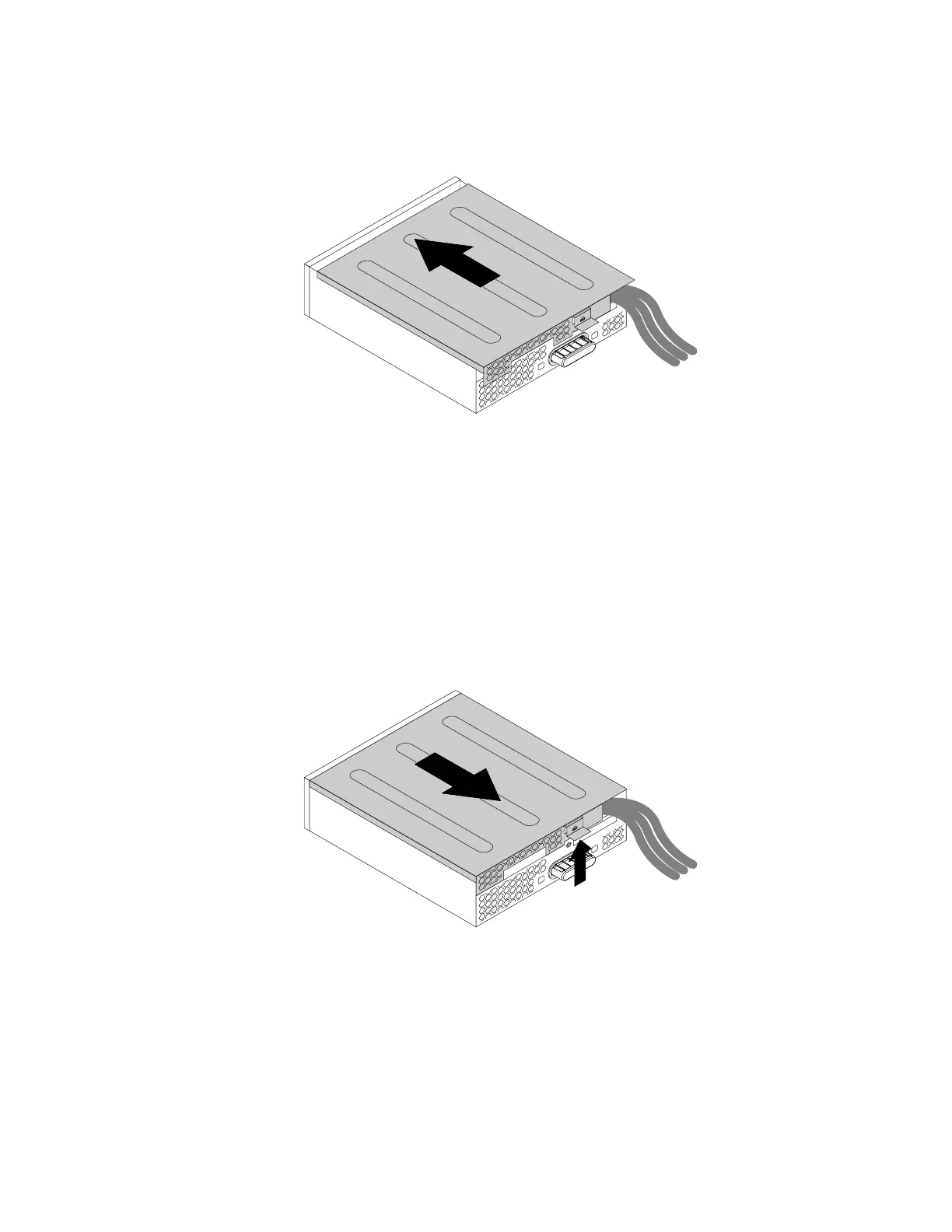
6.Positiontheflexmodulecoverontheflexmodulesothattherailguidesonthebottomofthecover
engagetherailsontheflexmodule.Then,pushthecovertothefrontuntilitsnapsintoposition.
Figure50.Reinstallingtheflexmodulecover
Whattodonext:
•Toworkwithanotherpieceofhardware,gototheappropriatesection.
•Tocompletetheinstallationorreplacement,goto“Completingthepartsreplacement”onpage166.
Installingorreplacingacardreaderintheflexmodule
Toinstallorreplaceacardreaderintheflexmodule,dothefollowing:
1.Removetheflexmoduleoutofthechassis.See“Installingorreplacinganopticaldrive”onpage109.
2.Lifttheclipontherearoftheflexmoduleandslidetheflexmodulecovertothereartoremovethecover.
Figure51.Removingtheflexmodulecover
3.Ifyouarereplacingacardreader,dothefollowing:
a.Disconnectthecardreadercablefromthesystemboard.See“Partsonthesystemboard”on
page34.
Chapter9.Installingorreplacinghardware115








 To Next Page