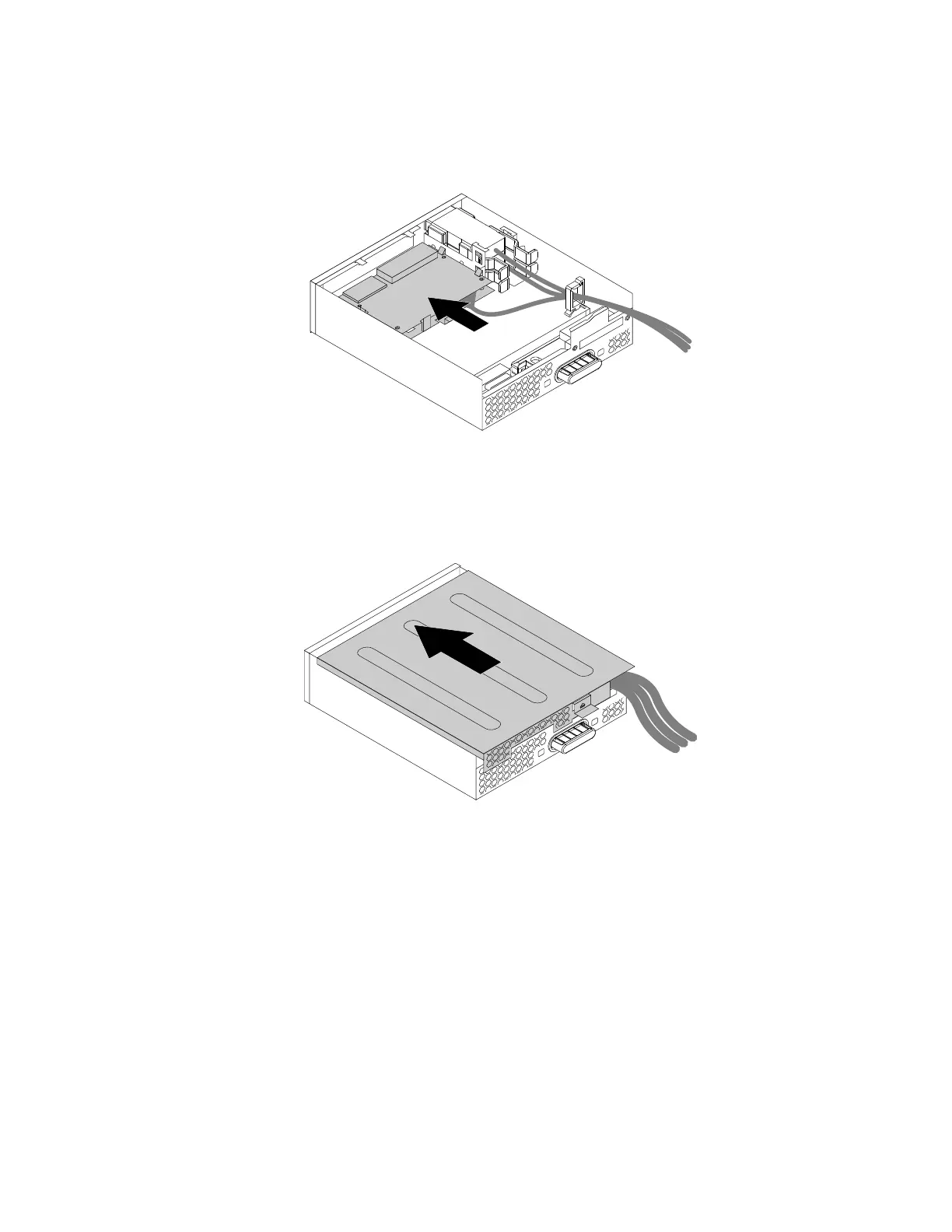
5.Notetheorientationofthenewcardreaderandroutethecardreadercableintothecableclip.Hold
thecliponthecard-readerretainingbrackettoinsertthenewcardreaderintothecardreaderslotin
theflexmodule.Ensurethatthecardreadersnapsintoposition.
Figure55.Installingthecardreaderintheflexmodule
6.Positiontheflexmodulecoverontheflexmodulesothattherailguidesonthebottomofthecover
engagetherailsontheflexmodule.Then,pushthecovertothefrontuntilitsnapsintoposition.
Figure56.Reinstallingtheflexmodulecover
7.ConnectthecardreadercabletotheUSB2.0connectoronthesystemboard.See“Partsonthe
systemboard”onpage34.
Whattodonext:
•Toworkwithanotherpieceofhardware,gototheappropriatesection.
•Tocompletetheinstallationorreplacement,goto“Completingthepartsreplacement”onpage166.
InstallingorreplacinganeSATAconnectororIEEE1394connectorintheflexmodule
ToinstallorreplaceaneSATAconnectororIEEE1394connectorintheflexmodule,dothefollowing:
1.Removetheflexmoduleoutofthechassis.See“Installingorreplacinganopticaldrive”onpage109.
Chapter9.Installingorreplacinghardware117








 To Next Page