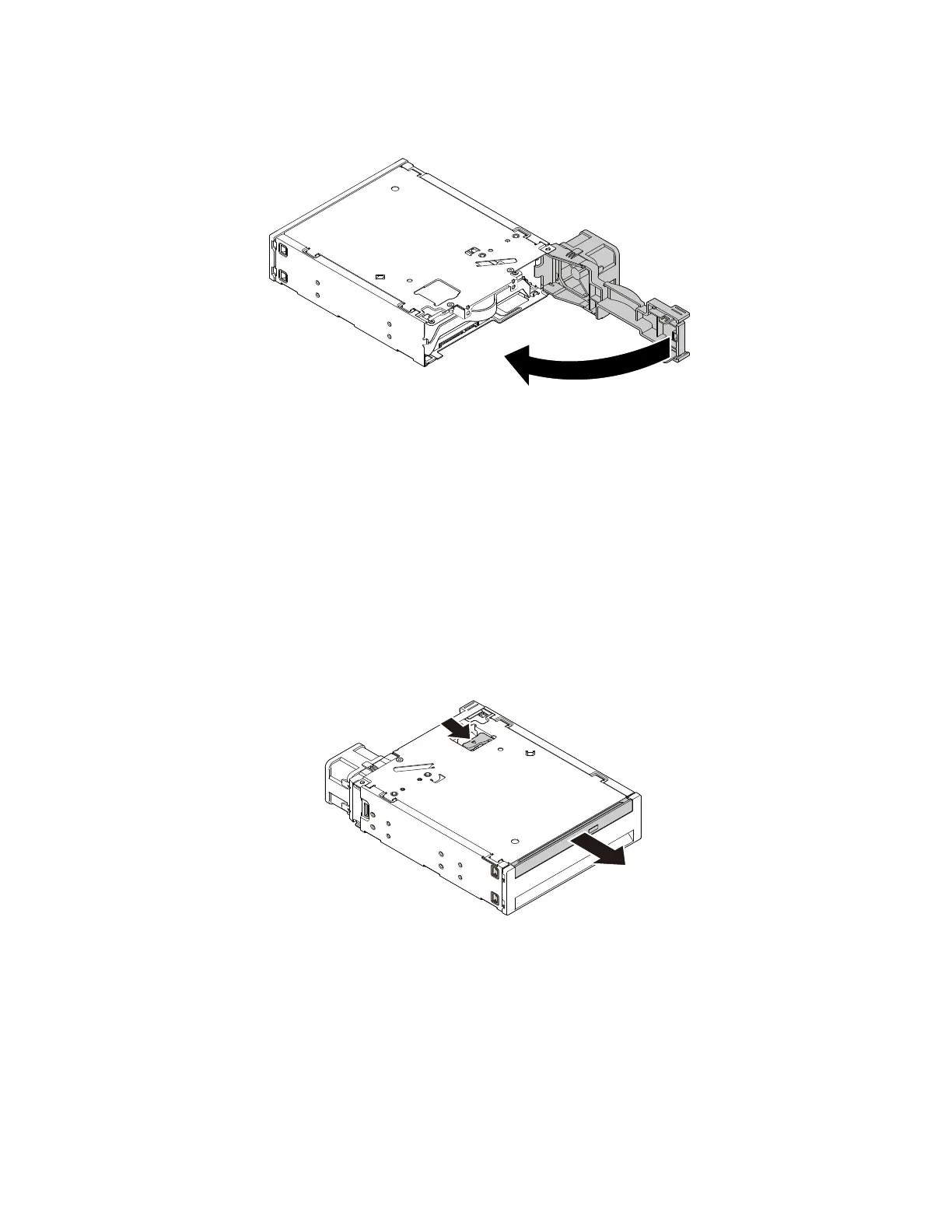
6.Pivottherearcoveroftheenclosureinwarduntilyouhearaclick.Therearcoverissecuredinplace.
Figure72.Pivotingtherearcoverinward
Whattodonext:
•Toworkwithanotherpieceofhardware,gototheappropriatesection.
•Tocompletetheinstallationorreplacement,goto“Completingthepartsreplacement”onpage166.
Installingorreplacingaslimopticaldriveintheoptical/storagecombination
enclosure
Toinstallorreplaceaslimopticaldriveintheoptical/storagecombinationenclosure,dothefollowing:
1.Slidetheenclosureoutofthechassis.See“Installingorreplacinganopticaldrive”onpage109.
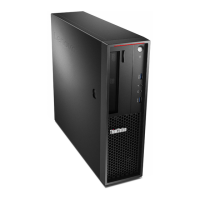
2.Ifyouarereplacinganoldslimopticaldrive,pressthecliponthetopoftheenclosureasshownand
pushforwardtheslimopticaldrive.Then,slidetheslimopticaldriveoutofthefrontoftheenclosure.
Figure73.Removingtheslimopticaldrivefromtheenclosure
126ThinkStationP310HardwareMaintenanceManual








 To Next Page