LIGHTMED TruScan Pro – Operator’s Manual Rev. No. 01 Page 42 of 109
4.3.3 Pattern Scanner Panel
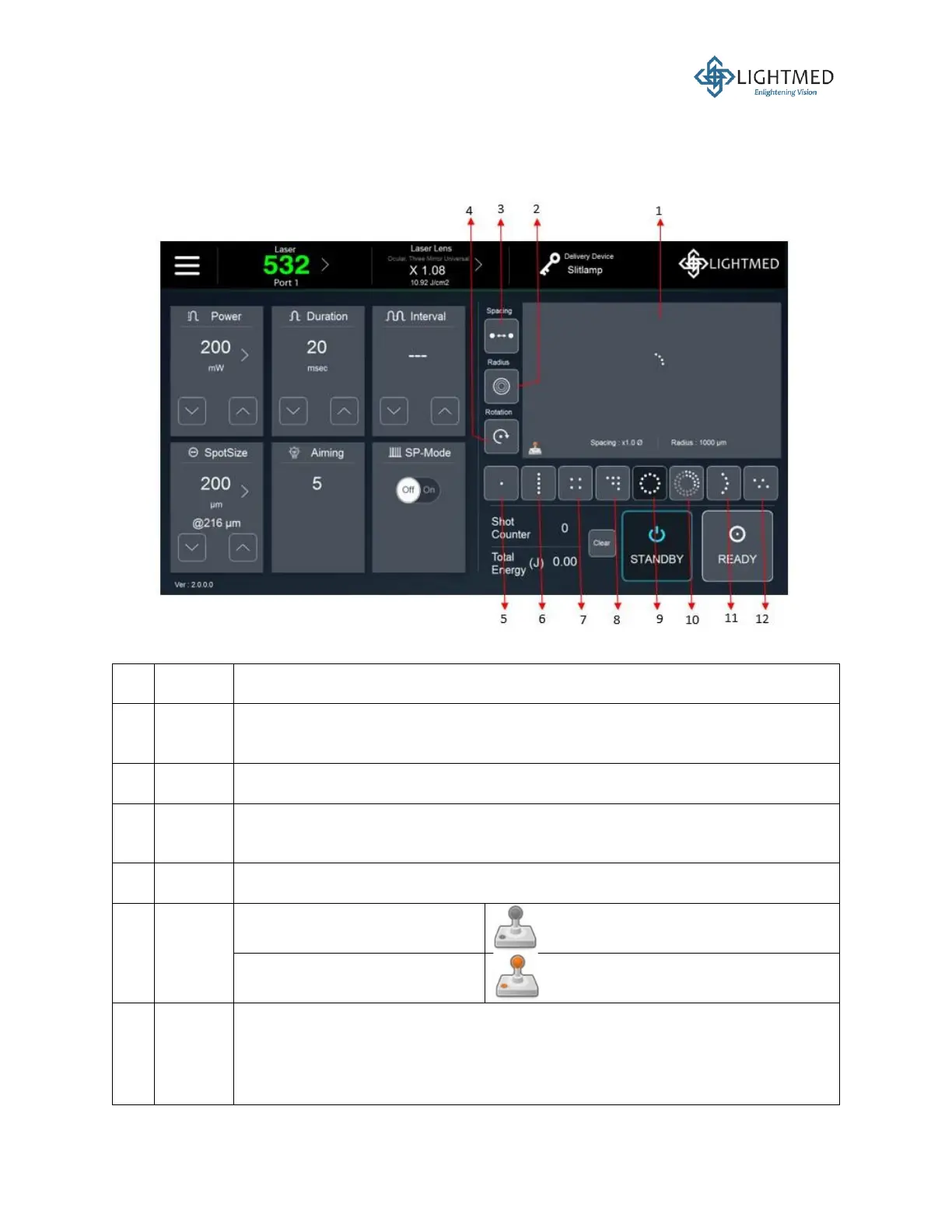
The pattern scanning function is available for all wavelengths. The controls on the pattern scanner
panel are described in more details below:
Figure 13: Pattern scanner panel controls.
Displays the patterns chosen and/or modified by the user in real time.
Adjusts the radius between the circular, arc, and curvature patterns. The radius
can be adjusted to 1,000, 1,500, or 2,000 µm.
Adjusts the spacing between two dots on any pattern. The maximum spacing
rate is triple (3x) the original size, and the minimum spacing rate would mean
the original pattern spacing.
Rotates the pattern by 5° clockwise.
The joystick is inactive.
The joystick is activated.
• Spot size (µm): 50, 100, 200, 300, 400, 500
• Power:
o 50 to 500 mW in 10 mW-increments
o 520 to 1,000 mW in 20 mW-increments
o 1,050 mW to maximum power in 50 mW-increments:



 To Next Page