21
User Manual
To choose your preferred setting follow the procedure:
'MENU' + "BASIC SETTINGS" + 'ENTER' + "INPUT/OUTPUT" + 'ENTER' +
"PORT 2 OUTPUT" + 'ENTER'
Then choose your preferred setting among the NMEA available settings
NMEA 0183 4800-N81-N, NMEA 0180, NMEA 0180/CDX (the default setting is
NMEA 0183 4800-N81-N) and press 'ENTER' to confirm.
The autopilot can be connected also to the Port 1 and 3, in this case select the
output format on the used port.
2.5.3 EXTERNAL NMEA CONNECTION
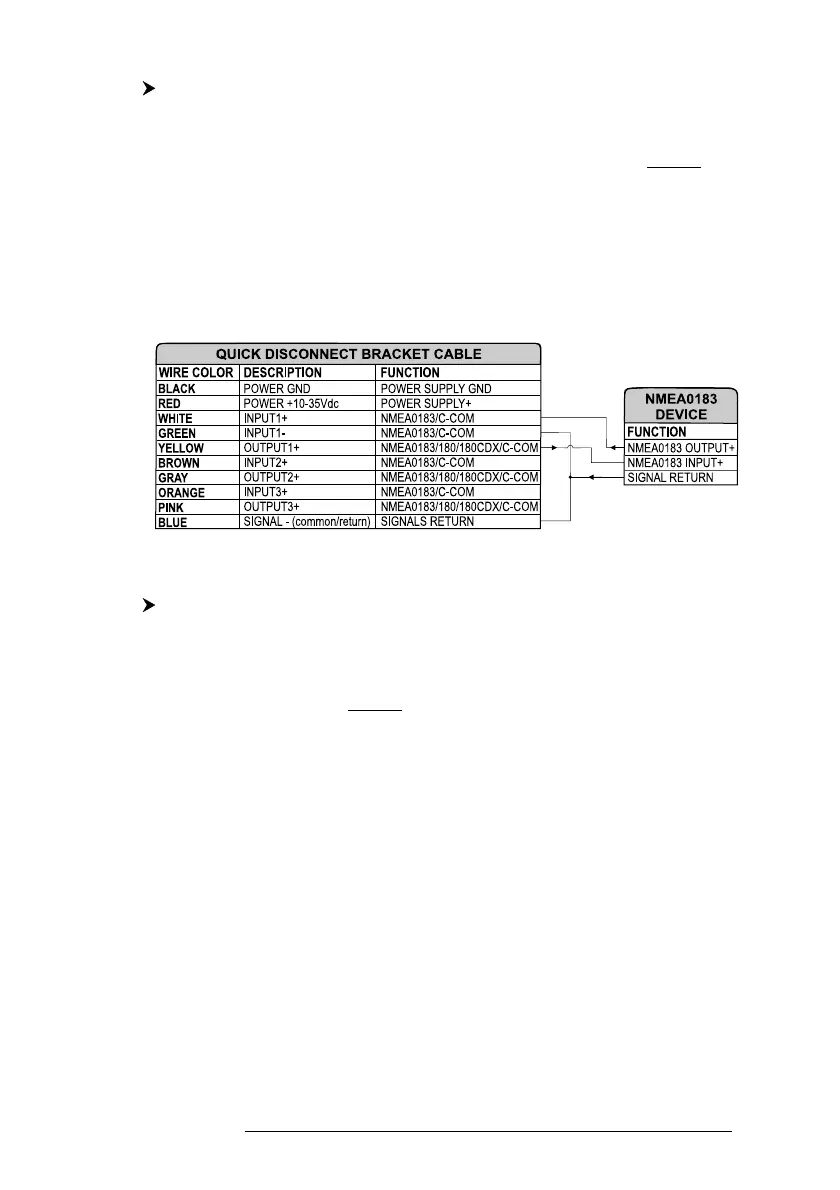
To connect the External NMEA to the Port 1 see the following picture:
Fig. 2.5.3 - External NMEA Connections on Port 1
To choose your preferred setting follow the procedure:
'MENU' + "BASIC SETTINGS" + 'ENTER' + "INPUT/OUTPUT" + 'ENTER' +
"PORT 1 INPUT" + 'ENTER'
Then choose your preferred setting among the NMEA available settings
NMEA 1200-N81-N, NMEA 4800-N81-N, NMEA 4800-N82-N, NMEA 9600-O81-
N, NMEA 9600-N81-N (the default setting is 4800-N81-N) and press 'ENTER' to
confirm.
An NMEA device can be connected also to the Port 2 and 3, in this case
select the format on the used port. Doing connection remember that only the Port 1
is optoisolated in input.
2.5.4 C-COM GSM PLUS CONNECTION
To connect the modem C-COM to the chart plotter with quick disconnect
bracket follow the procedure:
1. Cut the C-COM cable about 5 cm from the "T" connector:



 To Next Page