37
User Manual
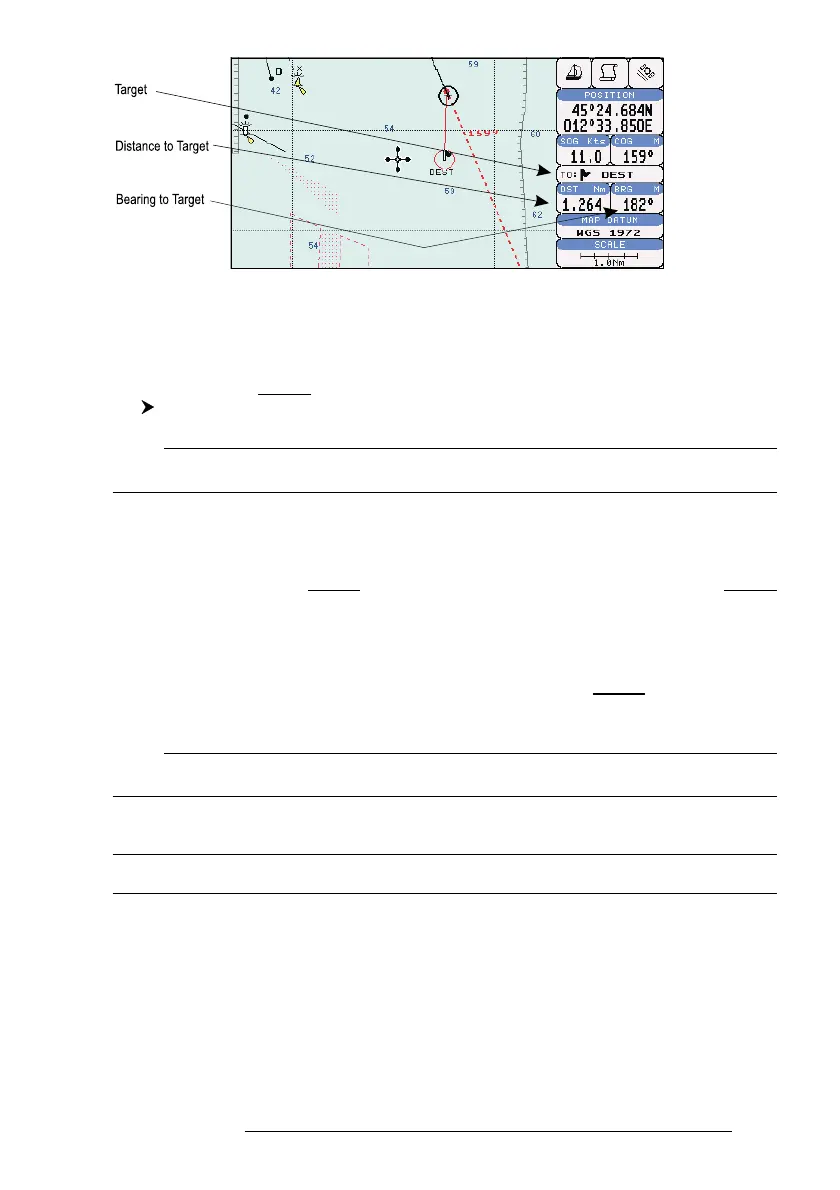
Fig. 3.4.1 - Navigation to a single destination
3.4.2 TIME TO GO
When the Target is set the TTG value is displayed in the Graphic Data page:
'PAGE' more times to select the Graphic Data page
Note
If SOG value is less than 1.0 knots or the BRG is greater than 90 degrees, the TTG value is not
displayed.
3.4.3 DELETING TARGET
Press cursor on Target icon, press 'CLEAR': the symbol identifies Target
disappears from the screen.
Otherwise (when the cursor is placed in a generic position on the chart)
press 'GO-TO'. A window appears to advise that the Destination is present: select
the item "STOP" and press 'ENTER', the symbol identifies Target disappears from
the screen.
Note
If you select the "START" item and press 'ENTER', the Target icon is moved on the new cursor
position.
3.5 C-MAP NT MAX INFORMATION
MAX is a major evolution of the NT/NT
+
product technology. Key points are:
New Data Features
- Tides and Currents (intuitive arrows show direction and strength)
- World Background Charts with terrestrial data



 To Next Page