99
User Manual
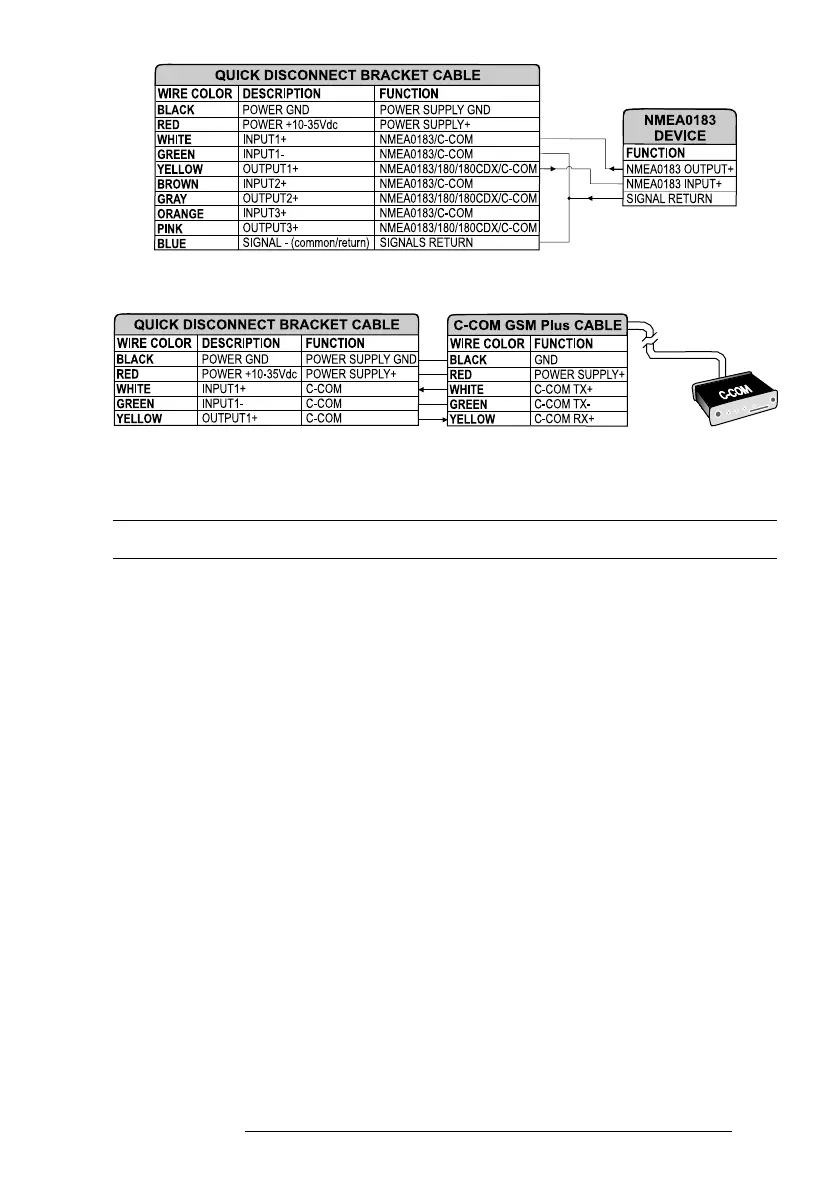
Fig. 6.4c - External NMEA Connection on Port 1
Fig. 6.4d - C-COM Connection on Port 1
6.5 TROUBLESHOOTING
The following is a brief guide to some of the problems you may experience
while using the chartplotter with common solutions.
6.5.1 PROBLEMS AND SOLUTIONS
The chartplotter does not turn On — Make sure that the correct voltage (10-35
volt dc) is present. Check also that the polarity is correct. Refer to the Par. 2.2.
The chartplotter does not turn Off — If, after a 'POWER' pressure (for at least 3
seconds) the chartplotter does not turn Off, then turn Off the voltage.
The chartplotter does not respond to any command — Try to turn Off, and then
turn On. If the problem persists, erase the memory (see Par. 6.6.1).
The chartplotter does not get a valid fix — Make sure that no metal obstacle is
placed around the chartplotter acting as a shield for the antenna. If, after 15 minutes,
the chartplotter does not get the fix, turn it Off and On again.



 To Next Page