40
User Manual
chart, whilst a long 'ZOOM...' push (press and hold) causes a pop-up window to be
displayed on a corner of the screen. The window shows the current Zoom Factor.
By pressing 'ZOOM IN'/'ZOOM OUT' the map is expanded or compressed
according to the zoom factor selected.
The Window is automatically closed if 'ZOOM...' is not pressed for 2 sec-
onds and the selected zoom factor will be used at the next zoom in/out.
3.5.1.5 Fonts & Symbols
'MENU' + "MAP SETTINGS" +'ENTER' + "Fonts & Symbols" + 'ENTER'
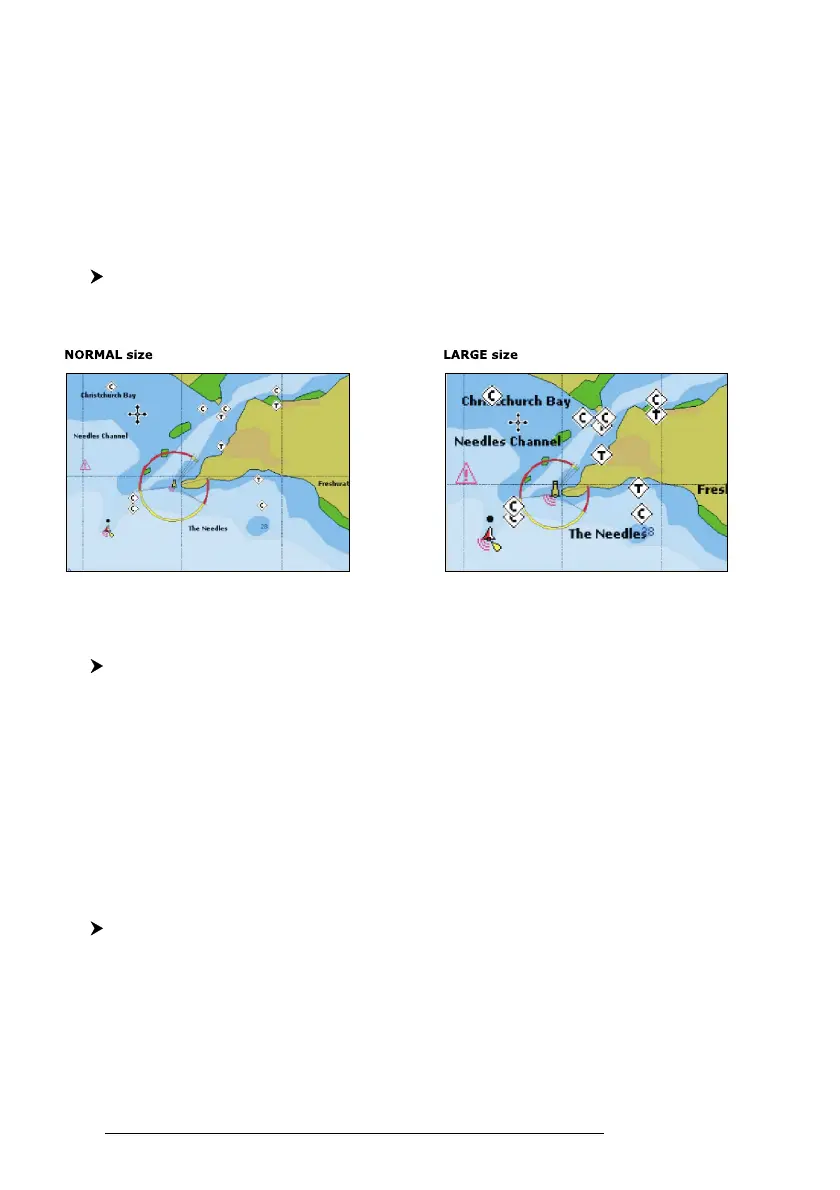
On MAX charts it is possible to set the size of all names and symbols drawn on
the charts, selecting between Normal size (the regular characters size) and Large size.
Fig. 3.5.1.5 - Example of Normal size (on the left side) and Large side (on the right side) settings
3.5.1.6 Dynamic Nav-Aids
'MENU' + "MAP SETTINGS" +'ENTER' + "Dynamic Nav-Aids" + 'ENTER'
This function allows settings blinking lights on Nav-Aids. The blink period
and color of each Nav-aid is read from the Nav-Aid attributes available on the data
cartridge. When the ship is inside the Nav-Aid nominal range, the light of the Nav-
Aid will start blinking.
When Dynamic Nav-Aids option is set to On, when the flashing light is Off,
or when fix position is out of the sector, the light color is displayed by using a faint
light color.
3.5.1.7 Mixing Levels
'MENU' + "MAP SETTINGS" +'ENTER' + "Mixing Levels" + 'ENTER'
When the map coverage at the current zoom level does not fill the entire
screen, the chartplotter draws the rest of the map expanding the cartographic infor-
mation read from, at most, two zoom levels above the current zoom level. For this
reason the map is drawn three times: firstly it draws the two levels before the current
level and then the current level. The area covered by the cartographic data read from



 To Next Page