22
User Manual
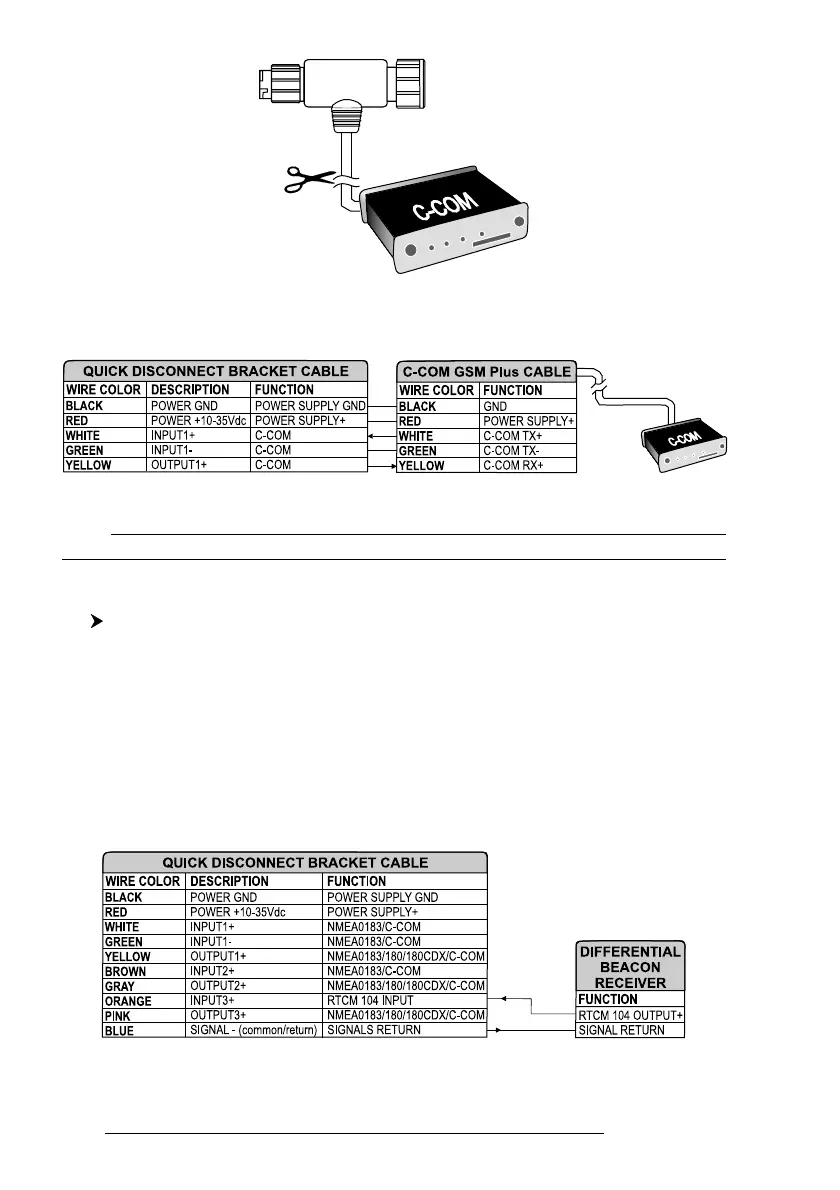
Fig. 2.5.4 - C-COM cable
2. Connect the wires to the quick disconnect bracket cable as follows:
Fig. 2.5.4a - Connection for the Port 1
Note
The connection is valid for the C-COM IR and C-COM RS232 too.
3. Set the C-COM for Port 1 as follows:
'MENU' + "BASIC SETTINGS" + 'ENTER' + "INPUT/OUTPUT" + 'ENTER' +
"PORT 1 INPUT" + 'ENTER' + "C-COM" + 'ENTER'
The C-COM can be connected also to the Port 2 and 3, in this case select the
format on the used port.
2.5.5 BEACON RECEIVER CONNECTION
O
NLY
F
OR
COMPACT 8 S
UN
To connect a Differential Beacon Receiver see the following picture:
Fig. 2.5.5 - Beacon Receiver Connection



 To Next Page