169441 232 Revision D
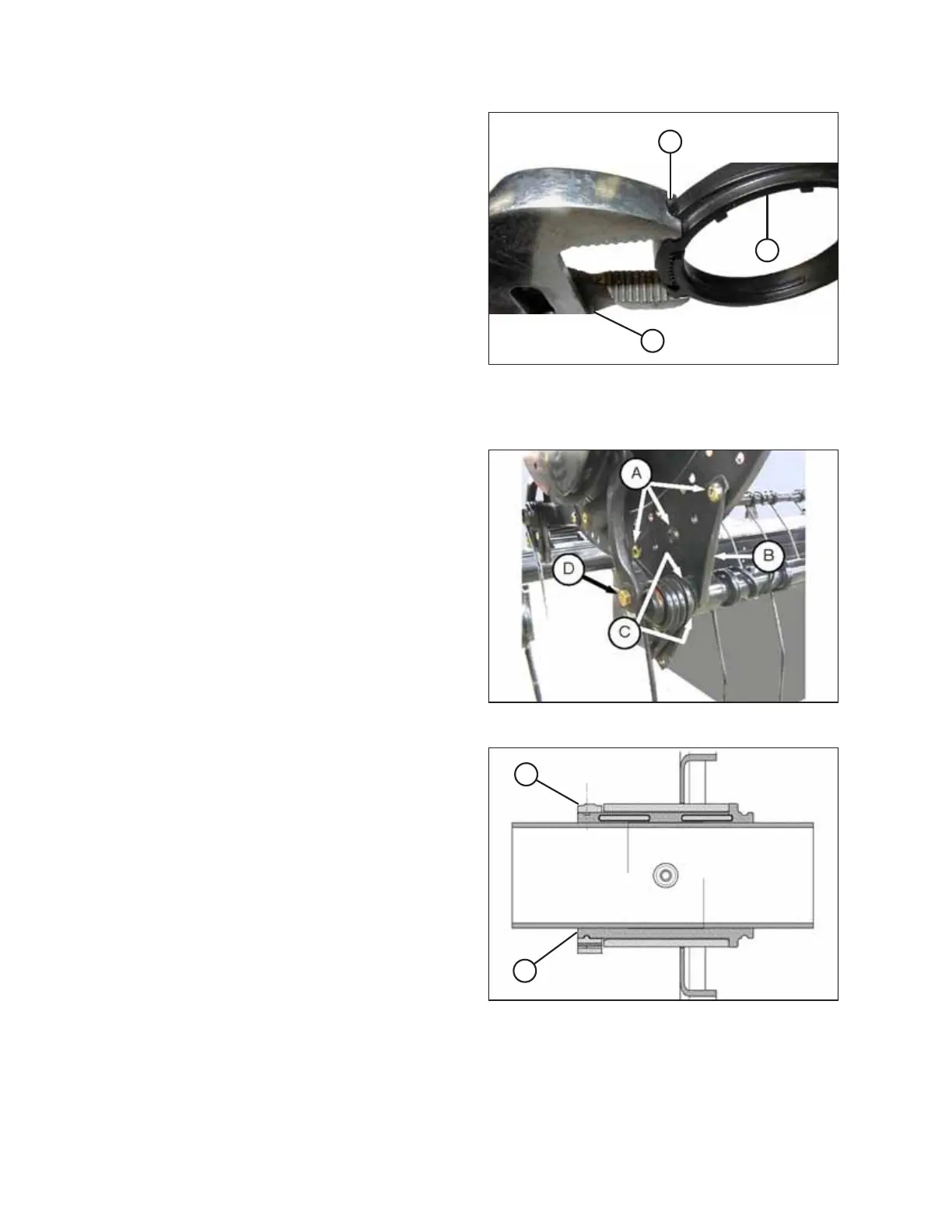
Figure 4.223: Modified Pliers
NOTE:
Use a pair of modified channel lock pliers (A) to install bushing
clamps (C). Secure the pliers in a vise and grind a notch (B) into
the end of each arm to fit the clamp as shown.
Installing cam end bushings:
Figure 4.224: Cam End
1. At the cam end disc, position bushing halves (C) on the tine
tube, and position the lug in each bushing half into the hole
in the tine tube.
2. Slide reel arm (B) into the busing, and position it against the
disc in its original location.
3. Install bolts (A) in their original holes, and tighten.
4. Reinstall any previously removed fingers or tines. Refer to
the following procedures as necessary:
• Removing Plastic Fingers, page 227
• Removing Steel Tines, page 225
5. Reinstall bolt (D) on the cam linkage.
Figure 4.225: Bushing
6. Spread bushing clamp (A) and slip it over the tine tube
adjacent to the flangeless end of bushing (B). Position the
clamp such that the edges of the clamp and bushing are
flush when the clamp is fit into the groove on the bushing
and the lock tabs are engaged.
MAINTENANCE AND SERVICING



 To Next Page