169441 236 Revision D
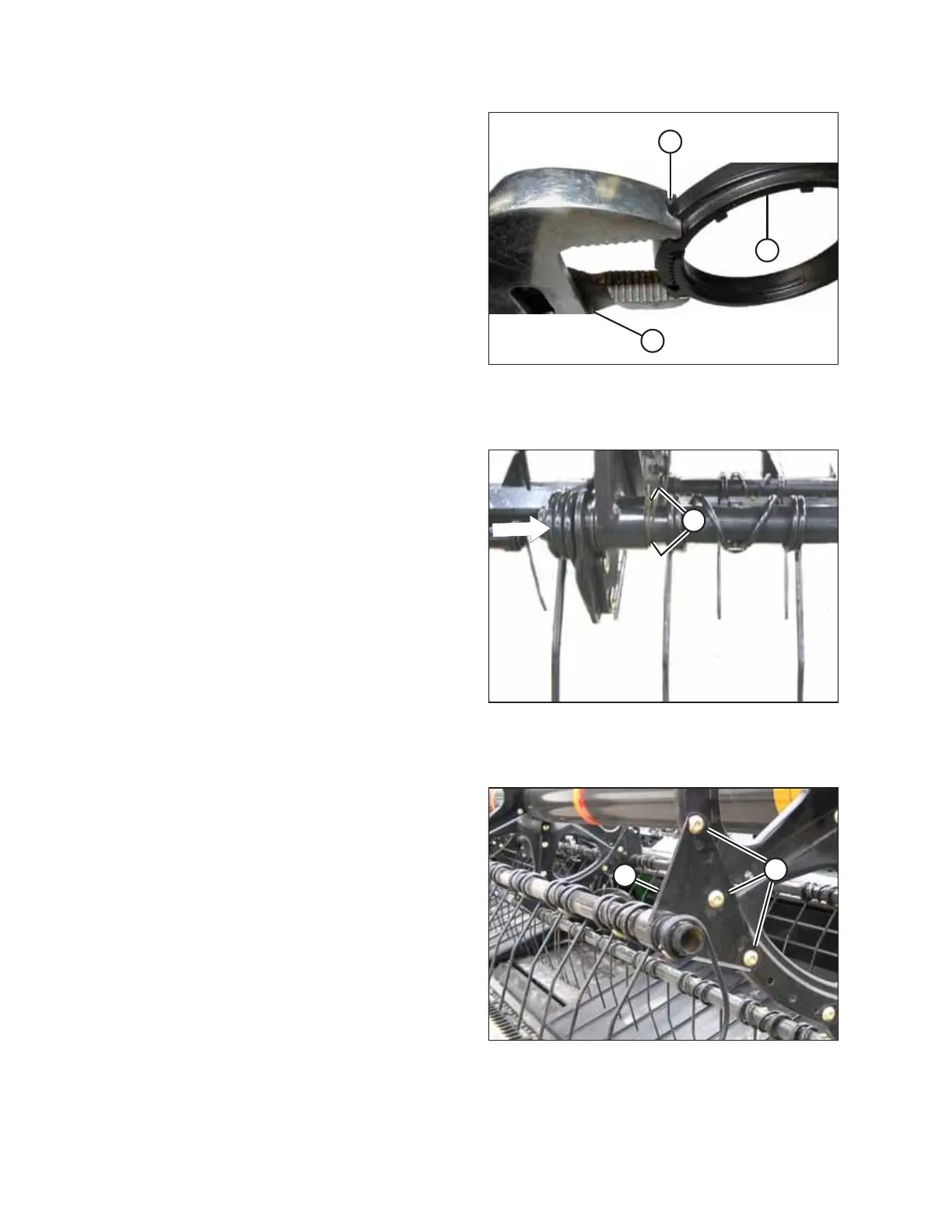
Figure 4.233: Modified Pliers
NOTE:
Use a pair of modified channel lock pliers (A) to install bushing
clamps (C). Secure the pliers in a vise and grind a notch (B) into
the end of each arm to fit the clamp as shown.
Installing cam end bushings
Figure 4.234: Cam End
1. Position bushing halves (B) on the tine tube so that the lug
in each bushing half fits into the hole in the tine tube.
2. Slide the tine tube toward the tail end of the reel to insert
bushing (B) into the reel arm.
3. Reinstall any previously removed fingers or tines. Refer to
the following procedures as necessary:
• Removing Plastic Fingers, page 227
• Removing Steel Tines, page 225
Installing center disc and tail-end bushings
Figure 4.235: Reel Arm
4. At the center and tail end discs, position bushing halves (C)
on the tine tube so that the lug in each bushing half fits
into the hole in the tine tube.
5. Slide reel arm (B) onto bushing (C) and position them
against the disc at the original location.
6. Reinstall bolts (A) in their original holes, and tighten.
7. Reinstall any previously removed fingers or tines. For
instructions, refer to the following procedures as necessary:
• Removing Plastic Fingers, page 227
• Removing Steel Tines, page 225
MAINTENANCE AND SERVICING



 To Next Page