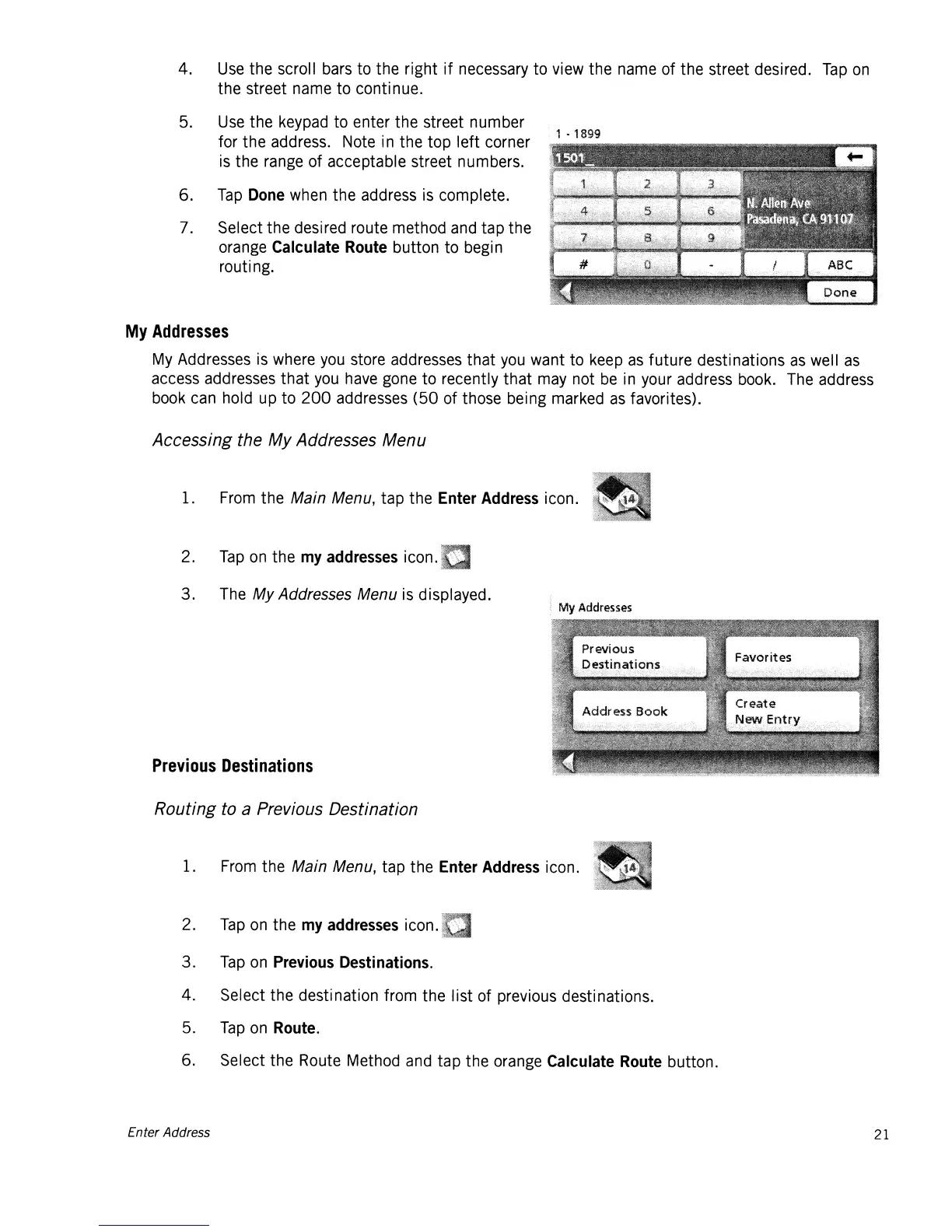
4. Use the scroll bars to the right
if
necessary
to
view the name
of
the street desired.
Tap
on
the street name to continue.
5.
Use the keypad to enter
the
street number
for
the
address. Note in
the
top
left
corner
is
the range
of
acceptable street numbers.
6.
Tap
Done
when
the
address is complete.
7. Select the desired route method and tap the
orange
Calculate
Route
button
to
begin
routi ng.
1 . 1899
My
Addresses
My Addresses is where you store addresses
that
you
want
to
keep
as
future destinations
as
well
as
access addresses
that
you have gone
to
recently
that
may not
be
in your address book. The address
book can hold up
to
200
addresses
(50
of those being marked
as
favorites).
Accessing the My Addresses Menu
1. From the Main Menu, tap the
Enter
Address
icon.
2.
Tap
on
the
my
addresses
icon.
3.
The
My
Addresses Menu is displayed.
Previous
Destinations
Routing to a Previous Destination
1. From the Main Menu, tap
the
Enter
Address
icon.
2.
Tap
on
the
my
addresses
icon.
3.
Tap
on
Previous
Destinations.
4.
Select the destination from the list of previous destinations.
5.
Tap
on
Route.
6. Select the Route Method and
tap
the orange
Calculate
Route
button.
Enter Address 21














 To Next Page