Points
of
Interest
(POI)
The
Magellan Maestro
has
POls
preloaded that
can
be
used
as
a destination for a route. Selecting a
restaurant
or
finding
an
ATM
nearby
is
at
your
fingertips.
Categories
and
Subcategories
POls
are
categorized into unique categories from
gas
stations to wineries.
Most,
but not all categories
are
further organized into subcategories. Restaurants
have,
for example, 54 subcategories that
provide a
way
to
search
for restaurants serving
Chinese
food,
or
fast food,
and
even
Swiss
food.
Creating a Route to a POI by Category
1.
From
the Main Menu, tap the
Enter
Address
icon.
2.
Select
Search
by
Category.
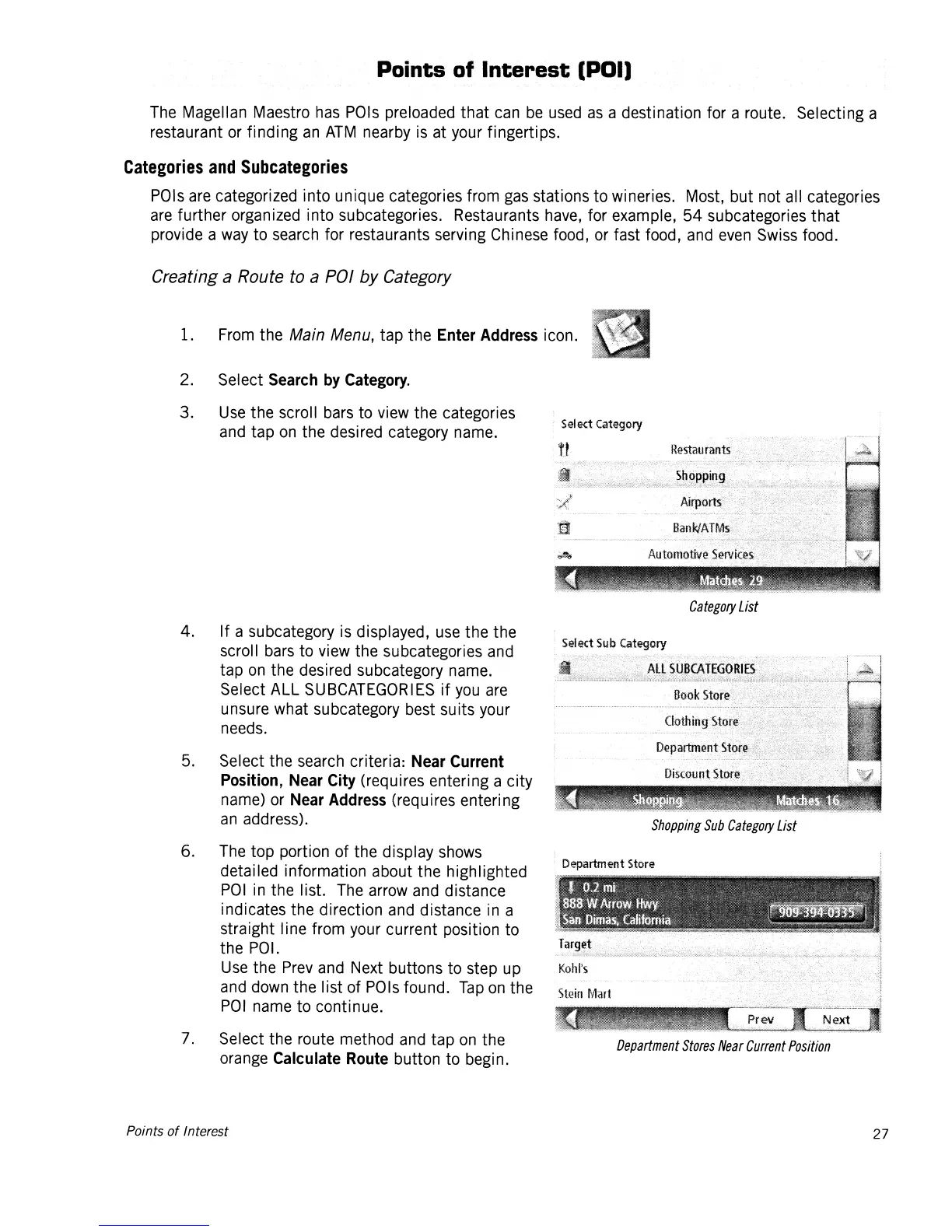
3.
Use
the scroll
bars
to
view
the categories
and
tap
on
the desired category
name.
4. If a subcategory
is
displayed,
use
the the
scroll
bars
to
view
the subcategories
and
tap
on
the desired subcategory
name.
Select ALL
SUBCATEGORIES
if
you
are
unsure what subcategory
best
suits
your
needs.
5.
Select the
search
criteria:
Near
Current
Position,
Near
City
(requires entering a city
name)
or
Near
Address
(req
u
ires
enteri
ng
an
address).
6.
The
top portion of the display
shows
detailed information about the highlighted
POI
in
the list.
The
arrow
and
distance
indicates the direction
and
distance
in
a
straight line from
your
current position to
the
POI.
Use
the
Prev
and
Next
buttons to step
up
and
down
the list of
POls
found.
Tap
on
the
POI
name
to continue.
7.
Select the route method
and
tap
on
the
orange
Calculate
Route
button to begin.
Points
of
Interest
Sel
ect
Category
Ca
tegory
List
Shopping
Sub
Category
List
Department
Stores
Near
Current
Position
27














 To Next Page