m
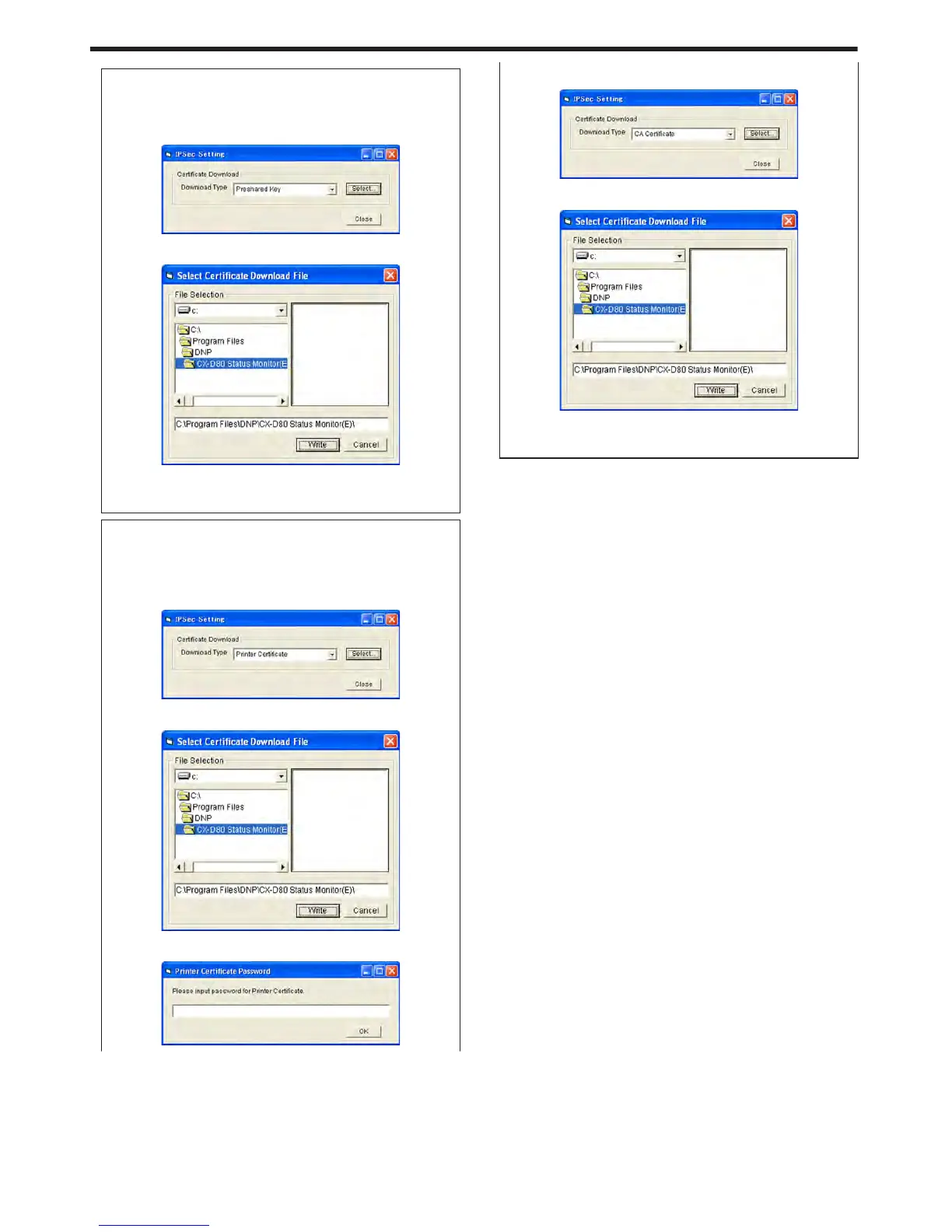
File settings required for preshared key authentication
A preshared key file is required for preshared key authentication.
1
Select [Preshared Key] for [Download Type], and click
[Select...]
.
2
Select a preshared key file, and click [Write]
.
3
Click the [Close] button on the [IPSec Setting] screen
v
IPSec setting for the printer is complete after closing the screen.
m
File settings required for certificate authentication
Certificate files for the printer as well as from the certification
authority are required for certificate authentication.
1
Select [Printer Certificate] for [Download Type], and click
[Select...]
.
2
Select a printer certificate file, and click [Write]
.
3
Enter the password for the printer certificate file, and click [OK]
.
4
Select [CA Certificate] for [Download Type], and click [Select...]
.
5
Select a certification authority certificate file, and click [Write]
.
6
Click the [Close] button on the [IPSec Setting] screen
v
IPSec setting for the printer is complete after closing the screen.
m
Sync Time
clicking the [Sync Time] button sends out the current time of the PC
to the printer. You can specify this setting via USB or network
connection.
m
Other Network Setting
m
Session Timeout
For setting the time interval before disconnecting automatically if
there is no communication after printing connection is established.
The default setting is [None].
m
MAC Address
Displays the MAC address of the printer.
m
[Update] button
Applies the selected value to the printer.
m
[Refresh] button
Displays the printer settings on the screen.
Setup
116















 To Next Page