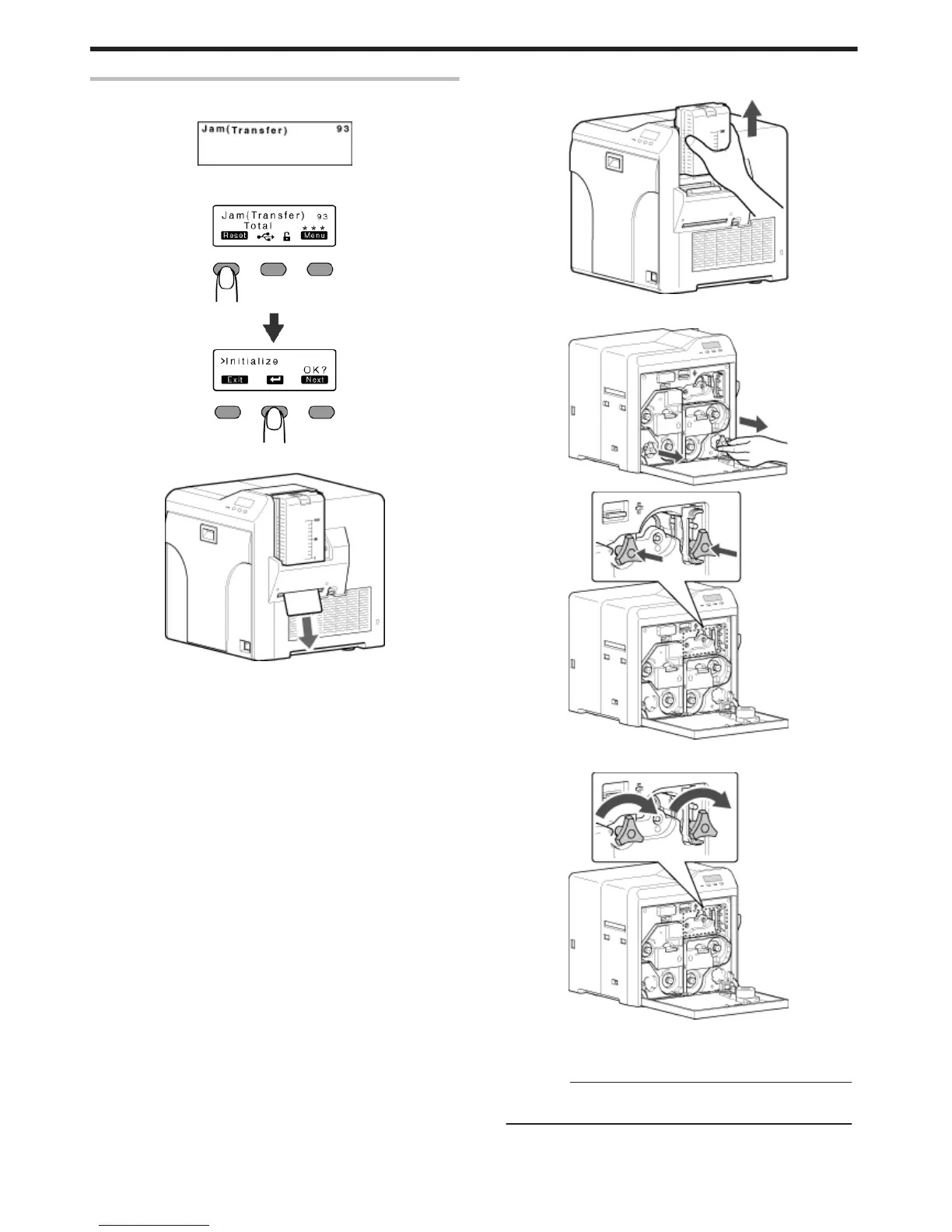
Error Code Jam(Transfer) 93
v
Card jam in the card feed roller.
.
1
Press KNB to reset the printer
.
v
The card is discharged from the NG card outlet.
.
m
If the card cannot be discharged
A Turn off the power, and detach the card hopper
.
B
Open the printer door, and check the position of the jammed card
C
Attach the jog dial to the card feed roller shaft and cleaning roller shaft
.
.
D Turn the card feed roller shaft and cleaning roller shaft in the
clockwise direction, while checking the position of the card
.
v
Remove the card after it is discharged from the card load slot.
(For single-sided printers, the card is discharged from the NG card
outlet.)
Cautions:
v
If the card cannot be removed, do not try to do so forcibly.
Consult our authorized dealers or the servicing personnel.
E Restore the jog dial to its original position
F Install the card hopper, and close the printer door
G Turn on the power
Troubleshooting
50















 To Next Page