Status Monitor
Uninstalling the Status Monitor
Cautions:
v
Do not execute “Uninstall” if there are applications that are currently
running.
v
If document printing is currently in progress, wait for all the jobs to
complete.
1
Exit the status monitor
2
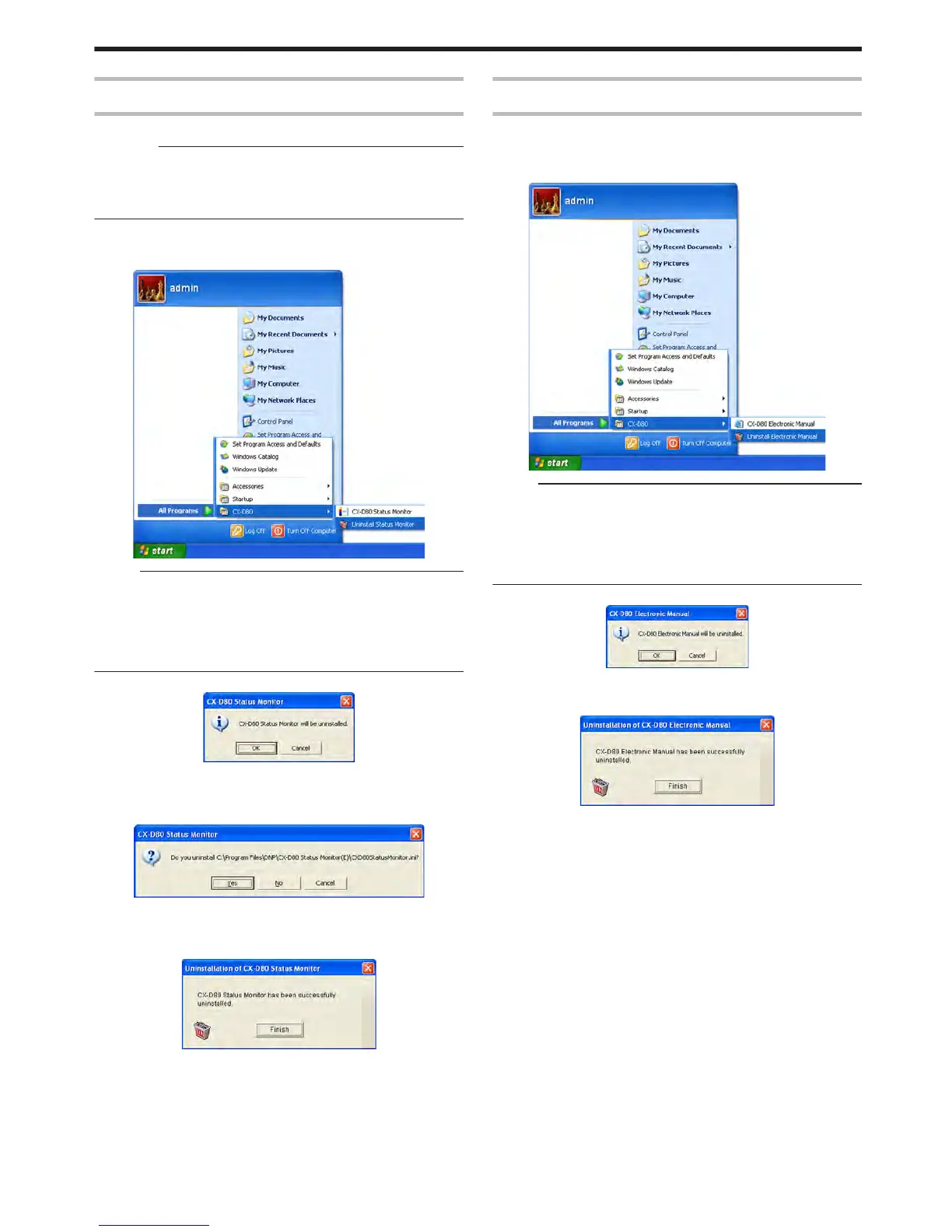
Select [Uninstall Status Monitor] from [Start menu]
.
Memo:
v
If the [Register for start menu] checkbox is not selected during
installation of the status monitor, delete using [Add or Remove
Programs] in [Control Panel].
v
You can also perform uninstallation using the “SETUP.exe”
automatic execution program.
"SETUP.exe" (A page 75)
v
A status monitor deletion confirmation screen appears.
.
3
Click [OK]
v
Uninstallation starts, and a confirmation screen for deleting the
setting file appears.
.
4
Click [Yes]
v
Deletes the setting file for the status monitor. If you do not want to
delete it, click [No].
.
5
Click [Finish]
v
Exits uninstallation.
Electronic Manual
Uninstalling the Electronic Manual
1
Exit the Electronic Manual
2
Select [Uninstall Electronic Manual] from [Start menu]
.
Memo:
v
If the [Register for start menu] checkbox is not selected during
installation of the Electronic Manual, delete using [Add or Remove
Programs] in [Control Panel].
v
You can also perform uninstallation using the “SETUP.exe”
automatic execution program.
"SETUP.exe" (A page 79)
v
An Electronic Manual screen appears.
.
3
Click [OK]
v
An Electronic Manual deletion screen appears.
.
4
Click [Finish]
v
Exits uninstallation.
Setup
83















 To Next Page