Network Sharing of Printer
Windows XP/ Windows 2000
Cautions:
v
Check to ensure that you can access the computer to which the
printer is connected.
v
Check also to ensure that the printer can be shared.
1
Open “Printers” in [Control Panel]
v
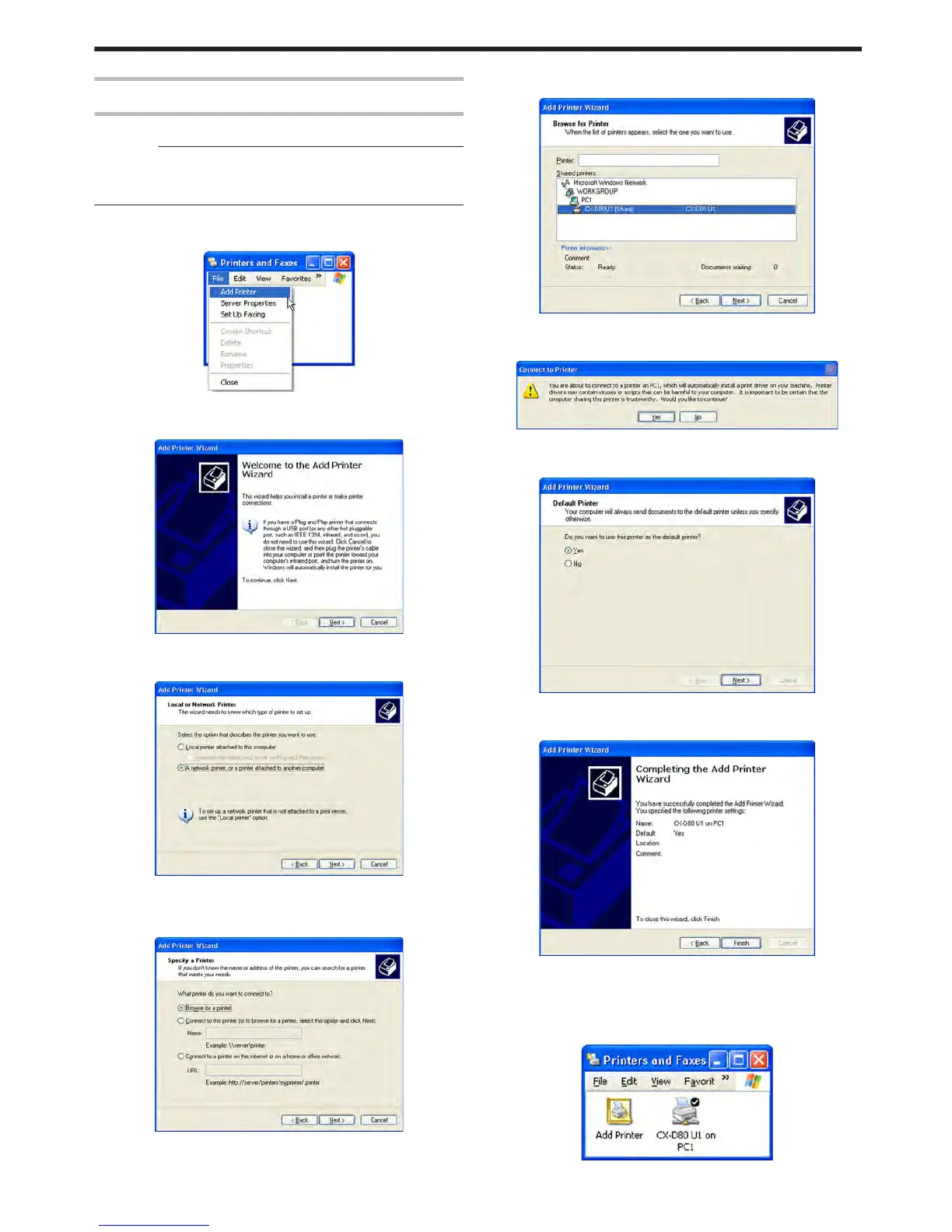
A [Printers and Faxes] screen appears.
.
2
Click [Add Printer] under the [File] menu
v
A “Welcome to the Add Printer Wizard” screen appears.
.
3
Click [Next]
v
A printer type selection screen appears.
.
4
Select [A network printer, or a printer attached to another computer],
and click [Next]
v
A “Specify a Printer” screen appears.
.
5
Select [Browse for a printer], and click [Next]
v
A “Browse for Printer” screen appears.
.
6
Select a printer from [Shared printers], and click [Next]
v
A [Connect to Printer] screen appears.
.
7
Click [Yes]
v
A “Default Printer” screen appears.
.
8
Select [Yes] if necessary, and click [Next]
v
A “Completing the Add Printer Wizard” screen appears.
.
9
Check the details, followed by clicking [Finish]
v
Network sharing of the printer is complete.
10
Open “Printers” in [Control Panel]
v
Check to ensure that the printer is added.
.
Setup
73















 To Next Page