Cards
Cards have Run Out
v
"Replenish the cards." (A page 31)
Card Jam
v
Error codes are displayed on the operation panel according to the
location of the card jam.
v
Check the error code, and remove the card according to the
corresponding procedure.
Cautions:
v
If the card cannot be removed, do not try to do so forcibly. Consult
our authorized dealers or the servicing personnel.
v
If the security lock is on, deactivate it. After work is complete,
activate the security lock again.
v
Do not apply excessive force on the card hopper. Doing so may
damage it.
v
Do not touch the printing surface of the card. Touching it may cause
printing errors. Put on the supplied gloves when handling the cards.
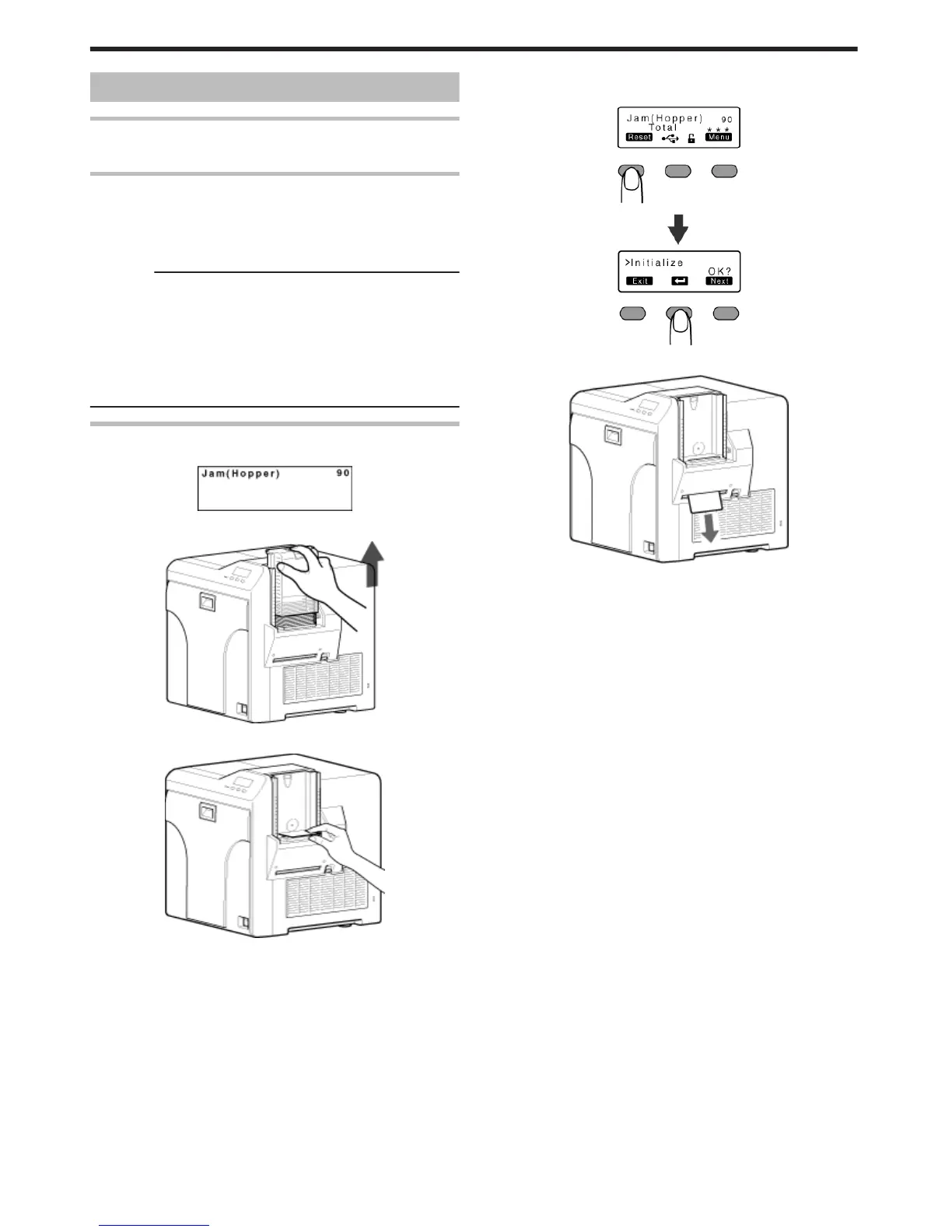
Error Code Jam(Hopper) 90
v
Card jam near the card hopper and cleaning roller.
.
1
Detach the card hopper cover, and remove the unused cards
.
2
Remove the jammed card with a hand
.
"If the card cannot be removed by hand" (A page 46)
3
Return the unused cards to their original position
4
Install the card hopper cover
m
If the card cannot be removed by hand
A Press KNB to reset the printer
.
v
The card is discharged from the NG card outlet.
.
"Go to step 3" (A page 46)
"If the card cannot be discharged" (A page 47)
Troubleshooting
46















 To Next Page