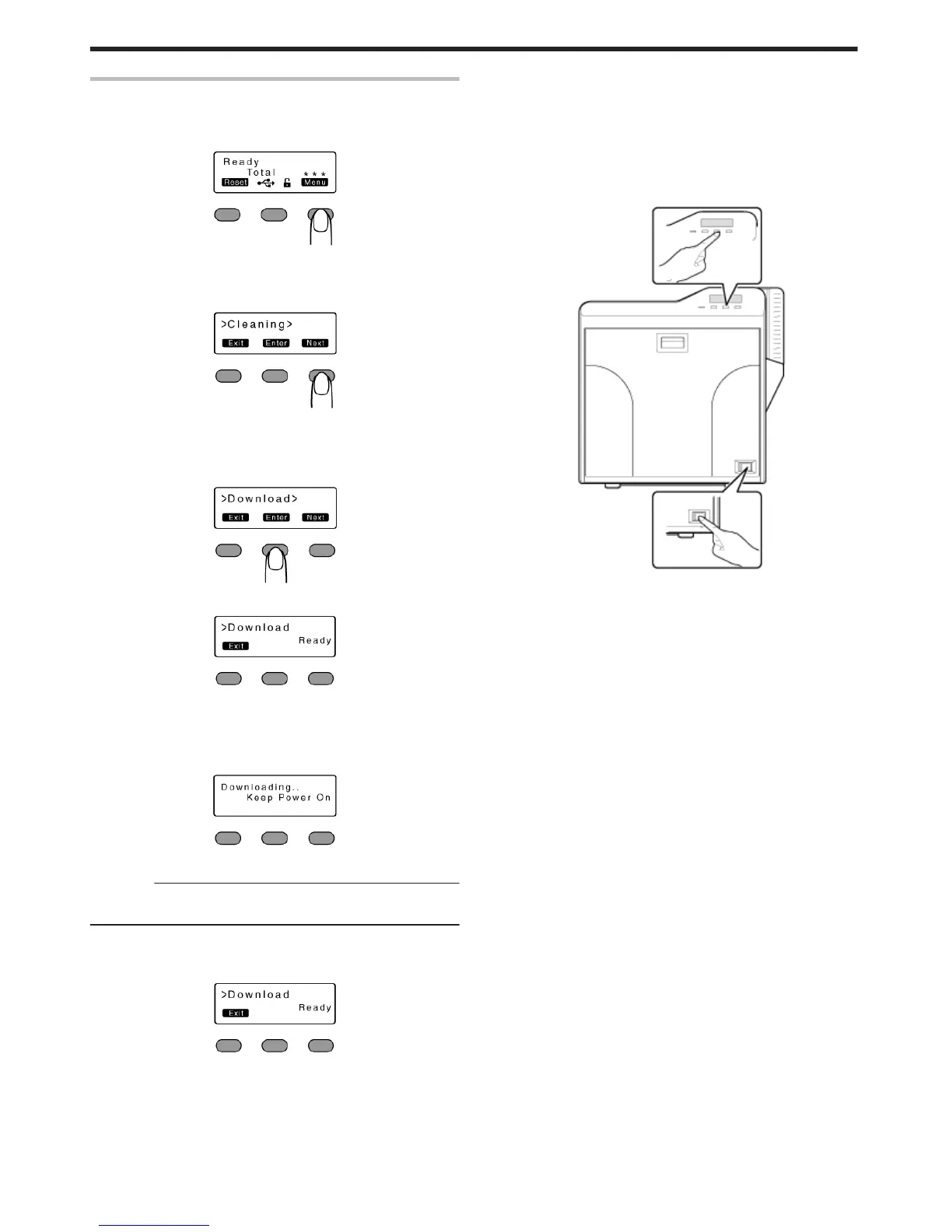
Firmware Update
1
Press I
v
A [Cleaning] message appears.
.
2
Press J to set to [Download]
v
Pressing it each time displays the next setting item.
.
3
Press G
v
A [Download Ready] message appears, indicating that the printer is
ready to download data from the computer.
.
.
4
Start data download from the computer
v
A [Downloading..] message appears.
.
Cautions:
v
Do not turn off the power during data download from the computer.
Doing so may damage the printer firmware and cause malfunction.
v
A [Download Ready] message appears when data download from
the computer is complete.
.
5
When [Download Ready] appears, press H
6
When the [Please Power Off] message appears, turn off the power
v
The firmware is updated after the power is turned on again.
m
If download fails and printer cannot be started up
v
If download of the printer firmware fails, the printer may not be
able to start up when it is rebooted. When this occurs, download
the firmware again according the following procedure.
A Turn on the power while holding down the operation button
(center)
v
A [SBP2 Running] message appears, indicating that the printer
is ready to download data from the computer.
.
B Start data download from the computer
v
A [Downloading..] message appears.
v
A [SBP2 Running] message appears when data download from
the computer is complete.
C When the [SBP2 Running] message appears, turn off the power
v
The firmware is updated after the power is turned on again.
Operating the Printer
24















 To Next Page