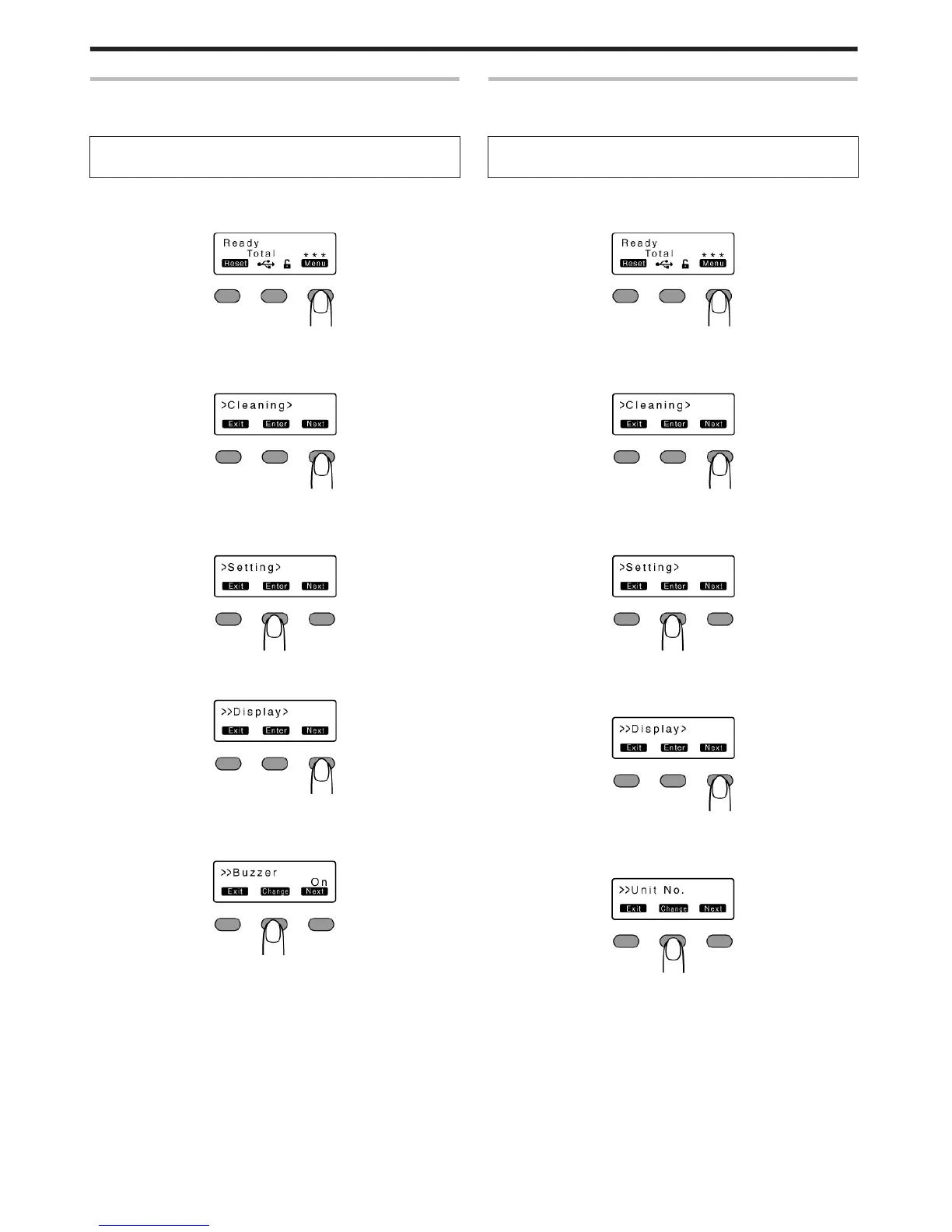
Buzzer Setting
v
For setting whether to sound the buzzer when an error occurs or
when settings are changed.
Settings
v
On: turns on buzzer sound, Off: turns off buzzer sound
1
Press I
v
A [Cleaning] message appears.
.
2
Press J to set to [Setting]
v
Pressing it each time displays the next setting item.
.
3
Press G
v
A [Display] message appears.
.
4
Press J to set to [Buzzer]
.
5
Press F
v
Enters the settings change mode.
.
6
Press A and select a setting
7
Press B to confirm the setting
v
Pressing B confirms the setting and returns you to the previous
screen.
8
Press H to exit the setting mode
v
Pressing it each time displays the setting item on the next higher
level.
Unit Number Setting
v
For setting the printer’s unit number according to the USB
environment.
Settings
v
No.1 - No.10
1
Press I
v
A [Cleaning] message appears.
.
2
Press J to set to [Setting]
v
Pressing it each time displays the next setting item.
.
3
Press G
v
A [Display] message appears.
.
4
Press J to set to [Unit No.]
v
Pressing it each time displays the next setting item.
.
5
Press F
v
Enters the settings change mode.
.
6
Press A and select a setting
v
You can select the unit number from No. 1 to No. 10.
7
Press B to confirm the setting
v
Pressing B confirms the setting and returns you to the previous screen.
8
Press H to exit the setting mode
v
Pressing it each time displays the setting item on the next higher level.
9
Turn off the power
v
The changes to the setting will be reflected when you turn on the
power again.
Operating the Printer
28















 To Next Page