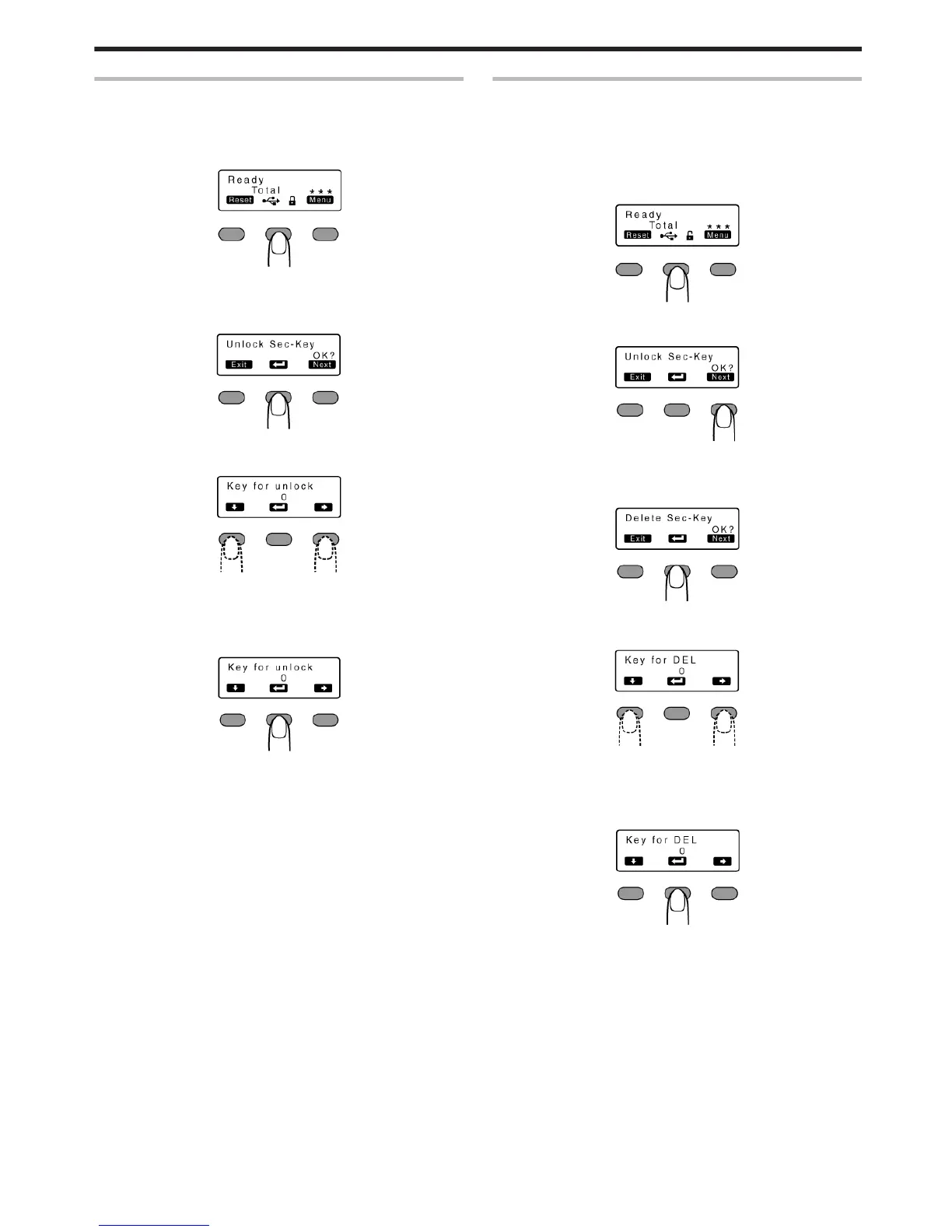
Deactivating the Security Lock
v
When a security lock is turned on, you can deactivate it as follows.
1
Press the operation button (center) for at least three seconds
v
A [Unlock Sec-Key OK?] message appears.
.
2
Press B
v
A [Key for unlock] message appears.
.
3
Enter the registered security key number
.
v
Pressing A each time advances to the next number.
v
Pressing E each time advances to the next digit.
4
Press B
.
v
If this number is consistent with the registered number, the display
returns to [Ready], and the security lock is deactivated.
v
If this number is not consistent with the registered number, the
display returns to [Unlock Sec-Key OK?]. Enter a number again.
Deleting the Security Key Number
v
You can delete a registered security key number as follows.
v
To change the security key number, you have to delete it and
register a new number again.
1
Press the operation button (center) for at least three seconds
v
A [Unlock Sec-Key OK?] message appears.
.
2
Press J to set to [Delete Sec-Key OK?]
.
3
Press B
v
A [Key for DEL] message appears.
.
4
Enter the registered security key number
.
v
Pressing A each time advances to the next number.
v
Pressing E each time advances to the next digit.
5
Press B
.
v
If this number is consistent with the registered number, the display
returns to [Ready], and the security key number is deleted.
v
If this number is not consistent with the registered number, the
display returns to [Delete Sec-Key OK?]. Enter a number again.
Operating the Printer
21















 To Next Page