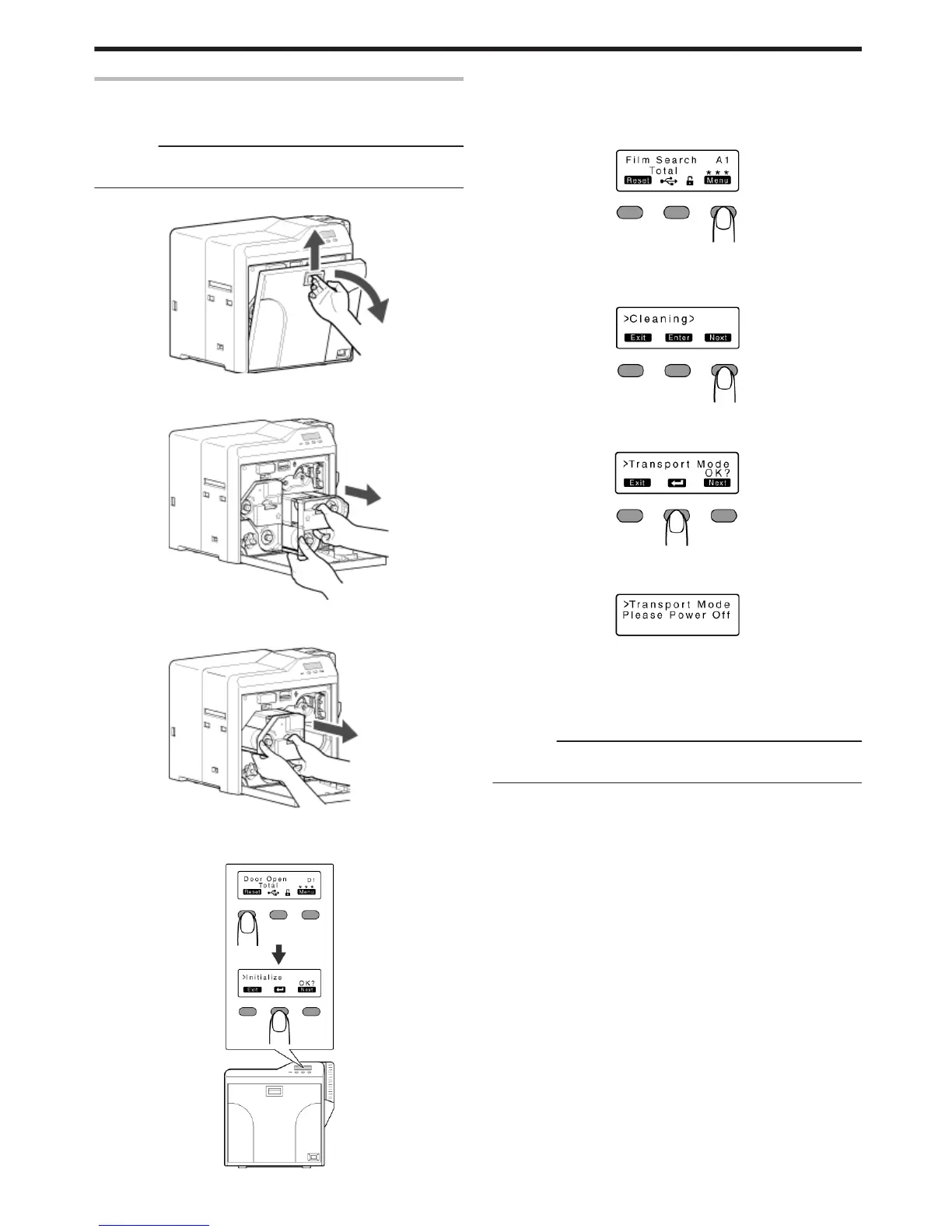
Transport Mode Setting
v
When transporting or moving the printer, ensure that the heating
roller is fastened to a safe position.
Cautions:
v
Make sure that you set to the transport mode when transporting or
moving the printer. Failure to do so will cause the printer to malfunction.
1
Open the printer door
.
2
Press and hold down the cassette button, and remove the ink ribbon
cassette (on the right) to remove the ink ribbon
.
3
Press and hold down the cassette button, and remove the retransfer
film cassette (on the left) to remove the retransfer film
.
4
Close the printer door
5
Press KNB to reset the printer
.
6
Check to ensure that [Film Search] is displayed on the operation
panel of the printer
7
Press I
v
A [Cleaning] message appears.
.
8
Press J to set to [Transport Mode]
v
Pressing it each time displays the next setting item.
.
9
Press B
.
.
v
After setting to the transport mode, a [Please Power Off] message
appears.
10
Turn off the power, and install the cassette
Cautions:
v
While in the transport mode, the retransfer film cassette cannot be
installed to the printer with the retransfer film loaded.
m
Canceling the transport mode
v
With the printer door closed, turn on the power to cancel the
transport mode.
Operating the Printer
29















 To Next Page