9
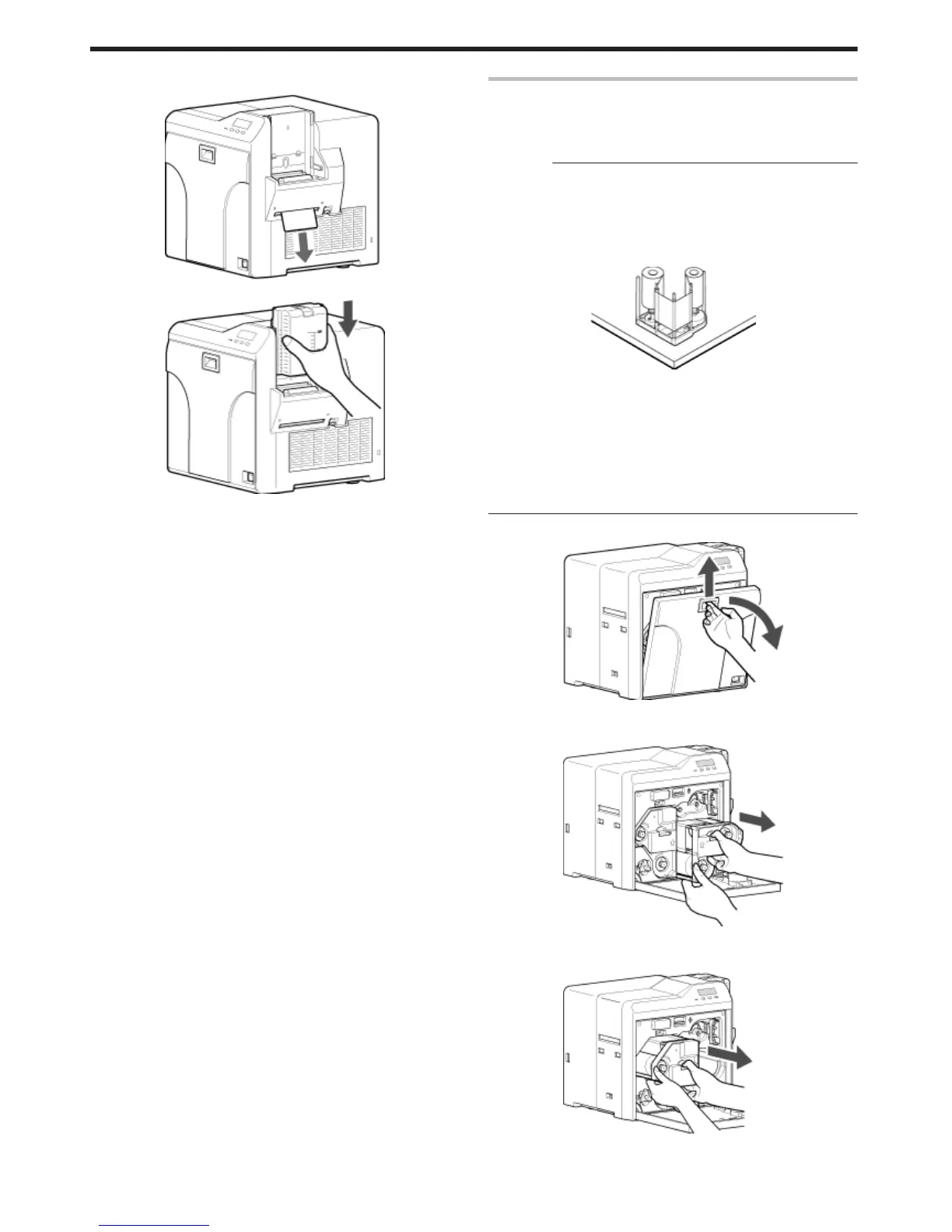
After the cleaning card is discharged, turn off the power, and install
the card hopper
.
.
v
To turn on the power again, do so after an interval of at least 10
seconds.
Bobbin Holders
v
If burrs produced by friction with the bobbins are attached to the
bobbin holders, they may fall onto the card, ink ribbon, or retransfer
film, causing printing errors.
Cautions:
v
If the security lock is on, deactivate it. After work is complete,
activate the security lock again.
v
Start work after ensuring that the power has been turned off.
v
Stand the cassette on a flat surface as illustrated in the diagram.
Avoid doing so on the floor as dust attached to it may cause printing
errors.
.
v
Do not perform any work on the printer door. Do not place heavy
objects or apply load on the printer. Doing so may damage it.
v
Perform cleaning each time you replace the ink ribbon or retransfer
film.
v
After cleaning is complete, check to ensure that all dismantled parts
are restored to their original positions. Failure to restore the parts
may result in malfunction of the printer.
v
For details on separately sold items, please consult our authorized
dealers.
1
Open the printer door
.
2
Press and hold down the cassette button, and remove the ink ribbon
cassette (on the right)
.
3
Press and hold down the cassette button, and remove the retransfer
film cassette (on the left)
.
Maintenance
40















 To Next Page