3
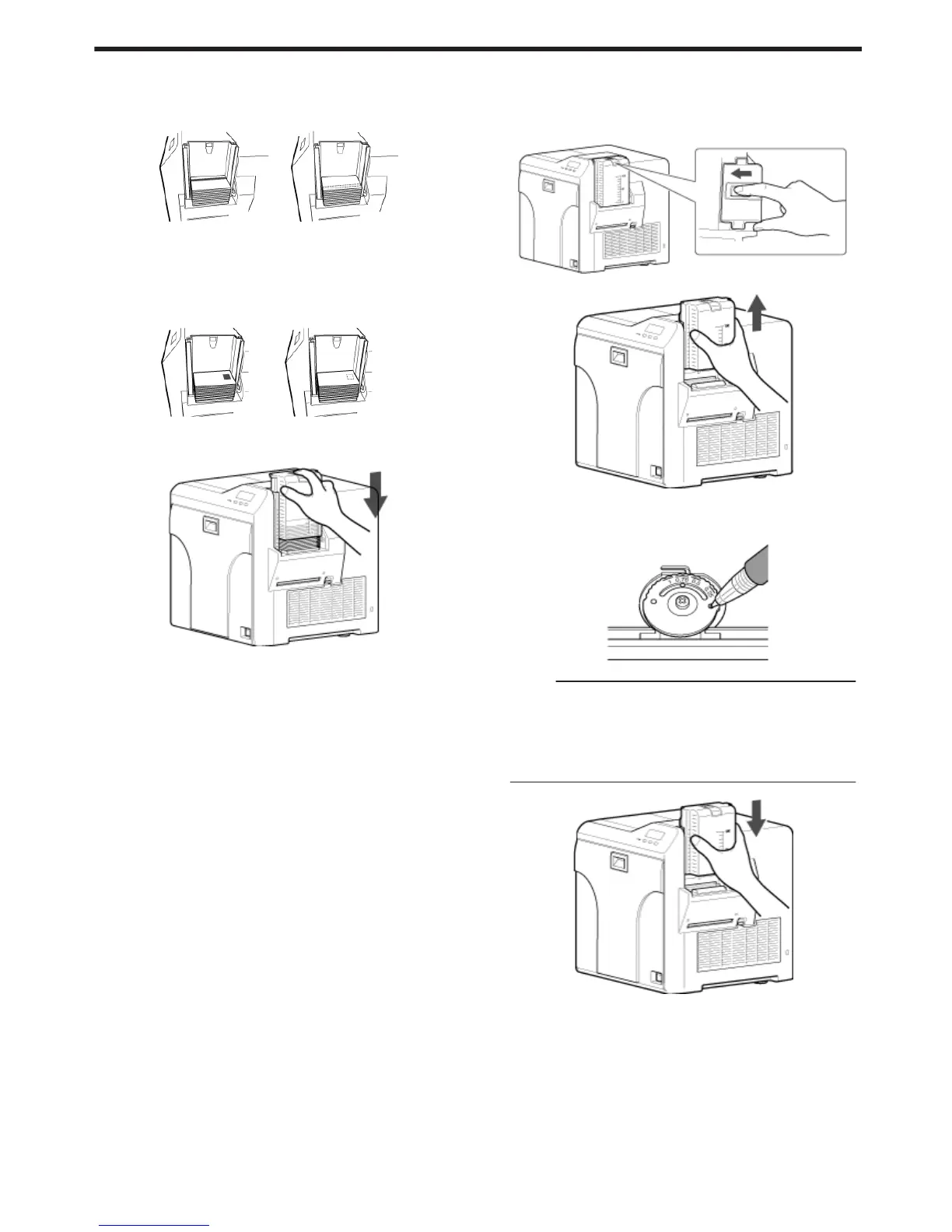
Align the orientation of the cards, and set them in the printer
m
Magnetic stripe cards
v
Set the card with the magnetic stripe facing upward and toward
the printer, or facing downward and toward you.
.
m
ISO contact IC cards
v
Set the card with the Contact IC terminal facing upward and
toward the rear of the printer, or downward and toward the rear of
the printer.
v
For single-sided printers, set the cards with the IC terminal facing
down and toward the rear of the printer.
.
4
Install the card hopper cover, and set the card hopper knob to
[LOCK]
.
m
Adjusting card thickness
v
The thickness of a card that is adjustable is between 0.25 mm and
1.00 mm.
This is adjusted to a thickness of 0.76 mm by default.
A Set the card hopper knob to [LOCK]
.
B Remove the card hopper
.
C Insert a ballpoint pen into the card separator hole, and turn
slowly
v
Adjust according to the range of the card thickness used.
.
Memo:
v
If the card cannot be discharged during printing, adjust the card
thickness by turning the card separator in the clockwise
direction by one scale at a time.
v
If two cards are discharged at a time during printing, adjust the
card thickness by turning the card separator in the anti-
clockwise direction by one scale at a time.
D Install the card hopper
.
Setup
63















 To Next Page