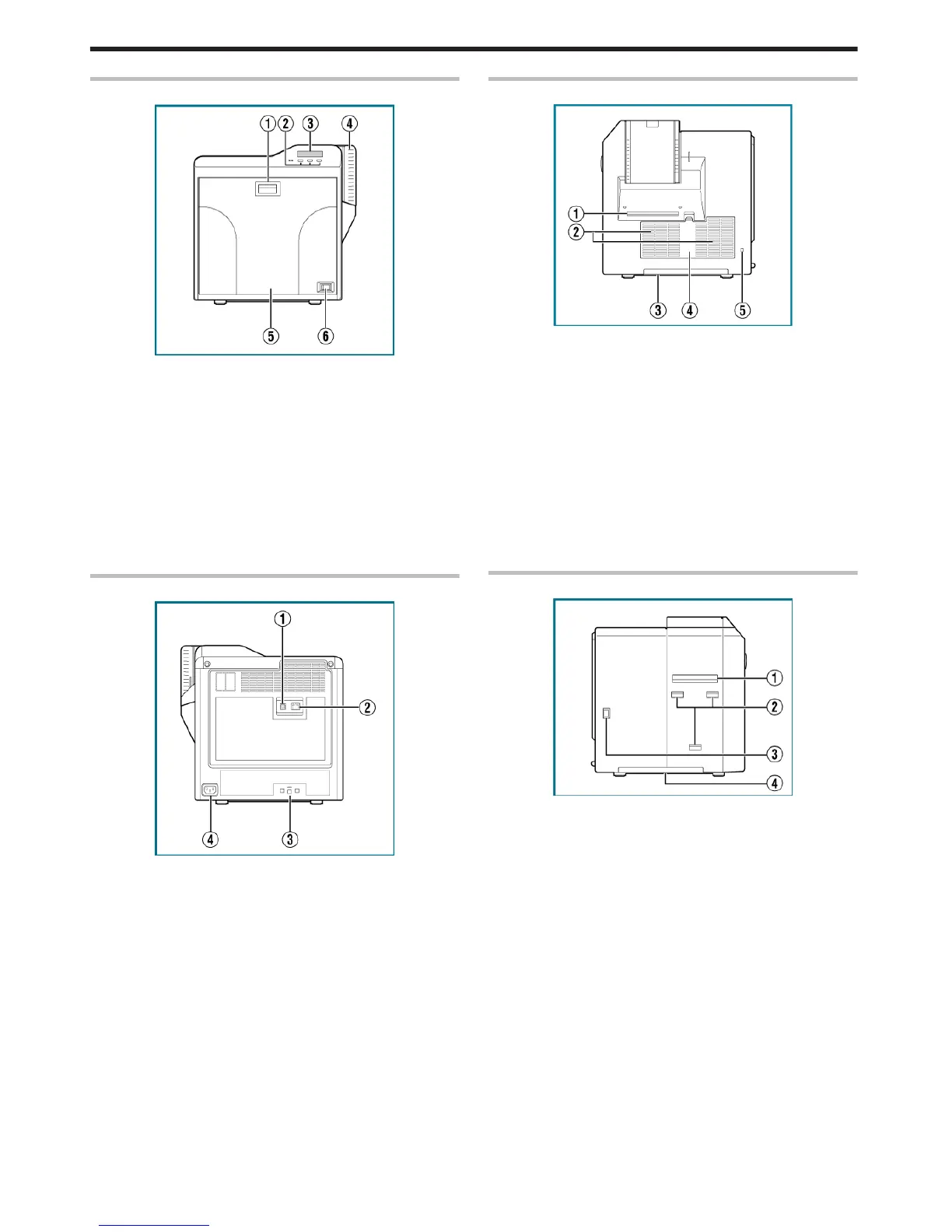
Front
.
A Sliding knob
v
Opens/closes the printer door.
v
Slide it upward, and pull toward you to open the printer door.
B Operation buttons
v
For selecting and confirming information on the operation panel.
C Operation panel
v
Displays the settings, operating status, and error messages.
D Card hopper
v
For loading cards.
E Printer door
F Power switch
v
Turns the power On/Off.
Rear
.
A USB cable connection terminal
v
For connecting a USB 2.0 interface cable.
B LAN cable connection terminal
v
For connecting a LAN cable.
C Cable clamp
v
For securing the supplied USB cable.
"Connection" (A page 64)
D AC inlet
v
For connecting the power cord.
Right
.
A NG card outlet
v
If a card is left inside the printer when the power is turned on or
reset, the card will be automatically discharged.
v
Cards in the printer are discharged when an error occurs in the
magnetic stripe card or IC card.
B Air suction fan opening
v
Air inlet of the internal cooling fan.
C Handle
v
Hold this area when moving the printer.
D Filter cover
v
Cover of the fan filter.
E Security slot
v
An anti-theft device that supports Kensington locks can be
installed.
Left
.
A Card outlet
v
Outlet for discharging the cards.
B Card stacker (supplied) attachment slot
v
For installing the supplied card stacker.
C Infrared window
v
Sends or receives data via infrared communication by connecting
with an external unit.
D Handle
v
Hold this area when moving the printer.
Before Use
8















 To Next Page